Hi
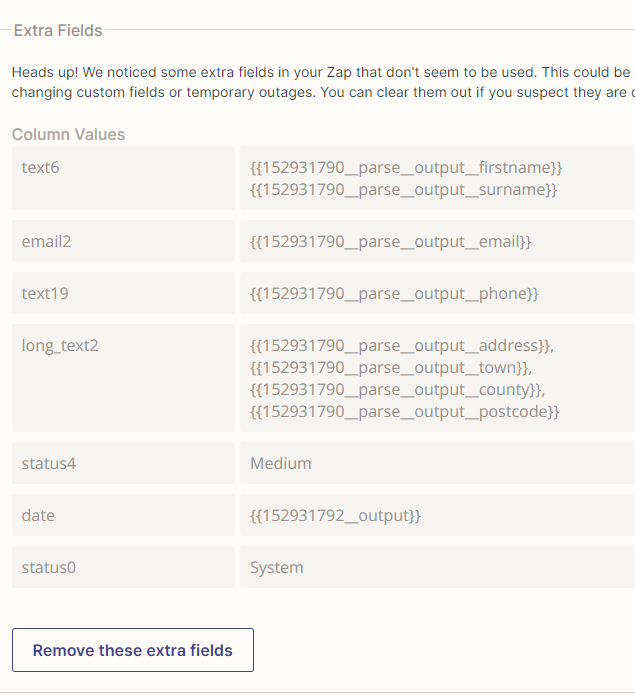
I have a zap that’s been running fine for a year now. It just creates an Item in Monday from a parsed message. This is in the Create Item - Set up Action section. I went today to edit the zap and all the fields are looking like this: why, please?
Hi
I have a zap that’s been running fine for a year now. It just creates an Item in Monday from a parsed message. This is in the Create Item - Set up Action section. I went today to edit the zap and all the fields are looking like this: why, please?

Best answer by christina.d
Hi there,
It looks like this was the last recommended step:
... what could have taken place is that Monday.com made changes to their "Create Item" action event integration on Zapier and incorporated those fields in the "Extra Fields" into the fields in the action event itself.
For example, you will see that "text6" is being used to map the client's name. Now looking at the fields that are available in the action event, one of the fields is now Client Names(s):
(view larger)
This is also true for the field labelled "long_text2" for the address, which now the action event also has a dedicated field for labelled Full Address:
(view larger)
Being equipped with this information now, the next step would be to examine the fields available in the action event and map the information in the "Extra Fields" to the fields that are now newly available. Then, remove the fields in the "Extra Fields" as you fill them.
I believe the reason you see these fields in the "Extra Fields" section is to ensure that your Zap continues to work even though the information was not mapped to the newly available fields.
Keep us posted! 🤗
Enter your E-mail address. We'll send you an e-mail with instructions to reset your password.