



Answer

Zapier text Formatter for spreadsheet-style formula is not working

  • June 15, 2023
  • 2 replies
  • 123 views

asg3
Forum|alt.badge.img

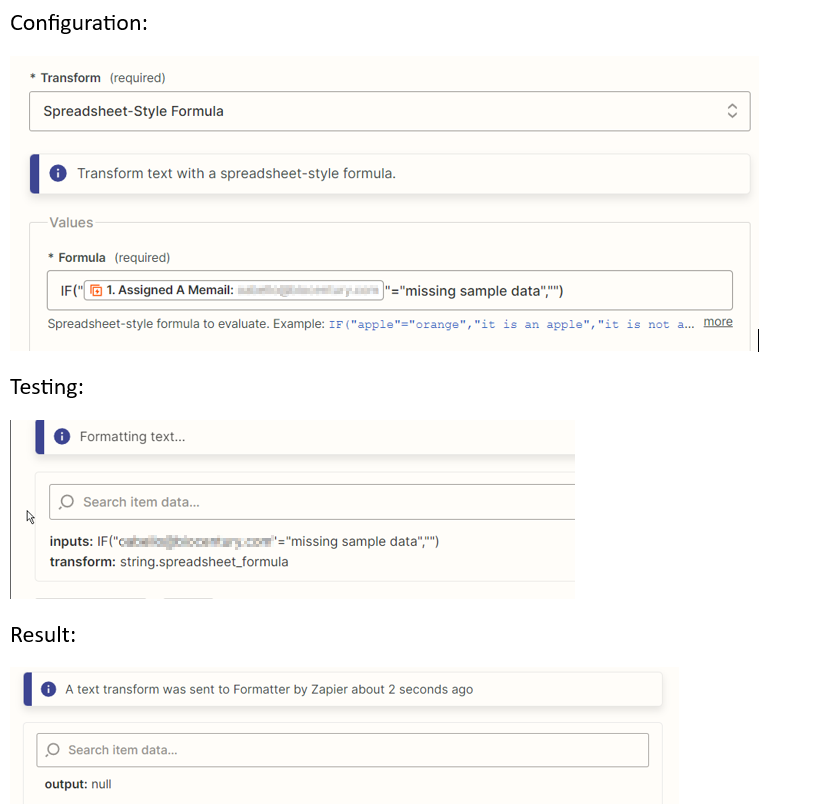
I have a simple IF statement that produces a null value when it shouldn't be. I’m trying to get it to replace what should be an email address with a value of “missing sample data” with a null string so that when I include it in the “To:” line for an email it doesn’t produce an error. In this case, there is a valid email address and it is returning a Null value.

IF("{{196777846__assignedAMemail}}"="missing sample data","")

It doesn't appear to be executing because even if I change the "" at the end to a string like "XX" it still returns a null value. Below shows how it is configured, the test values and the result.

This was working previously and I don’t think I made any changes to it. Any thoughts appreciated!

 

Best answer by asg3

Please ignore the above - I somehow deleted the <then> part of the if statement.  Not enough sleep.

This post has been closed for comments. Please create a new post if you need help or have a question about this topic.

2 replies

asg3
Forum|alt.badge.img
  • Author
  • Beginner
  • Answer
  • June 15, 2023

Please ignore the above - I somehow deleted the <then> part of the if statement.  Not enough sleep.


christina.d
Forum|alt.badge.img+9
  • Zapier Staff
  • June 15, 2023

Hey @asg3 - oof, no sleep, get’s all of us from time to time. 😴

Thanks for coming back around to update the thread on how you fixed this! Always appreciated. 🤗
