

Answer

OneDrive to AWS S3 File uploads are corrupted or do not fully upload

  • April 19, 2023
  • 6 replies
  • 236 views

noobnoob

Hey everyone,

I created a Zap that uploads a file into an S3 bucket whenever a file is uploaded into OneDrive. While test runs indicate that they are successful and files appear in the S3 bucket, the files that are in S3 seem to be corrupted or do not fully upload. I tested multiple file types and multiple file sizes and anything is uploaded results in an un-openable file, with a file size ranging from 10-60 bytes.

Best answer by jayeshkumarbhatia

Hey @noobnoob ,


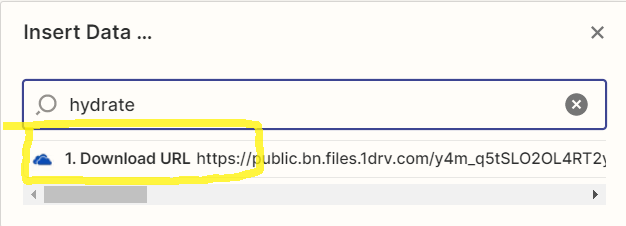
It looks like you have mapped incorrect value for file input. It should be below value and not file path which you have used now.


This post has been closed for comments. Please create a new post if you need help or have a question about this topic.

6 replies

jayeshkumarbhatia
Forum|alt.badge.img+7

Hey @noobnoob ,


Can you please share a screenshot of how did you configure the S3 action?


noobnoob
  • Author
  • New
  • April 20, 2023

Of course! Thanks @jayeshkumarbhatia !


jayeshkumarbhatia
Forum|alt.badge.img+7
  • Zapier Solution Partner
  • Answer
  • April 20, 2023

Hey @noobnoob ,


It looks like you have mapped incorrect value for file input. It should be below value and not file path which you have used now.


noobnoob
  • Author
  • New
  • April 20, 2023

@jayeshkumarbhatia thanks again for your input here! unfortunately I’m getting a different error regarding the token expiring now. I tried reauthenticating both OneDrive and AWS but no change in the error.


noobnoob
  • Author
  • New
  • April 20, 2023

Checking my S3 bucket however, it looks like files are uploading, even with the failed test. Unless there’s nothing to be concerned about, I think I’m good now. Much appreciated @jayeshkumarbhatia !


ken.a
Forum|alt.badge.img+6
  • Zapier Staff
  • April 20, 2023

Hi @noobnoob,

Awesome! We’re glad to know that everything is working.

If you have any other questions, please don’t hesitate to post them in the Community. We’re always happy to help! 🤗




