
Best answer

Time zone based filtering and paths

  • February 7, 2021
  • 8 replies
  • 387 views

chrisfinck
Forum|alt.badge.img+1

I run an application that creates tasks based on the 4 time zones in the US. Right now I have it filtering if its in a specific state, but since I plan to expand to all 50 states, I want to merge these into checking for the 4 time zones instead. Keeps things more organized. Are there any applications or filters to check if a location is in a certain time zone and continue if so?

Best answer by christina.d

Hi there, friends! 👋🏽 Just me popping into summarize some of the suggestions here:

Hi @chrisfinck 

Consider creating a lookup table (perhaps a simple GSheet) to use in a Zap step.

Or try this Formatter > Utilities > Lookup Table: https://zapier.com/help/doc/how-use-formatter-functions#using-the-lookup-table

Alternatively -- later in the thread utilizing Webhooks was recommended to avoid having to create the lookup table manually.

@chrisfinck

...there appears to be some APIs available that may returned the desired info, which could be used in a Zap via Webhooks or Code steps.

GSearch about possible API options: https://www.google.com/search?q=lookup+location+to+get+the+timezone


@chrisfinck 

it looks like you can send a Get request using Zapier’s webhook action to this address https://www.zipcodeapi.com/rest/f20ksZeP0tFutrIS8AbFm1U0nMNXS6uo6WXvlle2LRZ3rbftVIgpBm4zC3KY4P6R/info.json/{insert_ZipCode}/degrees 

and it will return a JSON object with the timezone of the zip code (taken from this address here: https://www.zipcodeapi.com/API#zipToLoc)
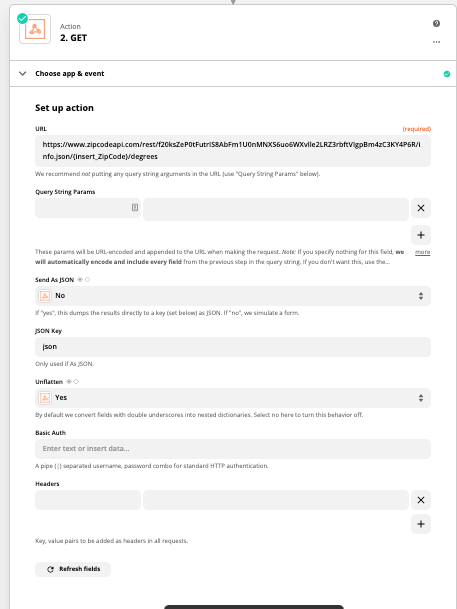


I hope this helps!

This post has been closed for comments. Please create a new post if you need help or have a question about this topic.


8 replies

Troy Tessalone
Zapier Orchestrator & Solution Partner
Forum|alt.badge.img+14
  • Zapier Orchestrator & Solution Partner
  • 34052 replies
  • February 8, 2021

Hi @chrisfinck 

Consider creating a lookup table (perhaps a simple GSheet) to use in a Zap step.

Or try this Formatter > Utilities > Lookup Table: https://zapier.com/help/doc/how-use-formatter-functions#using-the-lookup-table


chrisfinck
Forum|alt.badge.img+1
  • Author
  • Beginner
  • 32 replies
  • February 8, 2021

Hi @chrisfinck 

Consider creating a lookup table (perhaps a simple GSheet) to use in a Zap step.

Or try this Formatter > Utilities > Lookup Table: https://zapier.com/help/doc/how-use-formatter-If functions#using-the-lookup-table

If I understand correctly though I would have to type in each city and then map it to its time zone (since some states fall in the middle of a time difference). Are there not any applications that do this automatically?


Troy Tessalone
Zapier Orchestrator & Solution Partner
Forum|alt.badge.img+14
  • Zapier Orchestrator & Solution Partner
  • 34052 replies
  • February 8, 2021

@chrisfinck 

Depends on the data points available to you and what data point(s) you’re trying to use to determine the time zone.

Sometimes timestamps indicate the timezone, which could be used, such a locale timestamp.

GSearch about possible API options: https://www.google.com/search?q=lookup+location+to+get+the+timezone


chrisfinck
Forum|alt.badge.img+1
  • Author
  • Beginner
  • 32 replies
  • February 8, 2021

@chrisfinck

Depends on the data points available to you and what data point(s) you’re trying to use to determine the time zone.

Sometimes timestamps indicate the timezone, which could be used, such a locale timestamp.

GSearch about possible API options: https://www.google.com/search?q=lookup+location+to+get+the+timezone

Ya we have city, state, zip code, etc. Lots of different ways we could get the info, just not sure what zap I could use to identify these data points in a certain time zone


Troy Tessalone
Zapier Orchestrator & Solution Partner
Forum|alt.badge.img+14
  • Zapier Orchestrator & Solution Partner
  • 34052 replies
  • February 8, 2021

@chrisfinck 

Not sure if there is an existing Zap app (https://zapier.com/apps) that would provide this info.

But based on some GSearches there appears to be some APIs available that may returned the desired info, which could be used in a Zap via Webhooks or Code steps.

GSearch about possible API options: https://www.google.com/search?q=lookup+location+to+get+the+timezone


GetUWired
Forum|alt.badge.img+12
  • Zapier Solution Partner
  • 1030 replies
  • February 8, 2021

@chrisfinck 

it looks like you can send a Get request using Zapier’s webhook action to this address https://www.zipcodeapi.com/rest/f20ksZeP0tFutrIS8AbFm1U0nMNXS6uo6WXvlle2LRZ3rbftVIgpBm4zC3KY4P6R/info.json/{insert_ZipCode}/degrees 

and it will return a JSON object with the timezone of the zip code (taken from this address here: https://www.zipcodeapi.com/API#zipToLoc)


AndrewJDavison_Luhhu
Forum|alt.badge.img+11

@chrisfinck 
Just checking in to see if you still need help with this? 


christina.d
Forum|alt.badge.img+9
  • Zapier Staff
  • 2653 replies
  • Answer
  • June 6, 2022

Hi there, friends! 👋🏽 Just me popping into summarize some of the suggestions here:

Hi @chrisfinck 

Consider creating a lookup table (perhaps a simple GSheet) to use in a Zap step.

Or try this Formatter > Utilities > Lookup Table: https://zapier.com/help/doc/how-use-formatter-functions#using-the-lookup-table

Alternatively -- later in the thread utilizing Webhooks was recommended to avoid having to create the lookup table manually.

@chrisfinck

...there appears to be some APIs available that may returned the desired info, which could be used in a Zap via Webhooks or Code steps.

GSearch about possible API options: https://www.google.com/search?q=lookup+location+to+get+the+timezone


@chrisfinck 

it looks like you can send a Get request using Zapier’s webhook action to this address https://www.zipcodeapi.com/rest/f20ksZeP0tFutrIS8AbFm1U0nMNXS6uo6WXvlle2LRZ3rbftVIgpBm4zC3KY4P6R/info.json/{insert_ZipCode}/degrees 

and it will return a JSON object with the timezone of the zip code (taken from this address here: https://www.zipcodeapi.com/API#zipToLoc)


I hope this helps!





