
Question

Time tracking and formula columns are not available in the Monday.com "Get Column Values" action

  • January 12, 2023
  • 2 replies
  • 245 views

We would like set up a Zap pull tracked time in Monday.com and send it to Quickbooks. We found the help article below, but it does not appear to work. When setting up the Get Column Values action, the Time Tracking column is not listed as an option, nor is the Formula column, which we thought might be a potential workaround.


Any help would be greatly appreciated.
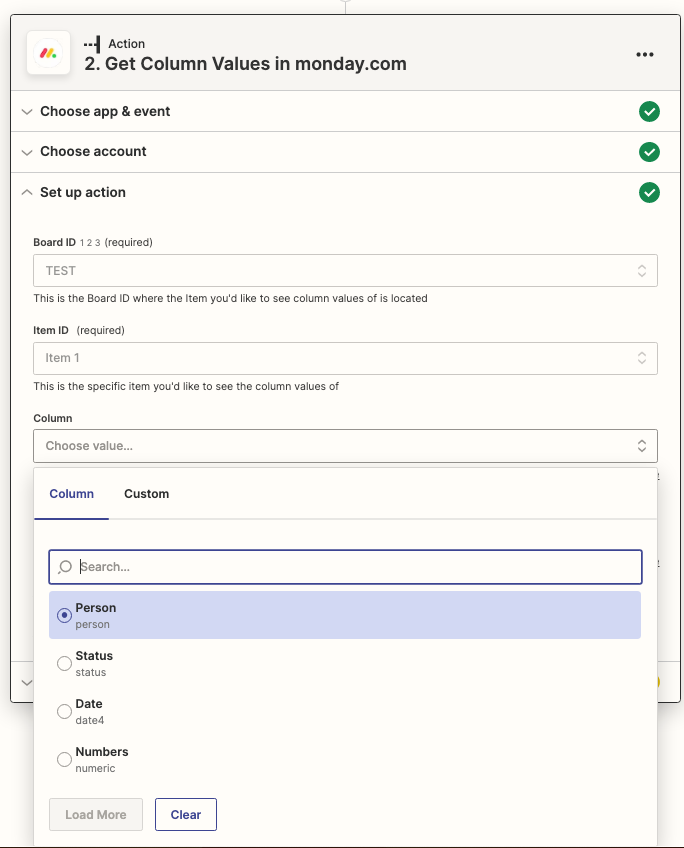
 

Get Column Values in monday.com with no Time Tracking or Formula column option given


This post has been closed for comments. Please create a new post if you need help or have a question about this topic.

2 replies

Troy Tessalone
Zapier Orchestrator & Solution Partner
Forum|alt.badge.img+14
  • Zapier Orchestrator & Solution Partner
  • 34052 replies
  • January 12, 2023

Hi @Innivee 

Good question.

It’s a known limitation that some Monday field types aren’t available for use in the Monday Zap app.

That likely means you’d have to use the Monday API: https://developer.monday.com/api-reference/docs

App APIs can be used in Zaps with the Webhooks app as an action step: https://zapier.com/apps/webhook/help

If you need help consider hiring a Zapier Expert: https://zapier.com/experts


christina.d
Forum|alt.badge.img+9
  • Zapier Staff
  • 2653 replies
  • January 14, 2023

Hey there, @Innivee! Thanks for reaching out in community!

I can see you were able to open a ticket with my teammates in support - which is awesome. Please keep in the loop, we’d love to hear the end solution once ya’ll arrive at it. 🤗





