Best answer

Dates from Typeform not added to Google Sheets in the correct format

  • September 2, 2021
  • 2 replies
  • 78 views

Hi you all,


I have a zap that passes information from typeform to gsheet, one field is "start date" but instead of giving me the date: 2021-08-20T14:24:12S it started giving me a random number that looks like this: 44428,68347

The number has no format in gsheet, can some one help me out please?

Best answer by Troy Tessalone

Hi @Maria Lucio 

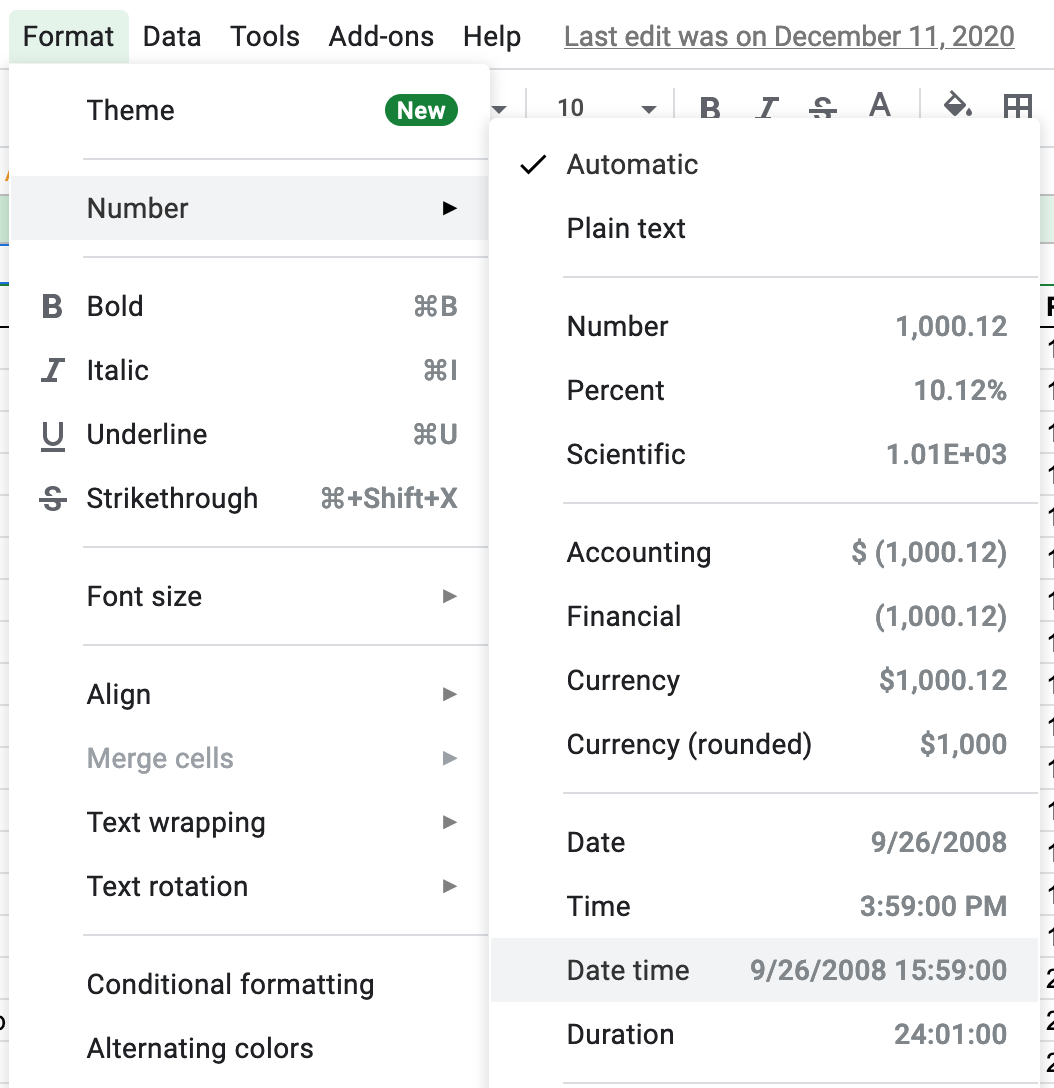
You may need to set the GSheet column Format:


This post has been closed for comments. Please create a new post if you need help or have a question about this topic.

2 replies

robschmidt
Forum|alt.badge.img+9
  • Zapier Solution Partner
  • 617 replies
  • September 3, 2021

Hi @Maria Lucio 

This looks like a unix timestamp, what you need to do is add a date/time formatter before Google Sheet in the Zap. The formatter will be able to convert the unix timestamp to actual readable date-time value.


Troy Tessalone
Zapier Orchestrator & Solution Partner
Forum|alt.badge.img+14
  • Zapier Orchestrator & Solution Partner
  • 34082 replies
  • Answer
  • September 3, 2021

Hi @Maria Lucio 

You may need to set the GSheet column Format: