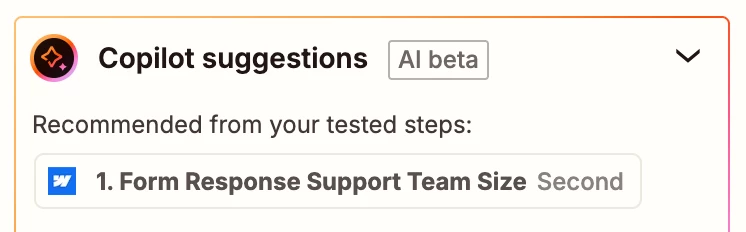
I am trying to connect a webform from Webflow to Hubspot. In my webform, I have a picklist giving options for the prospect to choose from. As I try to connect those fields with picklists from webflow to hubspot, instead of giving the actual picklist item, it loads the options as in first, second, third, etc options. You can see in the screen shot the “support team size” instead of saying 6-15, it says second as it’s the second option in the picklist. This is keeping me from completeing the automation.
Best answer by drtanvisachar
Hey @HelpGhost This usually means Webflow is sending the option index instead of the option text. So Zapier receives second or third rather than 6–15.
Open the Webflow select field and make sure every option has a value set. That value should be exactly what HubSpot expects. If the value is empty, Webflow defaults to sending the option order.
After updating the form, submit a new test entry and refresh the fields in Zapier. Also confirm the HubSpot dropdown property already contains matching option values.
For us to have more info, post screenshots showing:
how your Webflow form field is configured
how the data is returned from Zap step 1 in the TEST tab so we can see all of the data points available, not just those data points recommended by the AI Copilot
Hey @HelpGhost This usually means Webflow is sending the option index instead of the option text. So Zapier receives second or third rather than 6–15.
Open the Webflow select field and make sure every option has a value set. That value should be exactly what HubSpot expects. If the value is empty, Webflow defaults to sending the option order.
After updating the form, submit a new test entry and refresh the fields in Zapier. Also confirm the HubSpot dropdown property already contains matching option values.
@drtanvisachar Thank you for the response. I think you are on the right track of what i need to do. However, those articles you sent will not populate. This is what I see when I open all three of those links.
@drtanvisachar I got it all figured out in Webflow, thank you for you help!
Early access
Next Gen Zaps
Build and deploy automations from AI tools you already use. With Agentic Management, if anything breaks, the agent diagnoses the issue and proposes a fix.