Best answer

Unable to sync LinkedIn company updates in Zapier

  • February 1, 2026
  • 4 replies
  • 14 views

I have been using the LinkedIn Integration to post company updates for a year, no issues - this is the primary reason why I pay for Zapier!

For a while, my zap has started failing

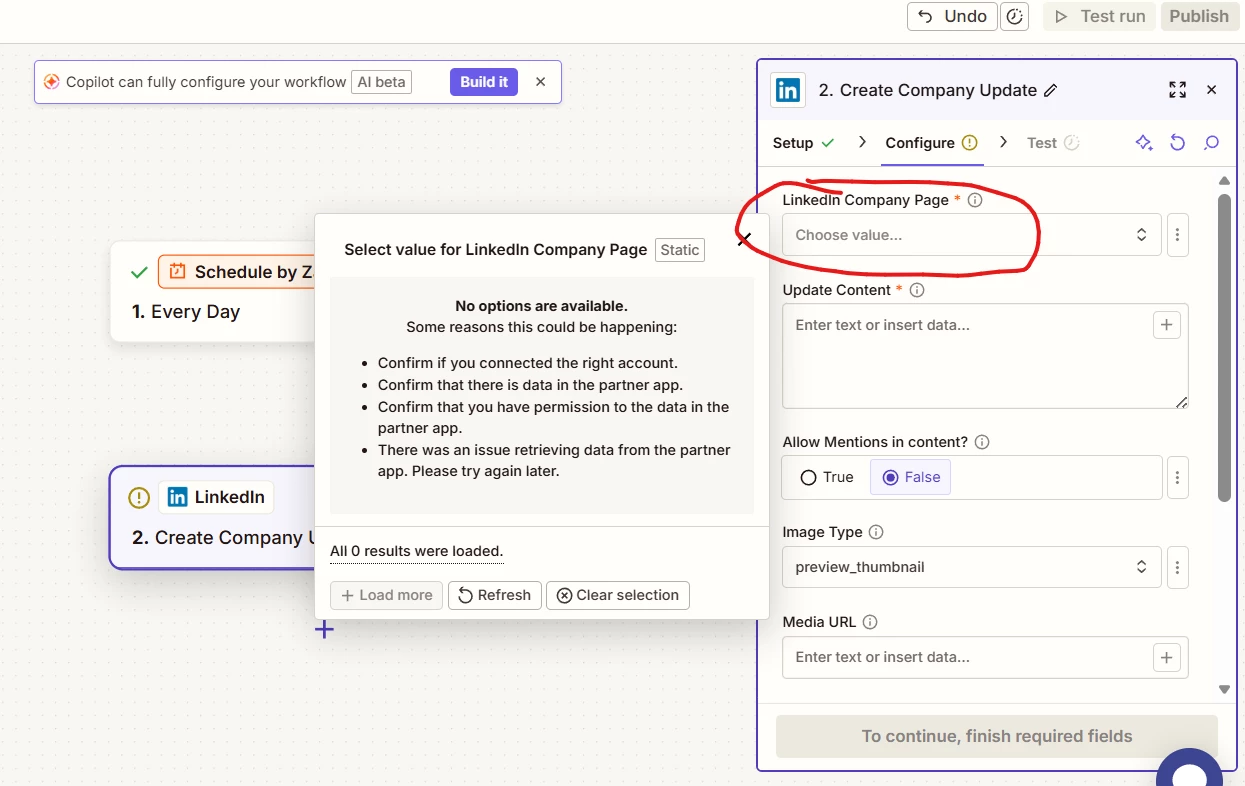
When I go edit the connector, it is unable to recognize the companies I have access to.

I started a brand new zap for debugging.


Best answer by SamB

Hey ​@Agbush 👋

Sorry to hear about the trouble in selecting the company page. I had a look into this and found a bug report for the same issue, where the Linked Company Page field isn’t loading any options. I can’t provide any sort of ETA as to when it will be fixed but I’ve added you to the bug report so you’ll be notified by email as soon as it’s resolved.

For now, can you try selecting the company by choosing the Custom value option and typing in the ID for the company page? If you’re not sure where to find the ID check out LinkedIn’s guide here: Here's how to find your LinkedIn Company ID

Hope that helps. If you run into any trouble on that or if there’s anything else I can help with in the meantime, just let me know! 🙂

4 replies

Troy Tessalone
Zapier Orchestrator & Solution Partner
Forum|alt.badge.img+14
  • Zapier Orchestrator & Solution Partner
  • February 1, 2026

Hi ​@Agbush 

Try reconnecting the LinkedIn app account in Zapier here: https://zapier.com/app/assets/connections

Help: https://help.zapier.com/hc/en-us/articles/8496290788109-Manage-your-app-connections#01JH3AK29AAFDNP7AS4PQ1NNM6


Help links for using LinkedIn in Zaps: https://zapier.com/apps/linkedin/integrations#help


Prerequisites

To use the LinkedIn app on Zapier, you must have:

  • A LinkedIn account.
  • Admin access to a LinkedIn Company Page if you want to use the Create Company Update action. Learn more about LinkedIn Page admin roles.

  • Author
  • Beginner
  • February 1, 2026

Thanks for following up….


Yep. Tried that

Tried refreshing connection - comes back green!

Tried deleting and makeing new collection - all works

Checked my Linkedin company pages - all show that i am owner/admin

...


Troy Tessalone
Zapier Orchestrator & Solution Partner
Forum|alt.badge.img+14
  • Zapier Orchestrator & Solution Partner
  • February 1, 2026

@Agbush 

There is a recent LinkedIn Ads incident, so perhaps this is related: https://status.zapier.com/incidents/01KG214THK2PQS34QQ984P93FE


SamB
Community Manager
Forum|alt.badge.img+11
  • Community Manager
  • Answer
  • February 2, 2026

Hey ​@Agbush 👋

Sorry to hear about the trouble in selecting the company page. I had a look into this and found a bug report for the same issue, where the Linked Company Page field isn’t loading any options. I can’t provide any sort of ETA as to when it will be fixed but I’ve added you to the bug report so you’ll be notified by email as soon as it’s resolved.

For now, can you try selecting the company by choosing the Custom value option and typing in the ID for the company page? If you’re not sure where to find the ID check out LinkedIn’s guide here: Here's how to find your LinkedIn Company ID

Hope that helps. If you run into any trouble on that or if there’s anything else I can help with in the meantime, just let me know! 🙂