Hi,
I’m having an issue with Facebook Lead Ads + Zapier.
What works:
-
Facebook Lead Ads trigger fires correctly in Zapier
-
New lead events are detected
-
Leads appear normally inside Facebook / Meta Contacts
-
Zapier is connected as CRM in Meta Business Settings
-
All permissions are enabled
-
CRM access is enabled
-
Reconnected Facebook account multiple times
-
Removed and re-added the trigger
-
Selected the specific page and specific form manually
Problem:
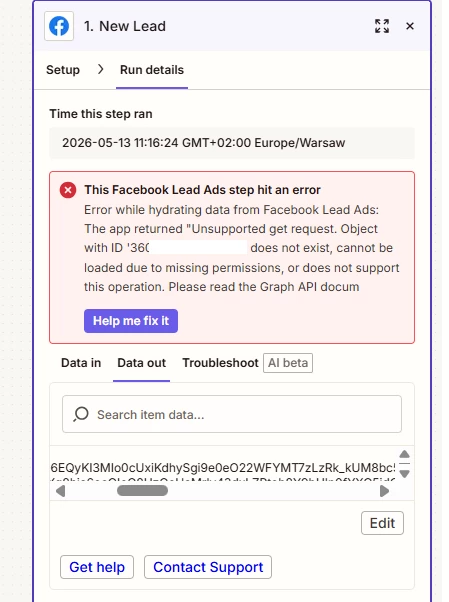
Zapier receives the lead event, but fails when trying to hydrate/fetch the actual lead data.
The error is:
“Object with ID ‘xxxxxxxxxxxx’ does not exist, cannot be loaded due to missing permissions, or does not support this operation.”
In Zapier task history I can see:
-
lead event arrives
-
but no field data is returned (no name/email/phone)
-
only the leadgen_id is present
Important details:
-
The form itself works correctly in Facebook
-
Leads are visible inside Meta Contacts / Leads Center
-
The form was NOT recently edited
-
Permissions appear to be fully granted
-
Webhook/event delivery works
-
Only the lead data fetch fails
Could this be:
-
a broken Form ID on Meta side?
-
a Lead Ads API issue?
-
webhook hydration issue?
-
hidden permissions issue despite full CRM access?
Has anyone seen this behavior before?
Thanks!
P.S. It was working fine before - today an error appeared