
Best answer

Google calander all day event.

  • Nov 25, 2024 5:52 AM UTC
  • 3 replies
  • 137 views

Hello all,


i am having an issue with googel calander only when it is an all day event.

It goes on the day before the acutal event. the event is tricgger form and update a google sheet./ 


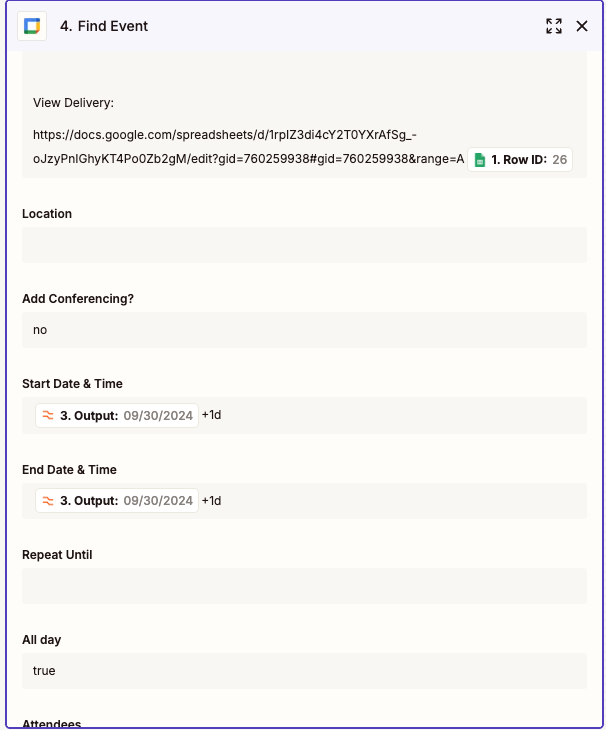
in the example below i have formated it form sydney australia formate to the correct format for gogoel clander but it still puts in on the wrogn day and and day before the 12th of the month it gets the date and month mixed up even though it is formated correctly


Best answer by ken.a

Hi there ​@Patlemon,

Welcome to the Community! 🎉

It looks like the issue here is because there’s no space in the date and the date modifier, the modifier is ignored. Could you please try adding a space here:

62cc905ae4f5981d8bd3a85c1b129d00.png
(view larger)

Kindly give it a try and let me know how it goes? I'll keep an eye out for your response!

View original
This post has been closed for comments. Please create a new post if you need help or have a question about this topic.

3 replies

ken.a
Forum|alt.badge.img+6
  • Zapier Staff
  • Answer
  • Nov 25, 2024 12:58 PM UTC

Hi there ​@Patlemon,

Welcome to the Community! 🎉

It looks like the issue here is because there’s no space in the date and the date modifier, the modifier is ignored. Could you please try adding a space here:

62cc905ae4f5981d8bd3a85c1b129d00.png
(view larger)

Kindly give it a try and let me know how it goes? I'll keep an eye out for your response!


  • Author
  • Beginner
  • Nov 25, 2024 10:53 PM UTC

Hi Ken,


Thank you for your help. i think that has made it work! i will keep testing and let you know. 


JammerS
Forum|alt.badge.img+6
  • Zapier Staff
  • Nov 26, 2024 3:26 AM UTC

Hi ​@Patlemon,


I'm glad Ken's recommendation got your Zap up and running. This will significantly help our Community resolve the same issue. Just keep us in the loop so we can assist you if needed. Thank you.