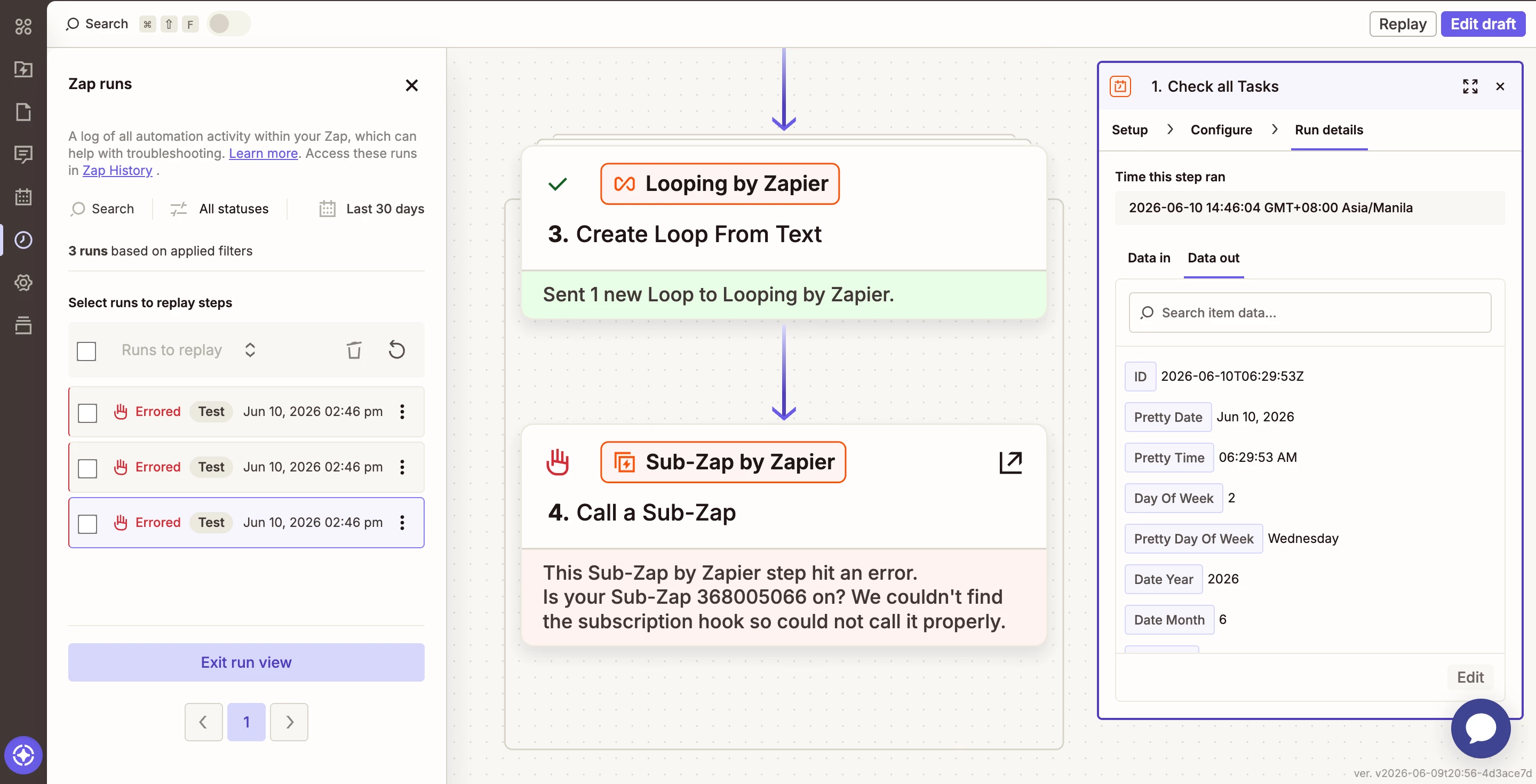
I am new to automation and am currently trying to connect a Zap to a Sub-Zap for a simple Google Sheets-to-Google Sheets workflow.
During testing, the Sub-Zap worked correctly before it was published. However, after publishing it and connecting it to my existing Zap, I encountered an error indicating that the Sub-Zap could not be located.
Additionally, whenever I attempt to publish or turn on the Sub-Zap, it automatically turns itself off shortly afterward.
Could you please help me understand what might be causing this issue and how I can resolve it?
Thank you for your assistance.
Best answer by SamB
Hi there @angel0817 👋
Looks like you managed to get back in touch with our Support team and they identified this as a bug. You’ve been added to the list of affected users so you'll get an email notification as soon as it's resolved. They also shared a workaround to try in the meantime, so including that here in case it helps others too:
It appears you might be running into a bug where a Sub-Zap using two different versions of the app can't be switched on:
This mismatch prevents the subscription hook from registering, which is what causes the "couldn't find subscription hook" error. It should keep both steps in sync automatically so your Sub-Zap continues working without any action on your end.
I've confirmed that this matches an existing issue reported by other users, so I'll let our engineering team know you've experienced this as well.
In the meantime, I have a suggestion for a workaround that may help:
Open your Sub-Zap in the editor
Update the Sub-Zap app on the trigger step to the latest
Once updated, publish the Sub-Zap
If you’re still having some trouble updating to your Zap workflows to use latest version of the Sub-Zap app just let us know. Want to make sure this gets sorted!
And if anyone else is running into the same issue, just drop a reply below and we can get you added to the bug report too.
I am currently exploring Zapier's features and functionality, but I have been stuck on this issue for over a day. As someone who is still learning the platform, I would greatly appreciate any guidance or assistance anyone can provide.
I am currently exploring Zapier's features and functionality, but I have been stuck on this issue for over a day. As someone who is still learning the platform, I would greatly appreciate any guidance or assistance anyone can provide.
In your Zap Step 4, check the CONFIGURE tab and reselect the field options.
Hello Sir, thank you for responding.
I tried deleting Step 4, configuring it again, reselecting the field options, making sure that every subzap is from the same version number, and connecting it again. However, the issue still remains.
Hi @angel0817 just checking in — did you manage to resolve this?
Hello Sir,
Thank you for checking on me.
Unfortunately, I was not able to resolve the issue. I managed to get in touch with Zapier Support and followed all the instructions they provided but the problem remains. However, our conversation was also disconnected because I replied after 10 minutes that’s why I had a problem following through my Sub-zap issue.
I am new to automation and am currently trying to connect a Zap to a Sub-Zap for a simple Google Sheets-to-Google Sheets workflow.
During testing, the Sub-Zap worked correctly before it was published. However, after publishing it and connecting it to my existing Zap, I encountered an error indicating that the Sub-Zap could not be located.
Additionally, whenever I attempt to publish or turn on the Sub-Zap, it automatically turns itself off shortly afterward.
Could you please help me understand what might be causing this issue and how I can resolve it?
Thank you for your assistance.
Hello @angel0817,
I can see you've already spent quite a bit of time on this and tried several of the recommended fixes.
Since the Sub-Zap worked before publishing and support wasn't able to get it sorted, I'd want to see the actual configuration to understand what's causing it to become unavailable.
If you'd like another set of eyes on it, you're welcome to schedule a quick call here and we can take a look together:
--link removed by moderator--
This post has been edited by a moderator to remove self-promotional calendar booking link as per our Community Code of Conduct.
Looks like you managed to get back in touch with our Support team and they identified this as a bug. You’ve been added to the list of affected users so you'll get an email notification as soon as it's resolved. They also shared a workaround to try in the meantime, so including that here in case it helps others too:
It appears you might be running into a bug where a Sub-Zap using two different versions of the app can't be switched on:
This mismatch prevents the subscription hook from registering, which is what causes the "couldn't find subscription hook" error. It should keep both steps in sync automatically so your Sub-Zap continues working without any action on your end.
I've confirmed that this matches an existing issue reported by other users, so I'll let our engineering team know you've experienced this as well.
In the meantime, I have a suggestion for a workaround that may help:
Open your Sub-Zap in the editor
Update the Sub-Zap app on the trigger step to the latest
Once updated, publish the Sub-Zap
If you’re still having some trouble updating to your Zap workflows to use latest version of the Sub-Zap app just let us know. Want to make sure this gets sorted!
And if anyone else is running into the same issue, just drop a reply below and we can get you added to the bug report too.
Early access
Next Gen Zaps
Build and deploy automations from AI tools you already use. With Agentic Management, if anything breaks, the agent diagnoses the issue and proposes a fix.