


Best answer

3 spaces to clear Airtable cell not working when passed as a variable?

  • October 8, 2024
  • 3 replies
  • 135 views

Forum|alt.badge.img+1

I have a zap that is writing to a date field in Airtable. It needs to be able to both update the field to a new date, as well as empty the field if no date meets the criteria of the zap logic.

Currently, the zap is running some javascript to process the dates, and the output of the javascript is the input to the “Update Record” step in Airtable. Output is either a date, or 3 spaces if the intention is to empty the cell in Airtable. I’m finding that it’s working as intended when writing a date, but it isn’t working when I am trying to erase the cell contents. When I manually type the 3 spaces, it works perfectly. When the 3 spaces are passed as a variable, however, nothing. Pic below of input to Airtable that is resulting in no action being taken:
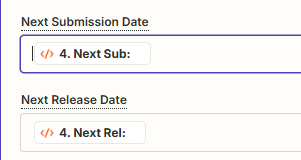
 

Has anybody run into this issue before? I can obviously add some branched logic so that if it knows it needs to delete the cell contents, it branches to a path with the three spaces hard-coded in, but that seems inelegant and a lot of extra work for something that seems like it should be functioning as-is.

Best answer by SamB

Circling back here with a quick update: it’s now possible to clear Airtable fields when three spaces are passed as a dynamic value! 🎉

Previously the three spaces had to be manually entered into the field, but now they can be mapped to a field on the Create or Update Record action and it will clear the value from that field. So the previous workaround to use paths is no longer needed.

If you run into any issues with it, please start a new topic or reach out to our Support team directly and we’ll be happy to help! 🙂

This post has been closed for comments. Please create a new post if you need help or have a question about this topic.

3 replies

Forum|alt.badge.img+1
  • Author
  • Beginner
  • October 8, 2024

Update: I chatted with Zapier support about this and it is a known limitation with a feature request already in to rectify it. Only workaround in the meantime is to use paths with a hard-coded deletion step.


SamB
Community Manager
Forum|alt.badge.img+11
  • Community Manager
  • October 9, 2024

Thanks for letting us know, @Alyssa_B! Really appreciate you taking the time to follow up here to share this update with the community. 🤗 🧡

If there's anything else we can help with in the meantime do let us know!
 

For anyone that comes across this and would like their vote added to that feature request as well, just reply here to let us know and we’ll get it added! 🙂


SamB
Community Manager
Forum|alt.badge.img+11
  • Community Manager
  • Answer
  • July 28, 2026

Circling back here with a quick update: it’s now possible to clear Airtable fields when three spaces are passed as a dynamic value! 🎉

Previously the three spaces had to be manually entered into the field, but now they can be mapped to a field on the Create or Update Record action and it will clear the value from that field. So the previous workaround to use paths is no longer needed.

If you run into any issues with it, please start a new topic or reach out to our Support team directly and we’ll be happy to help! 🙂
