Best answer

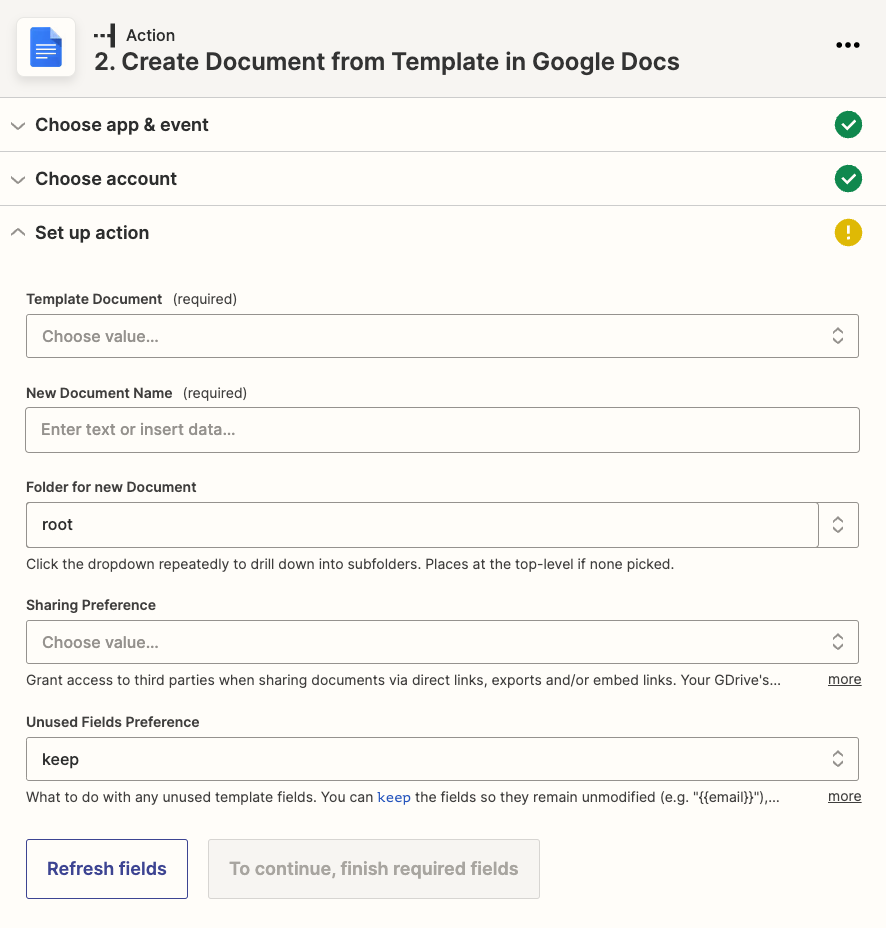
Zapier doesn't retrieve my Google Docs Template custom values

  • May 31, 2022
  • 7 replies
  • 190 views

I am trying to to autofill my Google Docs template custom placeholders but they just do not appear when trying to use “Create Document from Template”.

What am I doing wrong here?
 

Best answer by christina.d

Ah, nothing to be embarrassed about, @JMR! We’ve all been there. 🙃 We’re just glad to hear you were able to sort it out. 🎉

To sum it up though in this particular case, the answer was a template mix up but some good troubleshooting steps to take as Troy pointed out are:

Us[ing] the ‘custom’ option to put the static ID of the GDoc Template that is found in the browser URL.

A solid read would to brush up on how to do this can be found here:
https://zapier.com/help/create/basics/set-up-your-zap-action#set-up-your-action


Thanks again for posting and being active in the Community! 

This post has been closed for comments. Please create a new post if you need help or have a question about this topic.

7 replies

Troy Tessalone
Zapier Orchestrator & Solution Partner
Forum|alt.badge.img+14
  • Zapier Orchestrator & Solution Partner
  • May 31, 2022

Hi @JMR 

Good question.

Try this workaround.

Use the ‘custom’ option to put the static ID of the GDoc Template that is found in the browser URL.


  • Author
  • New
  • May 31, 2022


Use the ‘custom’ option to put the static ID of the GDoc Template that is found in the browser URL.

Sorry, now I don’t understand. 🙈


Troy Tessalone
Zapier Orchestrator & Solution Partner
Forum|alt.badge.img+14
  • Zapier Orchestrator & Solution Partner
  • May 31, 2022

@JMR

Please clarify what part(s) you don’t understand.

If you paste the URL of the GDoc template here, then I can indicate the GDoc ID.

Help article about using the ‘custom’ option: https://zapier.com/help/create/basics/set-up-your-zap-action#set-up-your-action


  • Author
  • New
  • June 1, 2022

Solved it!


Danvers
Forum|alt.badge.img+12
  • Zapier Staff
  • June 1, 2022

Hi @JMR! Thanks for letting us know you figured things out :D Would you mind sharing how you got things working in case someone has a similar question? Thanks!


  • Author
  • New
  • June 1, 2022

I can’t cause it’s a bit embarrassing…. :D There was nothing wrong with anything, I just mixed my templates.


christina.d
Forum|alt.badge.img+9
  • Zapier Staff
  • Answer
  • June 1, 2022

Ah, nothing to be embarrassed about, @JMR! We’ve all been there. 🙃 We’re just glad to hear you were able to sort it out. 🎉

To sum it up though in this particular case, the answer was a template mix up but some good troubleshooting steps to take as Troy pointed out are:

Us[ing] the ‘custom’ option to put the static ID of the GDoc Template that is found in the browser URL.

A solid read would to brush up on how to do this can be found here:
https://zapier.com/help/create/basics/set-up-your-zap-action#set-up-your-action


Thanks again for posting and being active in the Community!






