How do I turn off or entirely disable Copilot and any other AI features?

Best answer
Turn off Copilot and AI
Best answer by SamB
Hi there
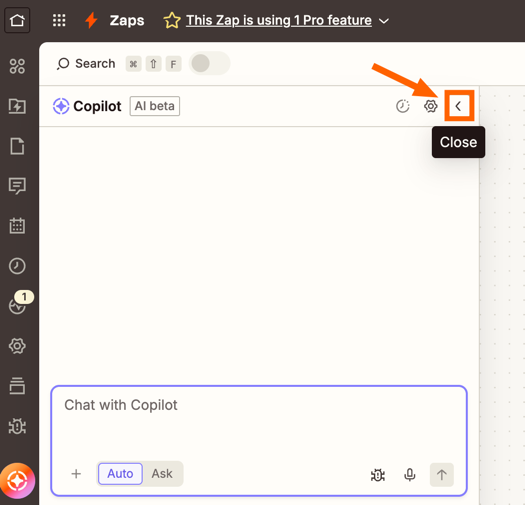
If you click on the Close icon, on the top right of the Copilot chat window that will disable Copilot, so you can proceed to continue build the Zap without it’s assistance:
To disable Copilot while it’s actively making changes to your Zap you can click on the “Stop” button that appears while it’s running: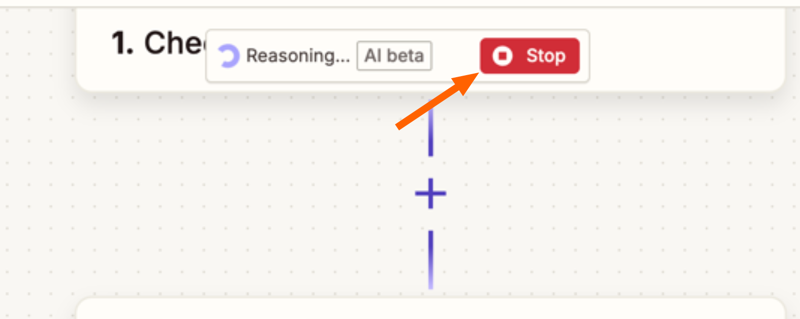
Copilot, like our other AI-based products and features like AI by Zapier, AI Fields in Tables, Agents, Chatbots etc. are mostly optional so would only be enabled if you use you choose to use, or build with them.
If it’s more that you’re wanting to opt-out of AI model training please reach out to our Support team here and they’ll be able to help with that.
Hope that helps. Let me know if you have any more questions or if there’s anything else I can help with. 🙂
This post has been closed for comments. Please create a new post if you need help or have a question about this topic.




Early access

Next Gen Zaps
Build and deploy automations from AI tools you already use. With Agentic Management, if anything breaks, the agent diagnoses the issue and proposes a fix.
Request access now
Enter your E-mail address. We'll send you an e-mail with instructions to reset your password.