Question

Only some Marketo fields being shown

  • November 18, 2021
  • 8 replies
  • 141 views

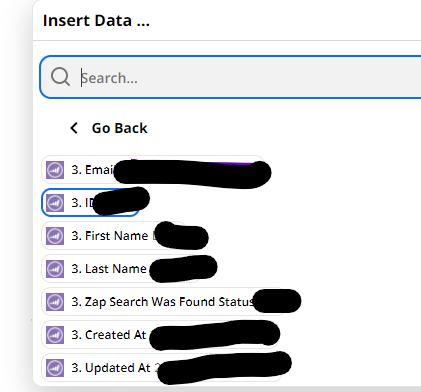
I’m trying to use fields from marketo leads found through a “Find a Lead in Marketo” Zap, but I only get access to a few select fields from the marketo lead, not nearly all of them.

I’ve tried reconnecting my zapier to marketo.

This post has been closed for comments. Please create a new post if you need help or have a question about this topic.

8 replies

Troy Tessalone
Zapier Orchestrator & Solution Partner
Forum|alt.badge.img+14
  • Zapier Orchestrator & Solution Partner
  • November 19, 2021

Hi @mlll 

Make sure the returned record has values populated for those fields.

Some APIs only return parameters with existing values to keep payload sizes small.

Otherwise, consider opening a ticket with Zapier Support: https://zapier.com/app/get-help


  • Author
  • Beginner
  • November 22, 2021

These fields are populated. They’re being overwritten to become blank for some reason.

Thanks


Troy Tessalone
Zapier Orchestrator & Solution Partner
Forum|alt.badge.img+14
  • Zapier Orchestrator & Solution Partner
  • November 22, 2021

@mlll 

Check if there are the internal Marketo automations being triggered.


  • Author
  • Beginner
  • November 23, 2021

 No processes are triggered. Either way I don’t see why I shouldn’t be able to see all the marketo fields for the found lead, I only have access to these: 


Troy Tessalone
Zapier Orchestrator & Solution Partner
Forum|alt.badge.img+14
  • Zapier Orchestrator & Solution Partner
  • November 23, 2021

@mlll 

Best advice at this point would be to open a ticket with Zapier Support: https://zapier.com/app/get-help


jesse
Forum|alt.badge.img+9
  • Architect
  • February 18, 2022

Hey @mlll, I just wanted to check in to see how things are going here. I see you have created a ticket with our support team but that they are awaiting your reply to continue troubleshooting. Anything we can lend a hand with? Let us know!


  • Author
  • Beginner
  • February 18, 2022

Thanks for checking in! I found a work around so stopped looking into it. Thanks!


SamB
Community Manager
Forum|alt.badge.img+11
  • Community Manager
  • February 21, 2022

That’s great news, @mlll!

Would you be open to sharing some more details about the workaround you found? I’m sure there are plenty of folk in the Community that could benefit from your discovery! :relaxed: