Until recently Notion didn’t have an option to upload files via API. I just found that there is an option now https://developers.notion.com/docs/uploading-small-files but the zapier field still says “External file URLs included here are linked rather than uploaded, so please ensure any URLs used in this field are permanent and publicly accessible (e.g. Dropbox, Google Drive). If you're sourcing your file from a trigger, please add a step to upload it to a publicly accessible source before including a link to the file here.” under Attachments. How can i create automations to for example take an attachment from gmail and upload it under a database item?

Best answer
How to upload files to Notion using Zapier
Best answer by SamB
Hi all 👋
Just circling back in here to share that the team have added two new actions which will allow files to be uploaded to Notion - Upload File to Data Source Item and Upload File to Page or Block:
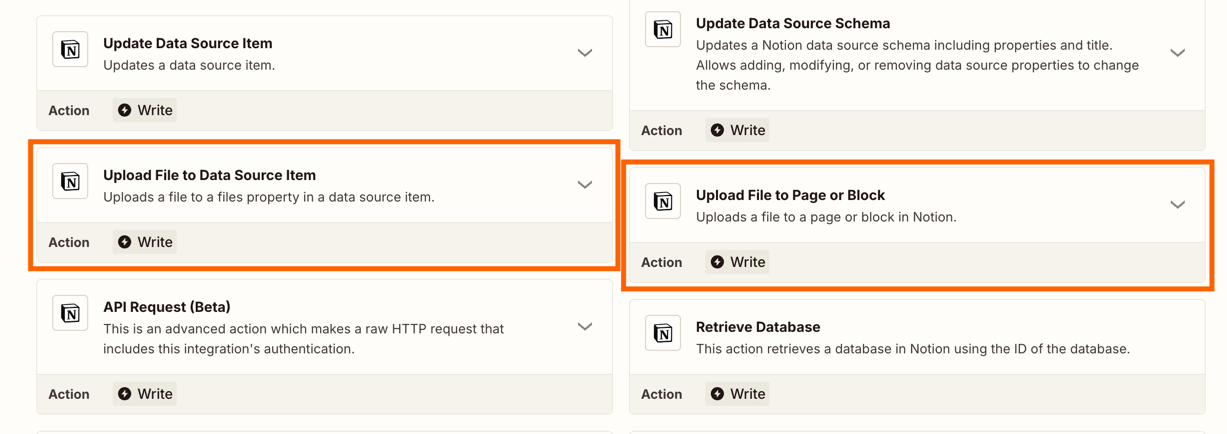
Thanks for your patience while the team worked on getting this functionality added to the Notion app.
If you run into any issues using either of those new actions, feel free to start a new topic or reach out to our Support team directly and we’ll be happy to assist. In the meantime, happy Zapping! 😁⚡
This post has been closed for comments. Please create a new post if you need help or have a question about this topic.







Early access

Next Gen Zaps
Build and deploy automations from AI tools you already use. With Agentic Management, if anything breaks, the agent diagnoses the issue and proposes a fix.
Request access now
Enter your E-mail address. We'll send you an e-mail with instructions to reset your password.