Best answer

How to set up Payhip, Zapier, and Mailchimp for course sales automation

  • March 11, 2026
  • 3 replies
  • 19 views

Hi there, I’m currently building a course sales funnel and I would appreciate some guidance.

My current setup is:

Payhip → Zapier → Mailchimp

Payhip hosts the courses and Zapier sends customer data into Mailchimp where we run email automations.

My goal is to trigger Mailchimp automations using tags depending on what action someone takes in Payhip.

For example:

• If someone downloads our free masterclass, Zapier should add them to Mailchimp with the tag "masterclass_download".
• If someone purchases our course "The Holm Edit", Zapier should add the tag "holm_edit_buyer".

Then in Mailchimp, automations will trigger when the contact receives those tags.

My questions are:

  1. When setting up the Zap from Payhip → Mailchimp, can I map different tags based on the product purchased in Payhip?

  2. Does Payhip send the product name or product ID to Zapier so I can apply different tags depending on which course was purchased?

  3. What is the best trigger to use for this setup (New Sale, New Customer, etc.)?

  4. Is there any way to detect abandoned checkouts from Payhip through Zapier?

I want to structure the funnel correctly so that each purchase or download triggers the correct Mailchimp automation.

Thank you very much for your help.

Best answer by devtrestllc

Yes! this should be doable.

I’d use New Sale as the trigger, then in Zapier use a Filter or Paths based on the product name/ID, and apply the right Mailchimp tag from there.

So basically:

  • free masterclass → add tag masterclass_download

  • paid course → add tag holm_edit_buyer

For abandoned checkouts, I don’t think Payhip sends that through Zapier natively, so that part would likely need another workaround.

3 replies

Troy Tessalone
Zapier Orchestrator & Solution Partner
Forum|alt.badge.img+14
  • Zapier Orchestrator & Solution Partner
  • March 11, 2026

Hi ​@Mackie 

For filtering/routing, use these apps as Zap steps:


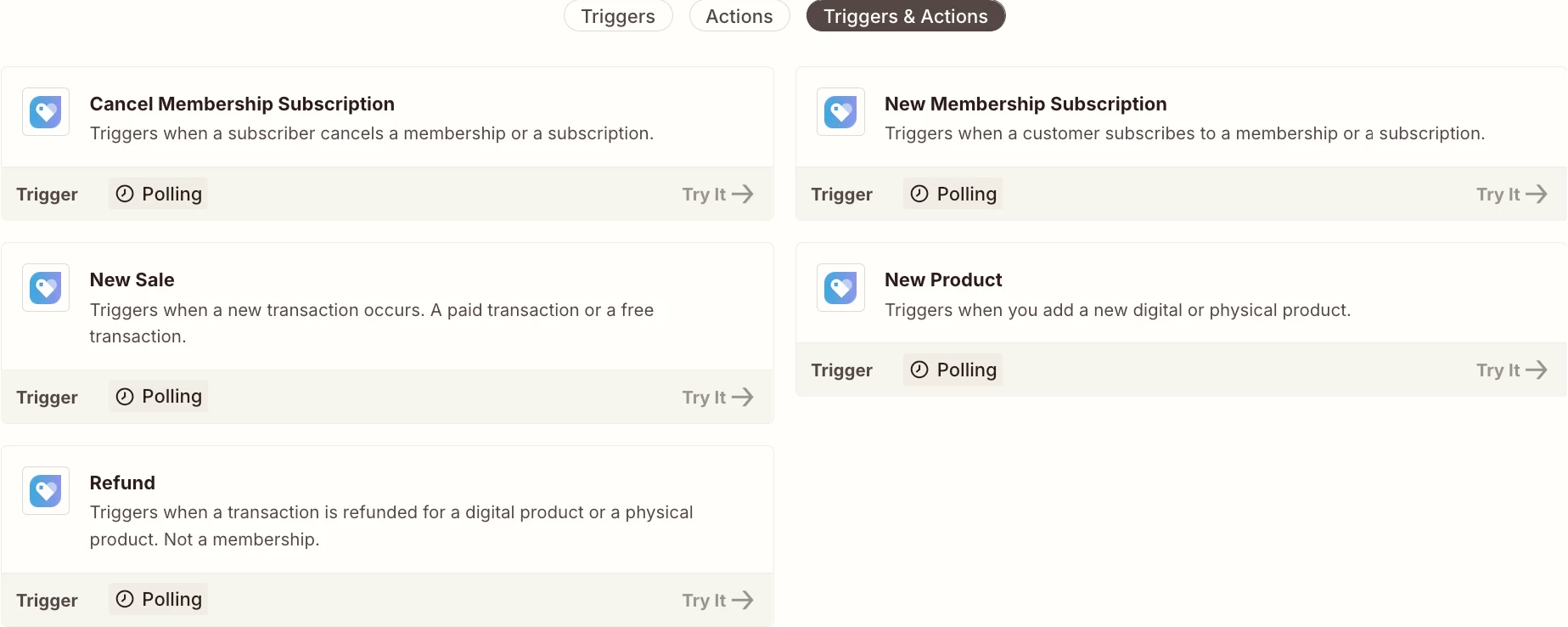
Payhip Zap app available triggers/actions: https://zapier.com/apps/payhip/integrations#triggers-and-actions

Help link from Payhip about their Zap app integration: https://help.payhip.com/article/116-zapier

See screenshot below for descriptions.


Sparsh from Automation Jinn
Forum|alt.badge.img+6

Hey ​@Mackie,

Here are the answers to your questions-

  • Yes it’s possible using Filter or Paths. 
  • Yes most probably the trigger data will have product name or product ID but better check the data directly.
  • New Sale will be ideal for your use case
  • No as Payhip doesn’t have an abandoned checkout trigger.

Hope it helps!

PS: If you need more active help, I’m happy to connect through my Zapier Solution Partner page if you’d like to reach out here- https://zapier.com/partnerdirectory/automation-jinn


Forum|alt.badge.img+1
  • New
  • Answer
  • March 12, 2026

Yes! this should be doable.

I’d use New Sale as the trigger, then in Zapier use a Filter or Paths based on the product name/ID, and apply the right Mailchimp tag from there.

So basically:

  • free masterclass → add tag masterclass_download

  • paid course → add tag holm_edit_buyer

For abandoned checkouts, I don’t think Payhip sends that through Zapier natively, so that part would likely need another workaround.