Best answer

How to select Facebook Lead Ads form data (title, body etc) within a Zap?

  • March 22, 2023
  • 5 replies
  • 388 views

Team Force

Hi 

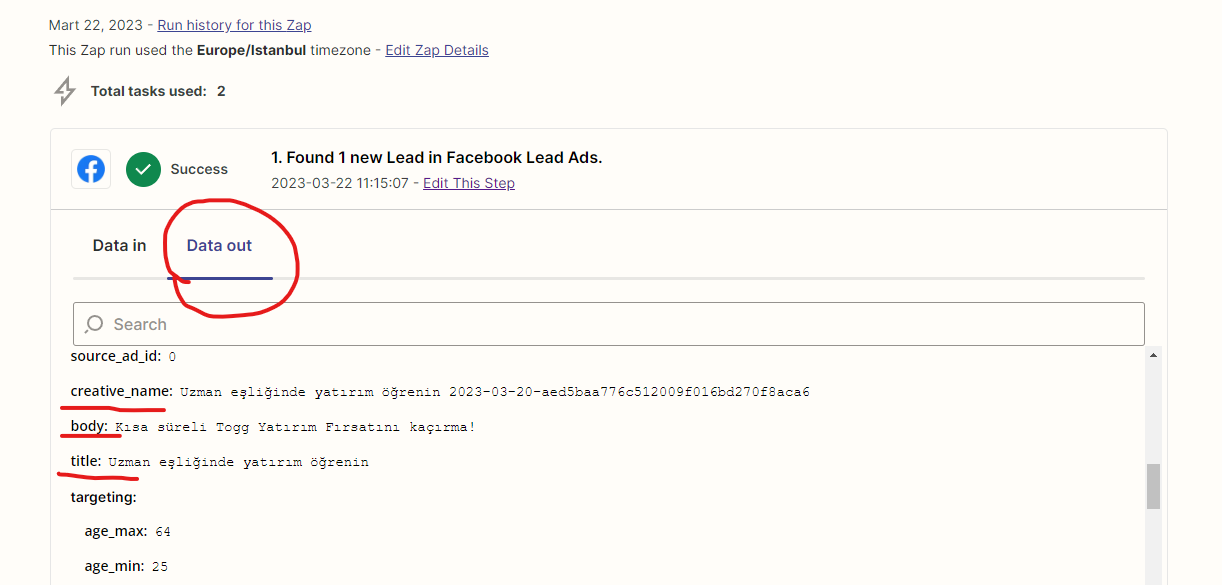
i want to take more facebook ad’s data like ad’s title or ad’s body text… but i cannot find in predefined variabled.  when i checked data out section at my zap’s history, i see all datas

so how can i add those variables’ datas to my input areas 


Best answer by SamB

Thanks for confirming that, @Team Force

I’ve added details about the three specific fields you’re missing to the bug report and have added you to the list of affected users. That will allow us to notify you by email as soon as that issue has been fixed.

I don’t have an ETA on when it will be resolved, but in the meantime, there’s a workaround I’d like to suggest. It involves using custom pill mapping to select the missing fields. Which is a way of referencing the field names in the Zap without selecting them from the dropdown menus.

We’ve got an article in Community which you can follow to get that set up:


Hopefully that will help the Zap to access the fields while this bug is being investigated. If you run into any trouble setting that up just let us know! 🙂

This post has been closed for comments. Please create a new post if you need help or have a question about this topic.

5 replies

SamB
Community Manager
Forum|alt.badge.img+11
  • Community Manager
  • March 22, 2023

Welcome to the Community, @Team Force! 👋
 

If you’re able to see the fields in the Zap History then it may be that the default test sample is selected in the Zap, which doesn’t have those fields. If you change the test sample that’s selected in the Zap it should allow you to pull in some real sample lead content that includes the fields you’re after.

If it’s not able to pull in a real sample, I’d suggest using the Facebook Lead Ads testing tool to generate a sample lead (make sure to fill out all the fields so that they appear in the sample in the Zap). You can find out more about how to do that here: Use the Facebook Lead Ads testing tool to create sample leads

Please let us know whether that does the trick. Want to make sure you’re all set here!


Team Force
  • Author
  • New
  • March 22, 2023

@SamB Did you read what I wrote once before answering?


i want to take more facebook ad’s data like ad’s title or ad’s body text…

means, i already take data from facebook but i wanna take more except ur predefined datas

when i checked data out section at my zap’s history, i see all datas

means, i see data that facebook sent to zapier, i dont need to see different test samples. this is default data that facebook send

so how can i add those variables’ datas to my input areas 

i ask how can i create data like this


SamB
Community Manager
Forum|alt.badge.img+11
  • Community Manager
  • March 22, 2023

Ah, sorry for the misunderstanding on my part there previously, @Team Force!  

Ok, so am I right in thinking that it’s not the custom fields on the Facebook Lead Ads form that you’re trying to select, it’s other standard fields like the Created Time field one which you can select. But those standard fields are only appearing in the Zap History, they aren’t available to select in the Zap. Is that correct?

If yes, is it just the “Creative Name”, “Body” and “Title” fields that you’re looking to select within the Zap or are you wanting to access other targeting fields (like age, Geo Location data etc)?

The reason I’m asking about the targeting fields is that I’ve been doing a bit more digging on this side and it looks like there’s a bug reported that related to certain fields being missing from the sample data on the Facebook Lead Ads app, specifically the targeting fields. Which if you’re missing those targeting fields as well would likely indicate that the there are other types of fields that are missing, not just the targeting fields. So we’d need to add that information to the bug report so it can be investigated further. 

Please can you confirm whether my understanding here is correct and, whether or not the targeting fields are missing for you too? Thanks for your assistance here. Looking forward to your reply!


Team Force
  • Author
  • New
  • March 23, 2023

Yeap, i confirm i cannot see many fields those come from facebook and right now i need just these three field (  “Creative Name”, “Body” and “Title”  ) but maybe later i need more

thank you very much for understanding, so what will we do about this , will i open new bug ticket about this or… ?


SamB
Community Manager
Forum|alt.badge.img+11
  • Community Manager
  • Answer
  • March 23, 2023

Thanks for confirming that, @Team Force

I’ve added details about the three specific fields you’re missing to the bug report and have added you to the list of affected users. That will allow us to notify you by email as soon as that issue has been fixed.

I don’t have an ETA on when it will be resolved, but in the meantime, there’s a workaround I’d like to suggest. It involves using custom pill mapping to select the missing fields. Which is a way of referencing the field names in the Zap without selecting them from the dropdown menus.

We’ve got an article in Community which you can follow to get that set up:


Hopefully that will help the Zap to access the fields while this bug is being investigated. If you run into any trouble setting that up just let us know! 🙂