
Best answer

How can I convert a phone number from number format to a text format?

  • Feb 1, 2023 3:36 PM UTC
  • 5 replies
  • 344 views

Hello,


i use Google contacts with sendinblue.


Now i have the problem, that the phonenumer is in sendinblue a TEXT-Field. In my Zap the phonenumber is a number field. So my question is. How can i change the format from number to TEXT-Field in Zapier?

Thank you.
Best answer by nicksimard

 Hi@vantage!

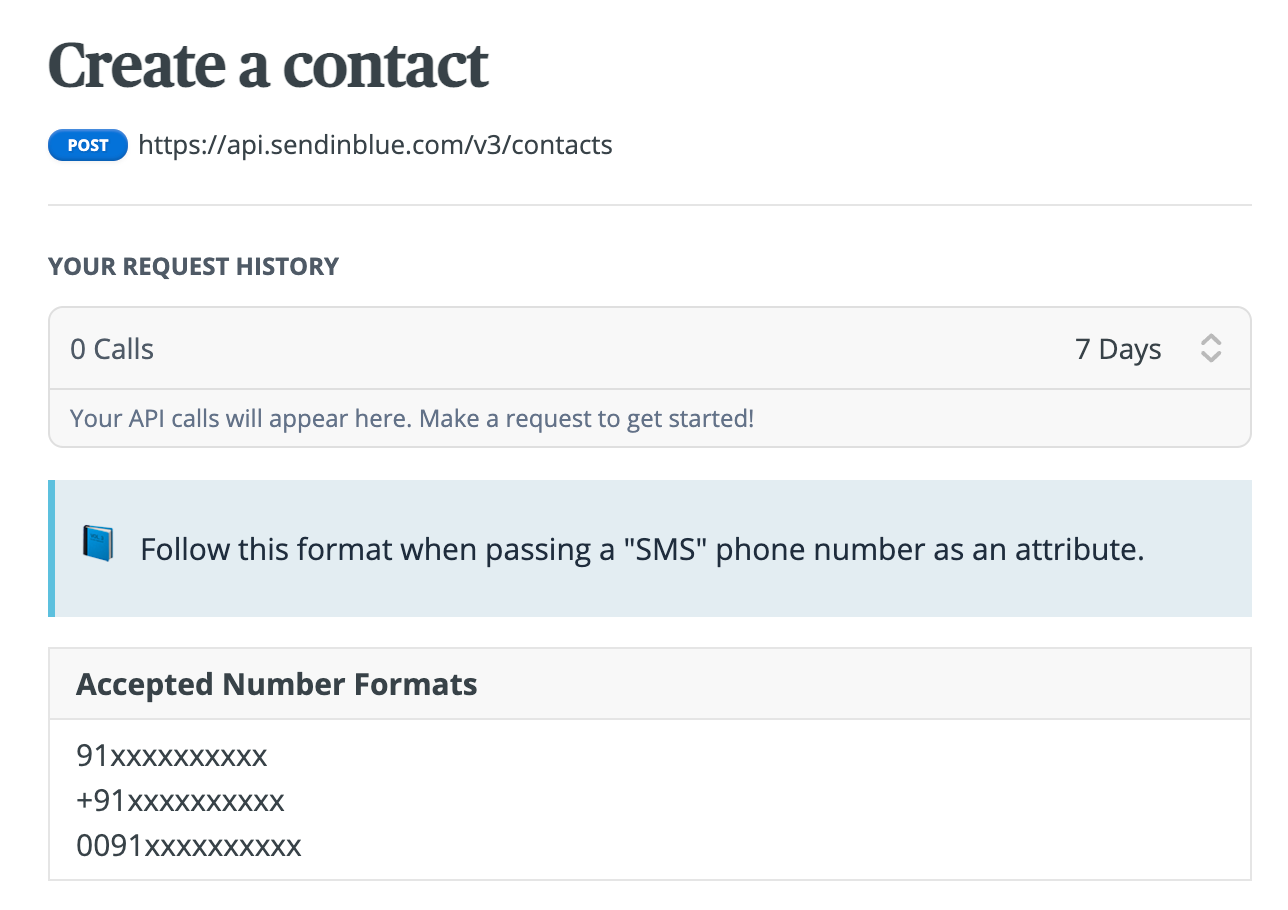
If you take a look at the API documentation for Sendinblue, you can see that these are the accepted formats for numbers:


Taking a look at our Formatter (find this under Formatter — Numbers — Format Phone Number), I’d say one of the following should work for you, but be sure to do some testing, to confirm. So the first option or the second last, as shown below:

251c3e837a4ddfe9755c24bec1f0570e.gif

View original
This post has been closed for comments. Please create a new post if you need help or have a question about this topic.

5 replies

Troy Tessalone
Zapier Orchestrator & Solution Partner
Forum|alt.badge.img+14
  • Zapier Orchestrator & Solution Partner
  • Feb 1, 2023 3:43 PM UTC

Hi @vantage 

Good question.

Are you encountering an error when trying to map variable across your Zap steps?

Have you tried testing the Zap step after mapping the variables?

Please provide detailed screenshots in order for us to have context, thanks.


  • Author
  • Beginner
  • Feb 1, 2023 3:56 PM UTC

Hello Troy,


i have the Error 400 and yes, and i have tested the step before.

Screenshots i will send you later.

Peter


nicksimard
Forum|alt.badge.img+11
  • Zapier Staff
  • Answer
  • Feb 1, 2023 4:26 PM UTC

 Hi@vantage!

If you take a look at the API documentation for Sendinblue, you can see that these are the accepted formats for numbers:


Taking a look at our Formatter (find this under Formatter — Numbers — Format Phone Number), I’d say one of the following should work for you, but be sure to do some testing, to confirm. So the first option or the second last, as shown below:

251c3e837a4ddfe9755c24bec1f0570e.gif


  • Author
  • Beginner
  • Feb 2, 2023 7:57 PM UTC

Hi @nicksimard !


Thanks a lot. With the formatter it was possible to do the zap! 😀


christina.d
Forum|alt.badge.img+9
  • Zapier Staff
  • Feb 3, 2023 5:22 PM UTC

Ayy! 🎉 Stoked to hear Nick’s recommendation’s did the trick for ya! 

Happy Zapping! 🧡