
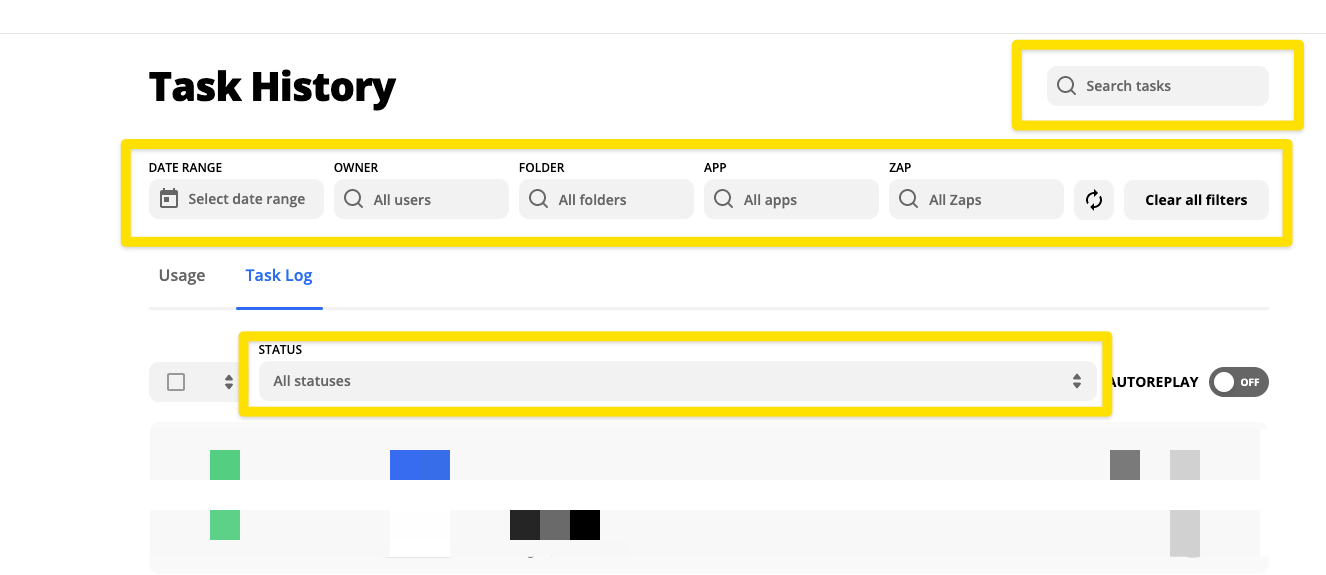
We have reached our limit on Tasks for the month. At our current level we are allowed 2,000 per month. St the moment there are still 2,500+ tasks in ‘holding’. The majority of those tasks do not need to be rerun as they don’t include a dollar amount. (We are sending purchased from our film festival to Salesforce). Is there a way to apply additional filters so that I can see and replay only those that the data I want to send? And then i could delete the others that are sill in holding?

Best answer
Filtering failed tasks
- Beginner
Best answer by andywingrave
Hey! Yes you will need to do this manually, but if you go to to https://zapier.com/app/history you can really filter these out with a lot of specificity - Right down to a field level in the zap.
This post has been closed for comments. Please create a new post if you need help or have a question about this topic.



Early access

Next Gen Zaps
Build and deploy automations from AI tools you already use. With Agentic Management, if anything breaks, the agent diagnoses the issue and proposes a fix.
Request access now
Enter your E-mail address. We'll send you an e-mail with instructions to reset your password.