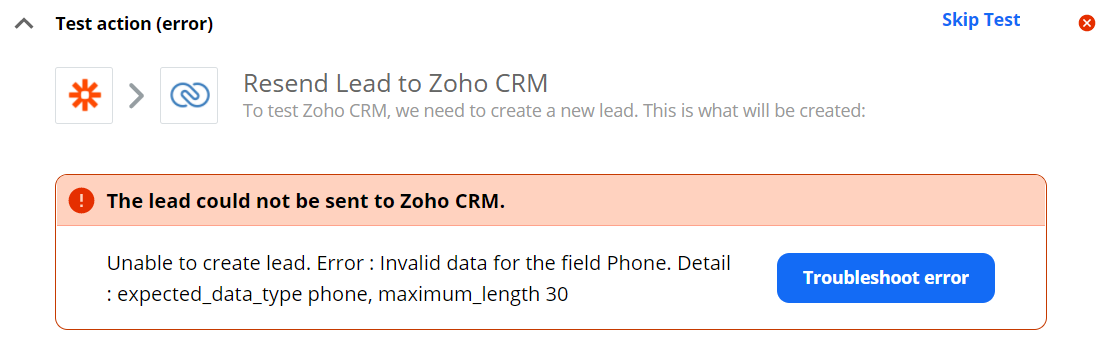
I want to connect Facebook Ads Leads with Zoho CRM, but when I test the zap this message appears.
I thought it could be due to the fact that the phone number section is more than 30 characters, so I tried putting the email trigger there, which has less characters, and it worked.
How can I solve this problem? Why did it happen if I’ve not changed anything recently?
Thanks
Best answer by SamB
Just wanted to follow up here to confirm that the issue here, as Steph spotted, was caused by the Phone Number field containing text rather than a valid phone number.
In cases like this where the values supplied by a default sample aren’t giving real data examples then you’ll want to try to pull in a new sample from Facebook Lead Ads that has a real phone number in order to test the Zoho CRM step with.
Hi there @CORR - Thank you for your message! I see that your test data does not contain a phone number. Are you able to input a test phone number to see if that would remedy your solution? I noticed that the “test lead:” field does not contain numbers but letters. Let me know if you were able to troubleshoot this. Thanks!
Just wanted to follow up here to confirm that the issue here, as Steph spotted, was caused by the Phone Number field containing text rather than a valid phone number.
In cases like this where the values supplied by a default sample aren’t giving real data examples then you’ll want to try to pull in a new sample from Facebook Lead Ads that has a real phone number in order to test the Zoho CRM step with.
Build and deploy automations from AI tools you already use. With Agentic Management, if anything breaks, the agent diagnoses the issue and proposes a fix.