Best answer

Contact form with several emails addresses

  • March 7, 2021
  • 4 replies
  • 124 views

Hey guys,

First of all, I’m a newbie here so I hope the question will make sense.


A client wish to have a contact form where upond the request we can redirect the sender to the right email address. For example, for General Inquiries, send email here ; for Sale enquiries, send email here; etc etc

The trick is the client doesn’t want the emails to be visible in any ways hence the idea to use a contact form.


A contact suggests to me it might be something I could do through Zapier but I honestly never used Zapier before. So any help would be much appreciated.


Many thanks,


Best answer by nicksimard

Hi @antoniooo!

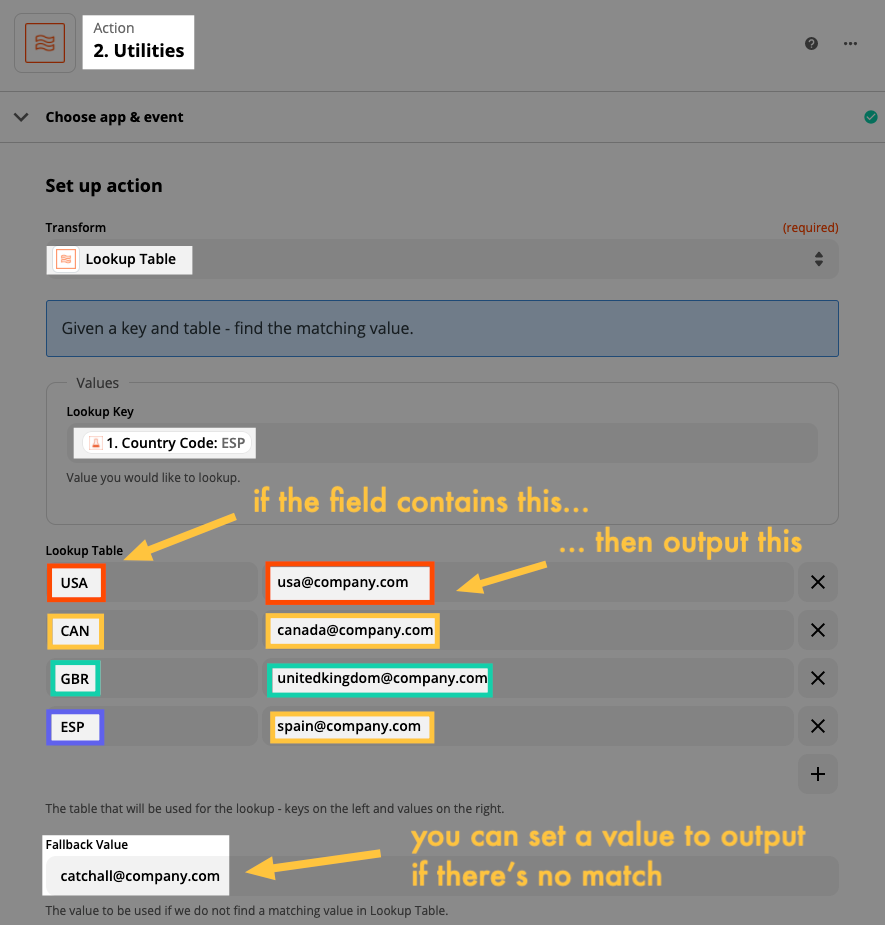
Here’s a look at how the Formatter step could be set up. In my example, I’m looking at a country code and if it matches, then I want to output the corresponding email address. 

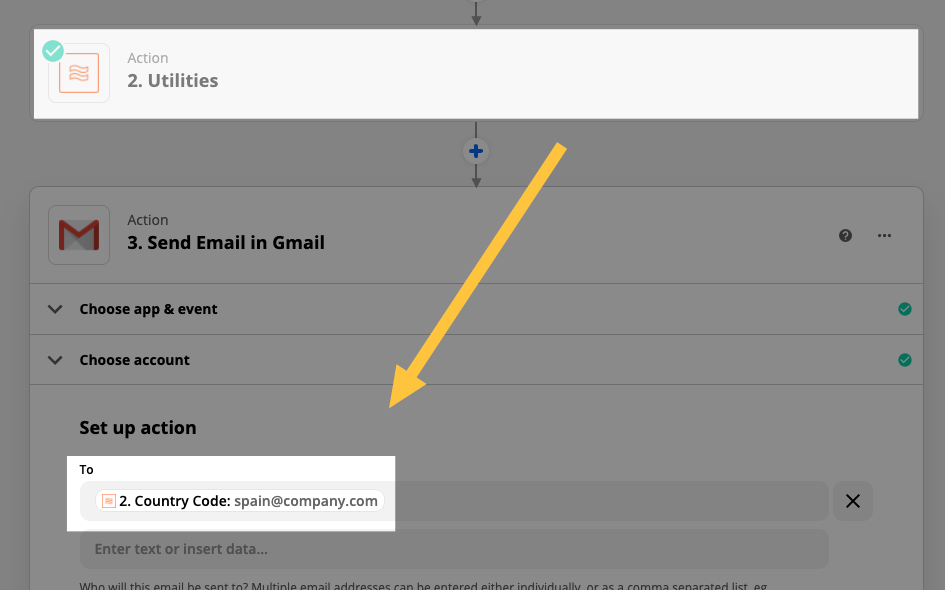
Then on the step after this one, you would use the output of that Formatter step. For example, here I’m using Gmail:

Hope that helps!

This post has been closed for comments. Please create a new post if you need help or have a question about this topic.

4 replies

Troy Tessalone
Zapier Orchestrator & Solution Partner
Forum|alt.badge.img+14
  • Zapier Orchestrator & Solution Partner
  • 34039 replies
  • March 7, 2021

Hi @antoniooo 

Try using the Formatter > Utilities > Lookup Table: https://zapier.com/help/doc/how-use-formatter-functions#using-the-lookup-table

OR Filters/Paths can be used in Zaps to redirect.

Filter: https://zapier.com/apps/filter/help

Paths: https://zapier.com/apps/paths/integrations#triggers-and-actions


Troy Tessalone
Zapier Orchestrator & Solution Partner
Forum|alt.badge.img+14
  • Zapier Orchestrator & Solution Partner
  • 34039 replies
  • March 7, 2021

Hi @antoniooo 

Check out JotForm which has this ability:


nicksimard
Forum|alt.badge.img+11
  • Zapier Staff
  • 2115 replies
  • Answer
  • March 9, 2021

Hi @antoniooo!

Here’s a look at how the Formatter step could be set up. In my example, I’m looking at a country code and if it matches, then I want to output the corresponding email address. 

Then on the step after this one, you would use the output of that Formatter step. For example, here I’m using Gmail:

Hope that helps!


SamB
Community Manager
Forum|alt.badge.img+11
  • Community Manager
  • 9679 replies
  • May 18, 2021

Hey @antoniooo,

Just wanted to circle back here to see if you saw Nick’s reply. Were you able to get that Lookup Table working? 

Please let us know!