Best answer

Constant Contact Zap not reading input from Squarespace

  • May 15, 2020
  • 2 replies
  • 351 views

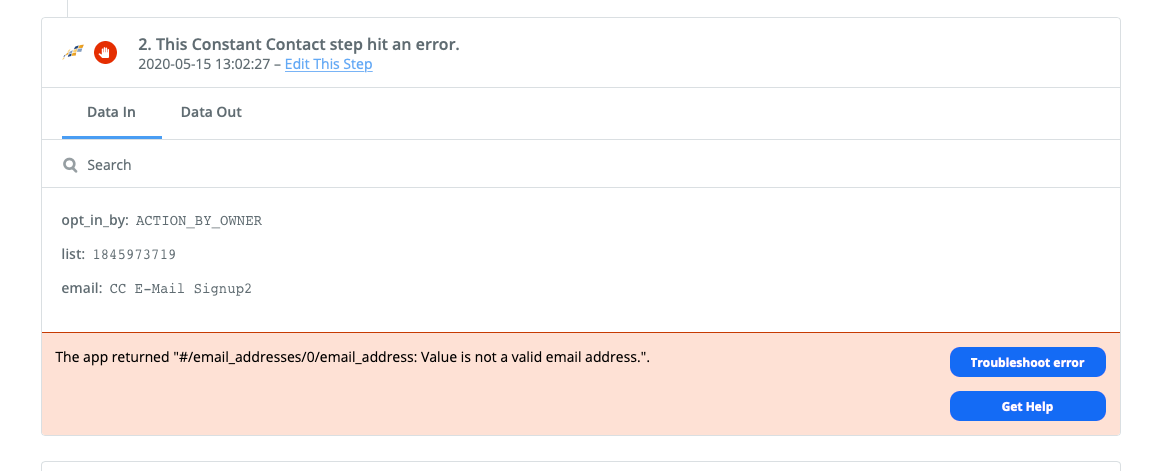
Hello, I am working on a Zap that allows me to add Constant Contact e-mails via a Squarespace form. Everything seems to check out, but when I try to test the form out, I get the attached error. 
 

Best answer by nicksimard

Hi @rsjowell!

I see that you’ve written to our Support team and they have responded with some directions and also some questions. For anyone else who finds this, here’s what the support team had written:


I took a peek at your Zap and I see the problem. The error you were seeing says that this isn't a valid email address:

f8a86fc8978eedc948356ae24dcdf38f.png

Looking at your setup, it seems like your Zap is currently trying to send the form name in the Email field:

f738c3f6e1e3a6e08b32753c18240cdd.png

Here's what you'll want to do to resolve this:

  1. Navigate to that Constant Contact step
  2. Delete what you currently have in the Email field
  3. Map "Email" from your trigger step to that field, instead
  4. Click "Continue" and make sure your Zap is on
  5. Navigate to the task history page where you see that error
  6. Click the "Replay" button in the upper righthand corner


This post has been closed for comments. Please create a new post if you need help or have a question about this topic.

2 replies

Liz_Roberts
Forum|alt.badge.img+8
  • Zapier Staff
  • May 18, 2020

Hi @rsjowell ,

Thanks for reaching out!

I see that you have been working with Erin in Support on this error and she suggested some tweaks that could be made to your email mapping. Let us know if that did the trick!


nicksimard
Forum|alt.badge.img+11
  • Zapier Staff
  • Answer
  • July 23, 2020

Hi @rsjowell!

I see that you’ve written to our Support team and they have responded with some directions and also some questions. For anyone else who finds this, here’s what the support team had written:


I took a peek at your Zap and I see the problem. The error you were seeing says that this isn't a valid email address:

f8a86fc8978eedc948356ae24dcdf38f.png

Looking at your setup, it seems like your Zap is currently trying to send the form name in the Email field:

f738c3f6e1e3a6e08b32753c18240cdd.png

Here's what you'll want to do to resolve this:

  1. Navigate to that Constant Contact step
  2. Delete what you currently have in the Email field
  3. Map "Email" from your trigger step to that field, instead
  4. Click "Continue" and make sure your Zap is on
  5. Navigate to the task history page where you see that error
  6. Click the "Replay" button in the upper righthand corner



