Best answer

How do I push the Webhook data out of the first Zap and into the second Zap?

  • June 1, 2022
  • 7 replies
  • 115 views

Hi there, I have the following zap set up.


> Catch hook (from my shopping cart)

> Delay for 30 days

But then I want to push that customer order via webhook to another zap that will process the order with a create order step in Shopify.

So how do I push the webhook data out of the first zap and into the second?

Is this a webhook post? Would appreciate any assistance.

Many thanks


Dan
 

Best answer by christina.d

Hi friends! I wanted to summarize some of the responses here in case it’s helpful!

Hi @Dan Lyons 

Good question.

Here’s a trick…

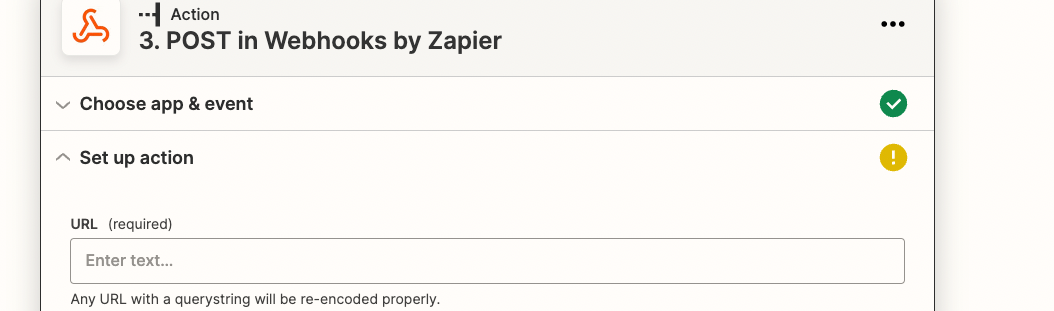
Use Webhook - POST 


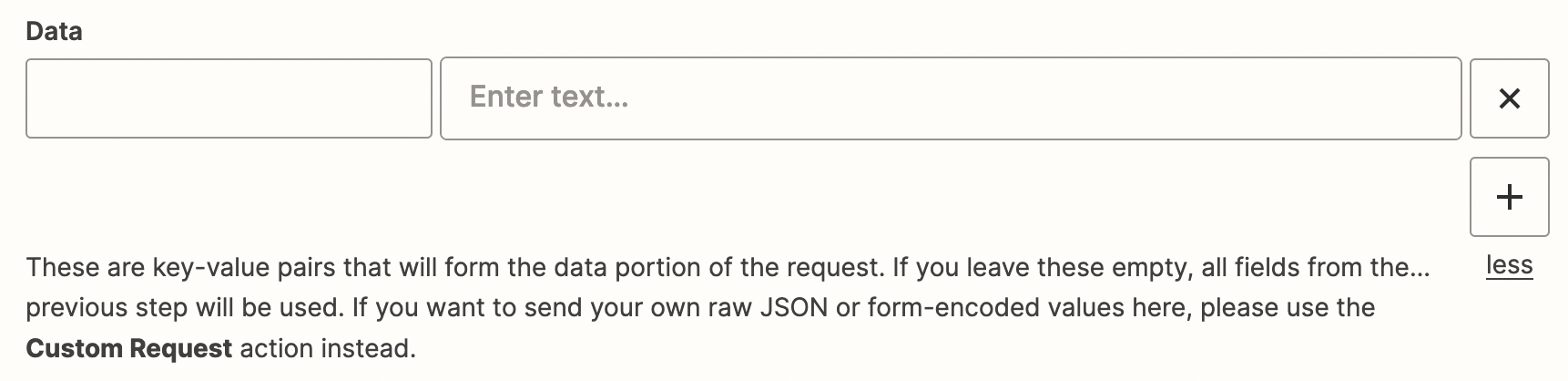
Also, you will need to map the values in the post action in step 3. Leaving all of the values blank will only send the data from the previous step which is a delay step and not the new order step. 


This post has been closed for comments. Please create a new post if you need help or have a question about this topic.

7 replies

Troy Tessalone
Zapier Orchestrator & Solution Partner
Forum|alt.badge.img+14
  • Zapier Orchestrator & Solution Partner
  • June 2, 2022

Hi @Dan Lyons 

Good question.

Here’s a trick…

Use Webhook - POST and leave all the data points blank. (see description)


  • Author
  • Beginner
  • June 2, 2022

Thanks @Troy Tessalone  - so do I put the webhook of the zap I want to push the data into here?


and just leave everything else?


Troy Tessalone
Zapier Orchestrator & Solution Partner
Forum|alt.badge.img+14
  • Zapier Orchestrator & Solution Partner
  • June 2, 2022

@Dan Lyons 

Yes, then make sure to test to send data to the new Zap so you can configure that Zap.


christina.d
Forum|alt.badge.img+9
  • Zapier Staff
  • June 4, 2022

Hey there, @Dan Lyons! I wanted to double check if Troy’s tips helped get this sorted for ya? Let us know! 🤗


  • Author
  • Beginner
  • June 4, 2022

Hey @christina.d  - I’m going to test this tomorrow.


Meantime, wondering if you can help.


I accidentally turned off a zap that had a bunch of people waiting on timers and then moving onto the next step (order to be palced in Shopify).


Can I just turn this back on and expect no problems? Or have I screwed badly? Nothing was edited in the zap, I’d just turned it off


Thanks


Dan


GetUWired
Forum|alt.badge.img+12
  • Zapier Solution Partner
  • June 6, 2022

Hi @Dan Lyons ,

I believe you should be able to turn that back on without any hiccups especially if the zaps in the history are still marked as scheduled/delayed.  

Also, you will need to map the values in the post action in step 3. Leaving all of the values blank will only send the data from the previous step which is a delay step and not the new order step. 


christina.d
Forum|alt.badge.img+9
  • Zapier Staff
  • Answer
  • June 6, 2022

Hi friends! I wanted to summarize some of the responses here in case it’s helpful!

Hi @Dan Lyons 

Good question.

Here’s a trick…

Use Webhook - POST 


Also, you will need to map the values in the post action in step 3. Leaving all of the values blank will only send the data from the previous step which is a delay step and not the new order step.