Best answer

Zoom Registrant sign up time not populating in Google Sheets

  • July 23, 2026
  • 7 replies
  • 58 views

HI all,


I have a google sheet that captures new Zoom webinar registrants. The zap captures details and custom fields correctly. However there is a token that says “created time” from Zoom that shows the registrant’s submission time.

That data cannot be populated on the Google sheet no matter how many times I try to add it.

Editing and testing it with past records work, just new submissions don’t.

Is there a way to capture sign up dates? It’s really important for us to see when each participant signs up


Thanks!
Best answer by Troy Tessalone

Hi ​@Gabrielng 

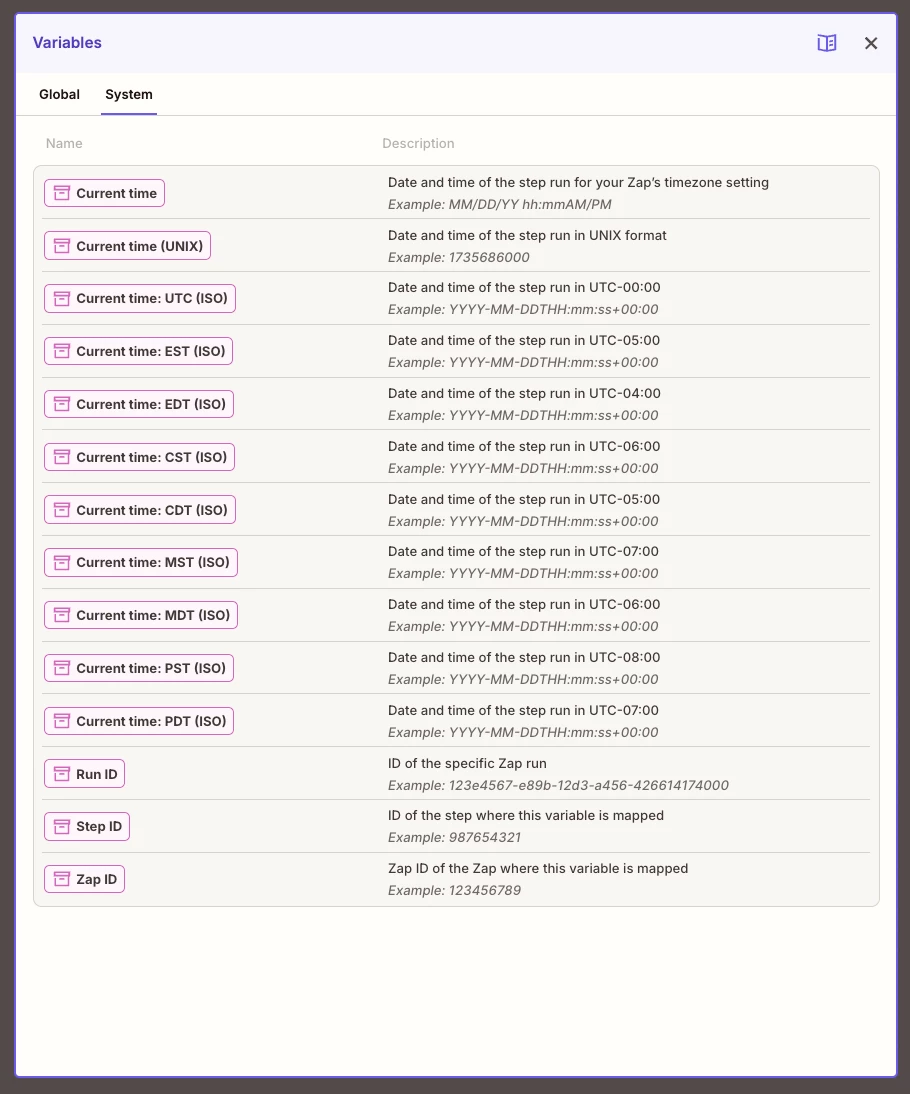
Alternatively, you can insert a system generated timestamp: https://help.zapier.com/hc/en-us/articles/35720226565773-Create-reusable-variables-to-use-in-Zap-workflows#h_01JVYKPHMTRP24XQ15FJB9RZBN


7 replies

Fabi.SPL
Forum|alt.badge.img
  • New
  • July 23, 2026

what's the trigger set to, new registrant or registrant created? that "created time" token behaves differently between the two, and if the zap fires the instant someone submits, zoom sometimes hasn't stamped the field yet so it comes through empty. past records already have it, which is why editing and testing works fine and live ones don't.

quick check, map it to a plain text column first instead of anything date formatted. if the value shows up as raw text you know it's a formatting reject on the sheets side, not a missing token. if it's blank there too, it's zoom not sending it yet.

i've built basically this for a couple clients and the fix that sticks is a formatter step in the middle, date/time in, iso or whatever format out, then sheets. sometimes a short delay step before the formatter if zoom's the one lagging.

curious what the raw value looks like on those past records that do work


  • Author
  • Beginner
  • July 23, 2026

Hi ​@Fabi.SPL, thanks for your response. currently it’s set to “New Webinar Registrant” and that’s the only option available for me. Strange that you have 2 options. 
 

I did what you recommended, setting a plain text column, and it’s blank. Makes sense that the data is not created before the zap ran.

could you share what a formatting step is? Thanks!


Troy Tessalone
Zapier Orchestrator & Solution Partner
Forum|alt.badge.img+14
  • Zapier Orchestrator & Solution Partner
  • July 23, 2026

Hi ​@Gabrielng 

For us to have more info, post screenshots showing how your Zap steps are outlined and configured in the CONFIGURE tab while in EDIT mode with the field mappings visible.


Troy Tessalone
Zapier Orchestrator & Solution Partner
Forum|alt.badge.img+14
  • Zapier Orchestrator & Solution Partner
  • Answer
  • July 23, 2026

SamB
Community Manager
Forum|alt.badge.img+11
  • Community Manager
  • July 27, 2026

Hi ​@Gabrielng 👋 Did you have any luck with Troy’s suggestion to use System variables to add a timestamp of when the Zap runs into the Google Sheets? 

Let us know if that sorted it or if you still need any help!


  • Author
  • Beginner
  • July 27, 2026

HI all,

Apologies for not coming back to this thread sooner. We learn something new everyday!
@Troy Tessalone’s suggestion worked like a charm. I didn’t know anything about Zapier variables.
Thank you so much!


SamB
Community Manager
Forum|alt.badge.img+11
  • Community Manager
  • July 28, 2026

No worries ​@Gabrielng! Really glad you were able to sort it with system variables 🎉 Big thank you to ​@Troy Tessalone for helping out here! 🙌 

Hope all goes well with the webinars, we're always here if you ever need any help!