

Question

Zaps on hold, even after upgrading

  • May 11, 2026
  • 3 replies
  • 24 views

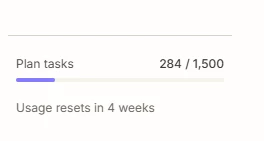
We hit our Zap limit several days ago. We upgraded immediately and went from 750 Zaps to 1500. 


When I came into work this morning and checked Zapier, it had held dozens of Zaps over the weekend. What do I need to do to ensure this doesn’t continue to happen?
 

Thanks!

Circle of Atonement

3 replies

Forum|alt.badge.img+3
  • Zapier Solution Partner
  • May 11, 2026

Hi ​@COA 

Fix the current backlog:
Go to Zap History -> On Hold tab -> select your hold Zaps -> click Replay. 

Prevent it from happening again:
Enable Pay-per-task billing in Settings. This keeps Zaps running past your 1,500 task limit by charging a small overage fee instead of pausing. 

Here are the Zapier doc that might help: 

What is replay?

How pay-per-task billing works in Zapier?
Hope this helps you!


Troy Tessalone
Zapier Orchestrator & Solution Partner
Forum|alt.badge.img+14
  • Zapier Orchestrator & Solution Partner
  • May 12, 2026

Hi ​@COA 

Zap Runs that get status = HELD must be manually replayed.


Help links for how to troubleshoot HELD Zap Runs:

https://help.zapier.com/hc/en-us/articles/37454233721869-How-to-troubleshoot-held-Zap-or-step-runs


Help link for how to replay Zap Runs: https://help.zapier.com/hc/en-us/articles/8496241726989-Replay-Zap-runs


SamB
Community Manager
Forum|alt.badge.img+11
  • Community Manager
  • May 15, 2026

Hi there ​@COA 👋 Did the replies from Fahad and Troy help you to sort this?

Let us know how you got on with replaying those held Zap runs, want to make sure you’re all set! 🙂





