Best answer

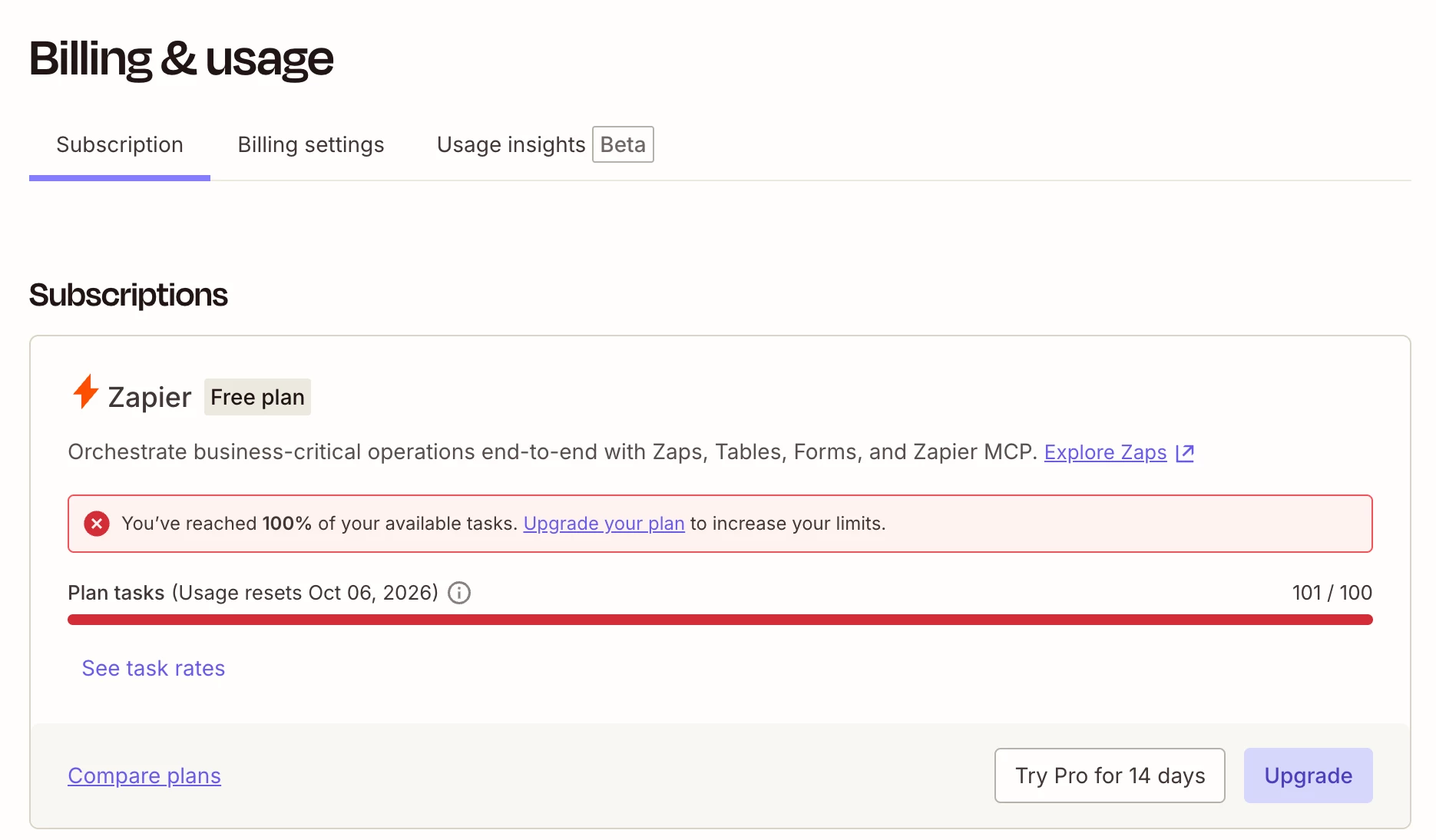
Zapier says I’m over my 100-task limit after using 25 task

  • September 26, 2026
  • 3 replies
  • 15 views

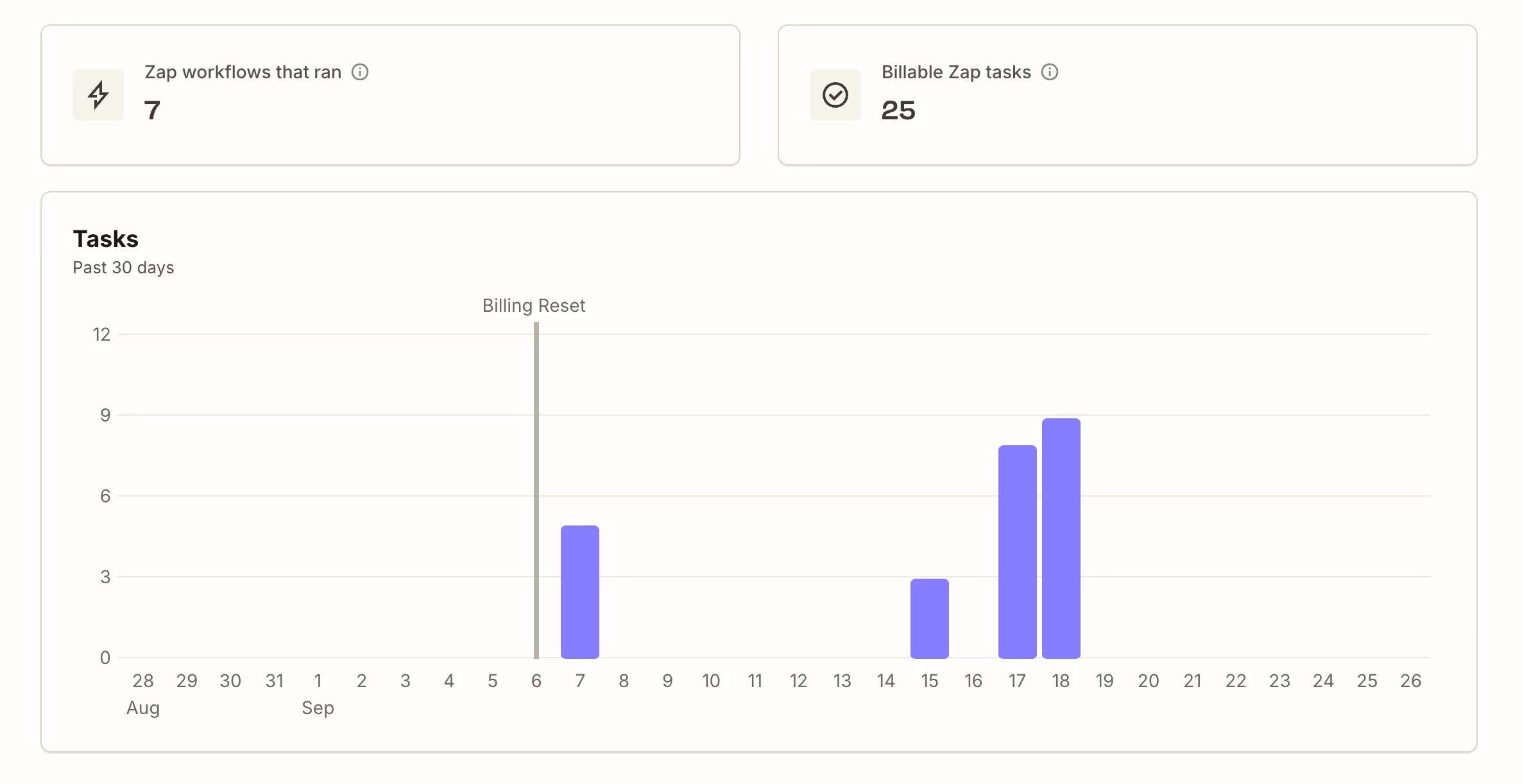
My plan includes 100 tasks per month. My billing cycle began September 6, and my account shows 25 tasks used since then. Zapier is now telling me I’m over my limit and need to upgrade.

It also says my tasks won’t reset until October 29. I expected them to reset on October 6, when my next billing cycle begins.

Can someone help me understand:

  1. Which usage is causing the over-limit notice if I’ve used 25 of 100 tasks?

  2. Why is the task reset date October 29 instead of October 6? (or is hold date different?)

  3. Is this an account or billing issue that support needs to correct?

Images below, thanks all. 


Best answer by SamB

Hi ​@ThePMac 👋

For all billing and account-related questions, our Support team are the best folks to contact. That said, I can see you’ve done that and they were able to identify what the unexpected task usage was coming from. 

Which usage is causing the over-limit notice if I’ve used 25 of 100 tasks?

Not sure if you’ve already seen their email reply, but it seems a large number of MCP calls to Zapier were made and that is what caused your plan’s task limits to be exceeded. Zapier MCP tool calls use 2 tasks for each successful tool call. You can learn more about that here: How is task usage measured in Zapier?

MCP tool calls aren’t included in the task usage graph you shared a screenshot of, as that only shows Zap workflow task usage specifically. To see the tasks used by MCP calls, you’ll need to go to the Usage tab on the Billing and usage settings page. 

Why is the task reset date October 29 instead of October 6? (or is hold date different?)

Yes, the hold date is different. The task usage reset date is October 6, and the October 29 date relates to how long we’ll keep the currently held Zap runs available for you to replay them.

Is this an account or billing issue that support needs to correct?

If you’ve not used Zapier MCP at all, then I’d definitely suggest following up with our Support team over email to get to the bottom of that. For now, you’d either need to wait until your plan’s limits reset on October 6, or upgrade to a paid plan to replay those held Zap runs now. 

Hope that helps to clarify things. Let us know how you get on replaying the held Zap runs, want to make sure you’re all set! 

3 replies

SamB
Community Manager
Forum|alt.badge.img+11
  • Community Manager
  • Answer
  • September 28, 2026

Hi ​@ThePMac 👋

For all billing and account-related questions, our Support team are the best folks to contact. That said, I can see you’ve done that and they were able to identify what the unexpected task usage was coming from. 

Which usage is causing the over-limit notice if I’ve used 25 of 100 tasks?

Not sure if you’ve already seen their email reply, but it seems a large number of MCP calls to Zapier were made and that is what caused your plan’s task limits to be exceeded. Zapier MCP tool calls use 2 tasks for each successful tool call. You can learn more about that here: How is task usage measured in Zapier?

MCP tool calls aren’t included in the task usage graph you shared a screenshot of, as that only shows Zap workflow task usage specifically. To see the tasks used by MCP calls, you’ll need to go to the Usage tab on the Billing and usage settings page. 

Why is the task reset date October 29 instead of October 6? (or is hold date different?)

Yes, the hold date is different. The task usage reset date is October 6, and the October 29 date relates to how long we’ll keep the currently held Zap runs available for you to replay them.

Is this an account or billing issue that support needs to correct?

If you’ve not used Zapier MCP at all, then I’d definitely suggest following up with our Support team over email to get to the bottom of that. For now, you’d either need to wait until your plan’s limits reset on October 6, or upgrade to a paid plan to replay those held Zap runs now. 

Hope that helps to clarify things. Let us know how you get on replaying the held Zap runs, want to make sure you’re all set! 


  • Author
  • Beginner
  • September 28, 2026

Thank you! I can't seem to find that email in my inbox, so I really appreciate you taking the time to help me out. Yep, I think Claude being integrated with Zapier is a problem, and I'll remove that right away. Thanks for letting me know (and to your Support Team). 


SamB
Community Manager
Forum|alt.badge.img+11
  • Community Manager
  • September 29, 2026

No worries ​@ThePMac! Glad we could help. 😊

Sorry to hear Support’s reply didn’t come through, maybe it landed in your spam or junk folder? If you run into anything else, just let us know.