Best answer

Zap with Paths + Zapier Tables "Find Records" not sending any messages

  • April 12, 2026
  • 8 replies
  • 46 views

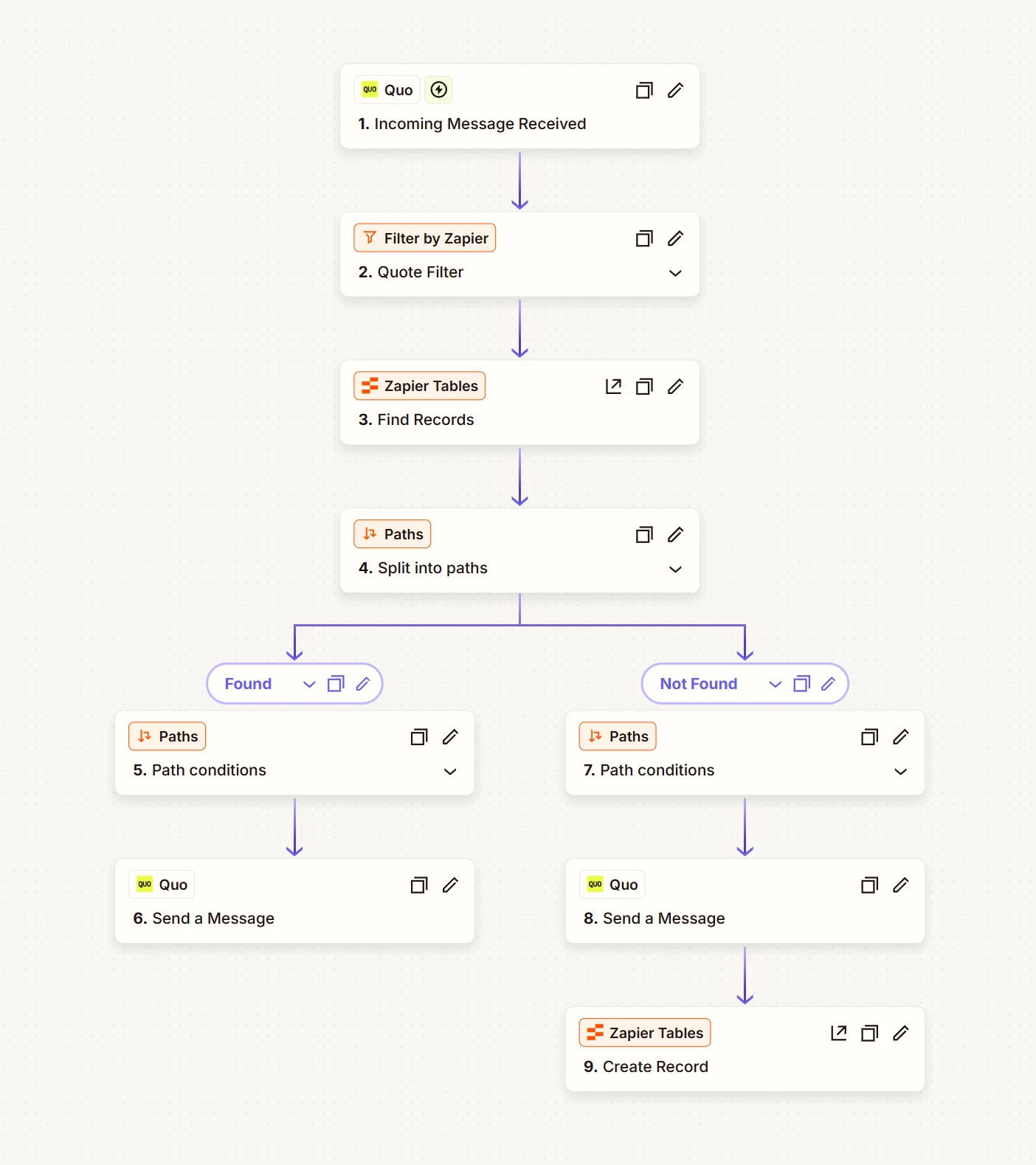
I have a Zap set up with the following steps:

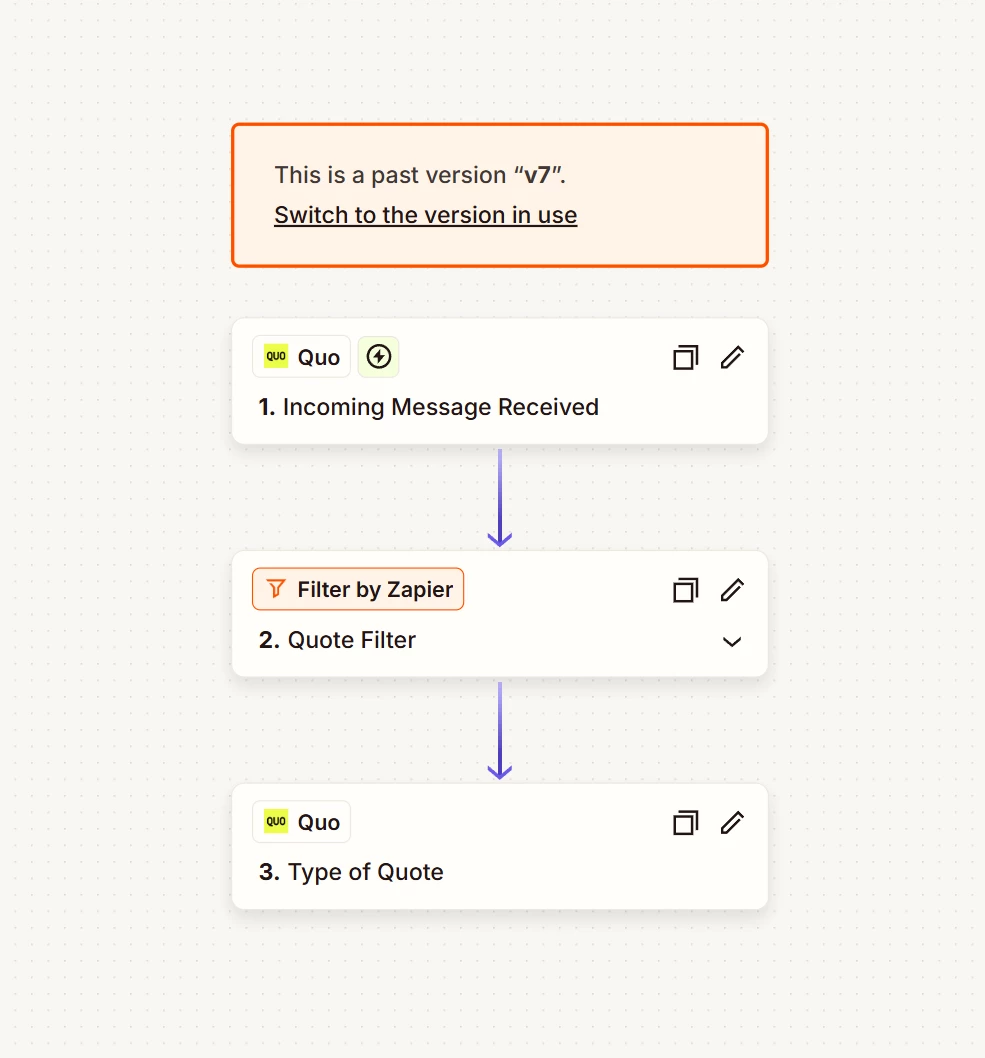
1. Incoming Message Received (Quo)
2. Filter by Zapier – Quote Filter
3. Zapier Tables – Find Records (looks up phone number to check if contact already exists)
4. Paths – Split into two paths: "Found" and "Not Found"
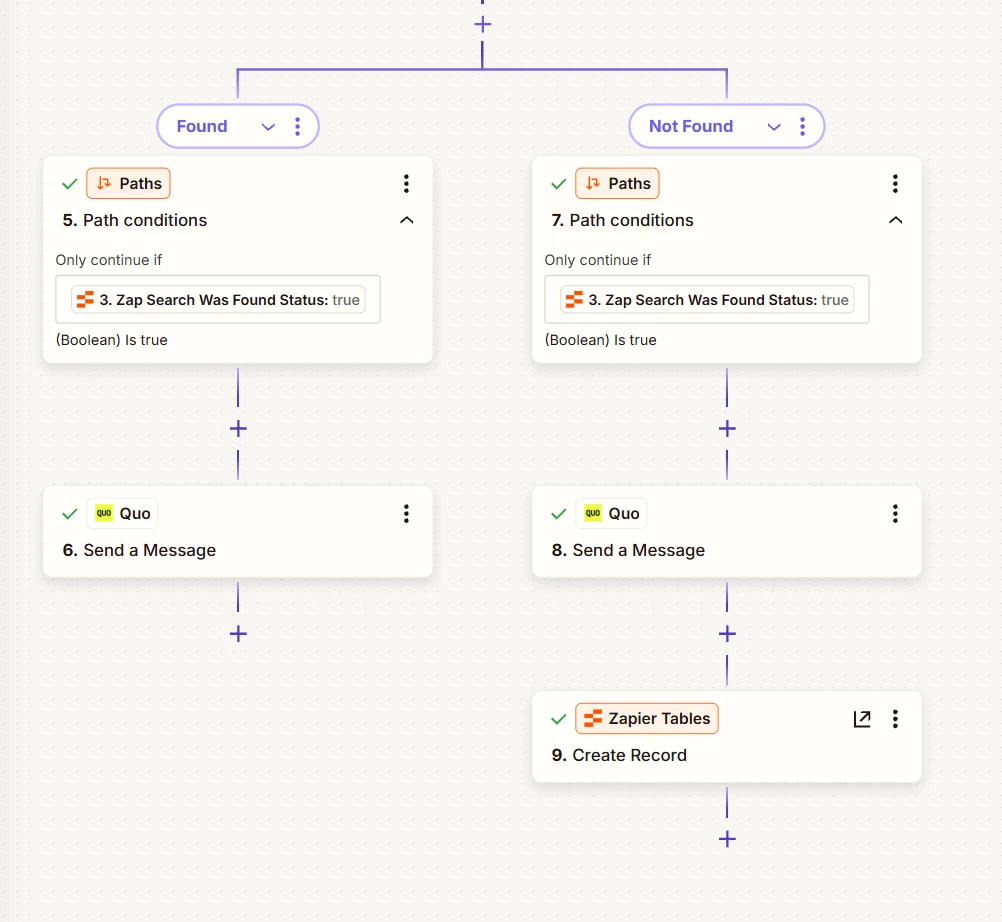
   - Found path: Path conditions (Step 5) → Send a Message (Step 6)
   - Not Found path: Path conditions (Step 7) → Send a Message (Step 8) → Create Record (Step 9)

The problem: The Zap runs but no messages are being sent at all — neither path seems to trigger. My previous version (v7) worked fine and did send messages, but it had no duplicate check so it would re-send to the same person every time they texted the word "quote." V9 is my attempt to fix that by adding a Zapier Tables lookup, but now nothing sends at all.

What I've tried: The Zap is turned on and the trigger fires. The filter passes. I believe the issue may be in how the path conditions are set up for the Found/Not Found split, or possibly in how Step 3 is mapping the phone number to search the table.

Has anyone successfully used Zapier Tables "Find Records" with a Paths split to prevent duplicate messages? What should the path conditions look like for each branch when a record is found vs. not found?

Screenshots attached showing v7 (worked) and v9 (broken) Zap structures.

Thanks in advance!
 

Best answer by SamB

Hi there ​@CoveragewithConfidence 👋

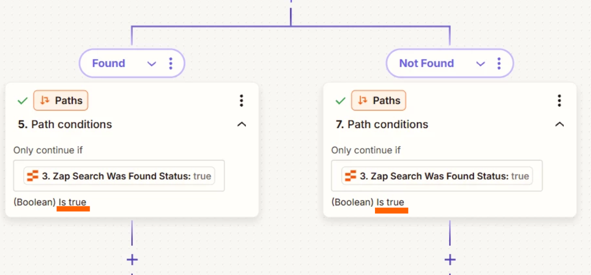
Looks like both of the paths are currently set up to check and continue if a record was found:
f9e308ed4094e9fa737a16b2bb5e1b0f.png

You’ll need to change the rule condition on the “Not Found” path to (Boolean) Is false instead. That will ensure that the second path only creates a record if an existing one isn’t found.

That said, should the “Found” path be sending a message to the user if there’s already a record for them in the table, or should a different action happen in those cases? Just wondering as you mentioned that the earlier version of your Zap was re-sending messages to the same person, so would you only want them to receive a message once?

8 replies

drtanvisachar
Forum|alt.badge.img+5
  • Zapier Solution Partner
  • April 13, 2026

Hey ​@CoveragewithConfidence !

This is your paths, right now neither one is matching so the Zap just stops and nothing sends. Go into your Find Records step and check the output, you should see an ID or some record data when it finds a match, then in your paths use that same field, set the Found path to “exists” and the Not Found path to “does not exist”. Also double check the phone number format because if it does not match exactly what is stored in your table the lookup will return nothing, so if Step 3 shows no data fix the lookup, if it does show data then your path conditions are the issue.


Ethan Marcellus- Automation Expert at Tuesday Wizard | Top Zapier Solution Partner | Zapier Community Contributor


Sparsh from Automation Jinn
Forum|alt.badge.img+6

Hey ​@CoveragewithConfidence,

For live Zaps, I recommend looking in the Zap history page(https://zapier.com/app/history) to spot any issues there. 

You may also want to turn On the Should this step be considered a success when nothing is found? option in Find Records to True as otherwise it would stop. You also want to check your path condition to check on Record ID to see if it exists or not for different paths. 

Hope it helps!

PS: If you need more active help, I’m happy to connect through my Zapier Solution Partner page if you’d like to reach out here- https://zapier.com/partnerdirectory/automation-jinn


Troy Tessalone
Zapier Orchestrator & Solution Partner
Forum|alt.badge.img+14
  • Zapier Orchestrator & Solution Partner
  • April 13, 2026

Hi ​@CoveragewithConfidence 

Help us have more info by posting screenshots showing how your Zap steps are configured in the CONFIGURE tab while in EDIT mode with the field mappings visible.


Forum|alt.badge.img+3
  • Zapier Solution Partner
  • April 14, 2026

Hi ​@CoveragewithConfidence 

The issue: Neither of your path conditions is matching, so the Zap stops at the Paths step.

The fix:

  • In your Paths step, use the Zap Data was found field from your Find Records step

  • Found Path: Set condition to Zap Data was found is true → Send your message

  • Not Found Path: Set condition to Zap Data was found is false → Send message → Create Record

If you don't see that field, use Record ID instead:

  • Found Path: Record ID Exists

  • Not Found Path: Record ID Does Not Exist

Still not working?

  • Check Zap History (https://zapier.com/app/history) to see which step is failing

  • Verify your phone number format matches exactly between your incoming message and your Zapier Table

Documentation:

Hope this helps you get it sorted! And let me know how it goes — happy to dig deeper if needed!
If you're still stuck, I offer a free 20-min Zapier troubleshooting call. Book it through my Zapier Directory profile — it's listed under Resources on the left side: https://zapier.com/partnerdirectory/automatemybiz!-->


is this not already how i have it?


SamB
Community Manager
Forum|alt.badge.img+11
  • Community Manager
  • Answer
  • April 15, 2026

Hi there ​@CoveragewithConfidence 👋

Looks like both of the paths are currently set up to check and continue if a record was found:
f9e308ed4094e9fa737a16b2bb5e1b0f.png

You’ll need to change the rule condition on the “Not Found” path to (Boolean) Is false instead. That will ensure that the second path only creates a record if an existing one isn’t found.

That said, should the “Found” path be sending a message to the user if there’s already a record for them in the table, or should a different action happen in those cases? Just wondering as you mentioned that the earlier version of your Zap was re-sending messages to the same person, so would you only want them to receive a message once?


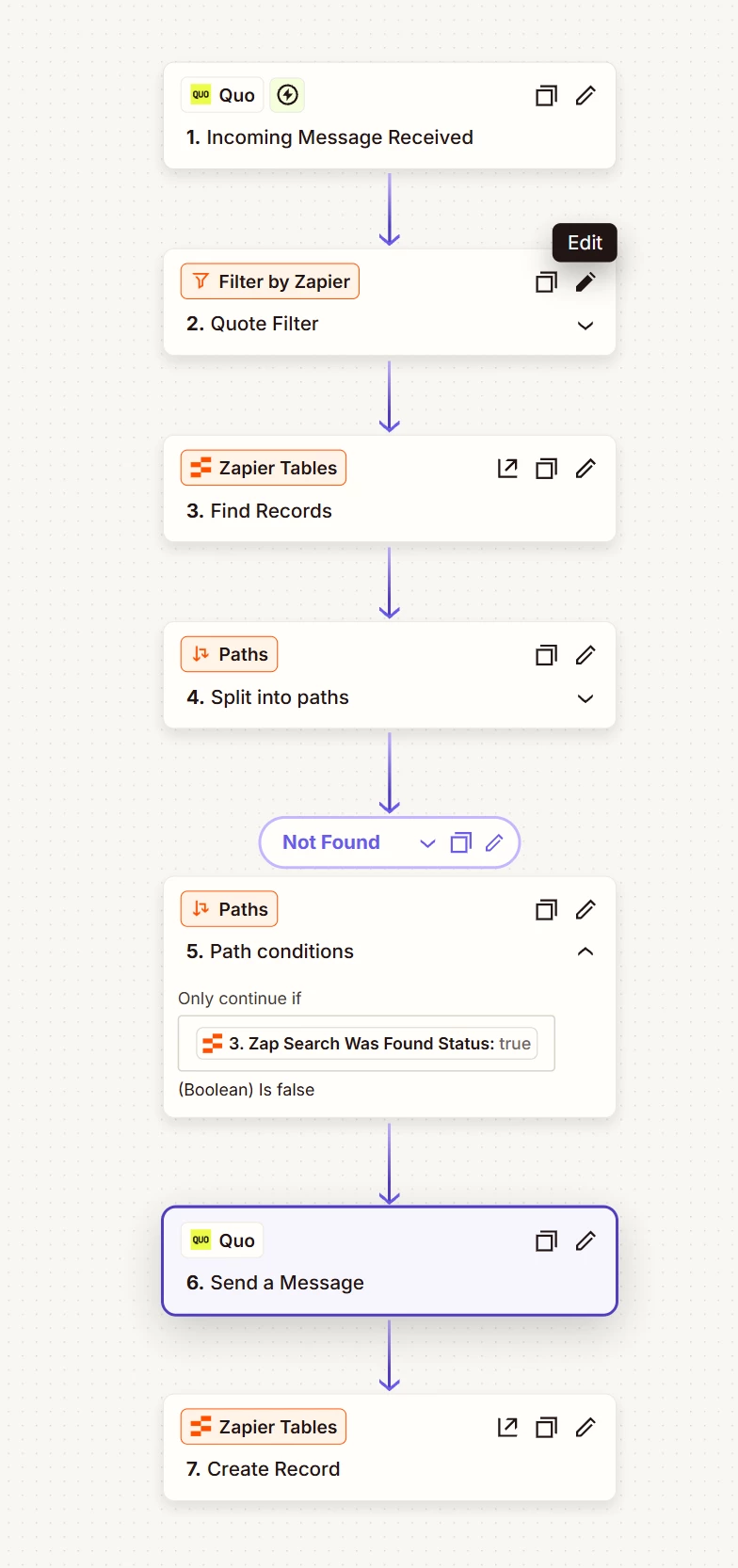
This is what I ended up going with. Please if it’s found it shouldn’t be doing anything anyway. Hopefully I’m doing this correctly


SamB
Community Manager
Forum|alt.badge.img+11
  • Community Manager
  • April 16, 2026

Great work ​@CoveragewithConfidence! 😁

Looks like the rule conditions for that “Not found” path are correct now. Just one minor thing, if the Zap should only carry out actions when no existing record is found, then you might want to swap the Paths action to be a filter instead (and have it use the same rule condition as per in your latest screenshot), since the Zap wouldn’t need the sort of branching logic that paths would provide. Other than that all looks good to me! 🙌