Best answer

Zap with Outlook Integration

  • December 2, 2024
  • 6 replies
  • 39 views

I have created a zap with the outlook integration.

  • I want the mail to come from the email address specified in my Google Sheet 
    • Email will come from different email addresses
  • The Zap works when it is coming from me
  • I get an error when trying to send from another email from within my company
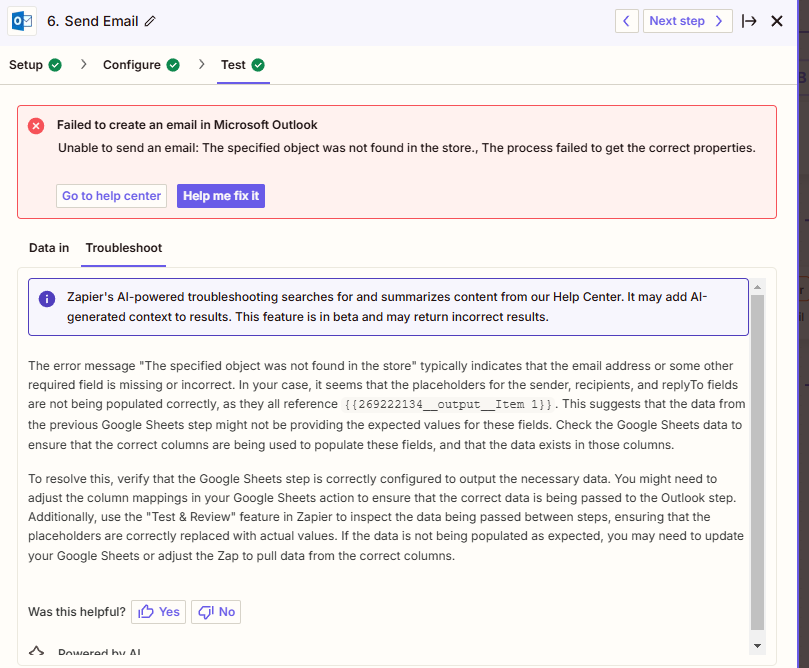
 

How do I resolve this?

 

Best answer by Troy Tessalone

@jkurahara 

Tip for connecting multiple app accounts to Zapier:


To use different Outlook app accounts, you may need to use Paths: https://help.zapier.com/hc/en-us/articles/8496288555917-Add-branching-logic-to-Zaps-with-Paths

This post has been closed for comments. Please create a new post if you need help or have a question about this topic.

6 replies

Troy Tessalone
Zapier Orchestrator & Solution Partner
Forum|alt.badge.img+14
  • Zapier Orchestrator & Solution Partner
  • December 2, 2024

Hi ​@jkurahara 

For us to have more info about the error, post screenshots showing how your Zap step 6 is configured in the CONFIGURE tab.

To send emails from different email addresses, the Outlook account would need to be connected/authorized to send from other email addresses.


  • Author
  • Beginner
  • December 2, 2024

I believe the problem is that are not connected.

  • I have roughly 10 email addresses
  • How do I connect mulitple emails at once
  • or Can I change the email log for each address as needed within zapier?

The only difference between the zap working or not is using a different email.

Thanks,

Jon


Troy Tessalone
Zapier Orchestrator & Solution Partner
Forum|alt.badge.img+14
  • Zapier Orchestrator & Solution Partner
  • Answer
  • December 2, 2024

@jkurahara 

Tip for connecting multiple app accounts to Zapier:


To use different Outlook app accounts, you may need to use Paths: https://help.zapier.com/hc/en-us/articles/8496288555917-Add-branching-logic-to-Zaps-with-Paths


SamB
Community Manager
Forum|alt.badge.img+11
  • Community Manager
  • December 10, 2024

Hi there, ​@jkurahara! 👋

I just came across this and wanted to check how things are going—did Troy’s latest reply here help you to get things sorted? 

Let us know whether you need any further help at all! 


  • Author
  • Beginner
  • December 10, 2024

Good Morning, 

I was able to create a path for each email account and get it to work. 

  • I did have to provide log in info for each account

Thanks,

Jon


SamB
Community Manager
Forum|alt.badge.img+11
  • Community Manager
  • December 11, 2024

That’s great news, ​@jkurahara! 🎉 Thanks so much for confirming that, and kudos to ​@Troy Tessalone for the great suggestion—nice one! 🙌

Please do reach back out to the Community if there’s anything else we can help with in future. In the meantime, happy Zapping! ⚡