


Best answer

Zap doesn't see headers in Google Sheet but they're there (I think)

  • December 10, 2024
  • 5 replies
  • 42 views

Forum|alt.badge.img

I’m trying to send RSS feed entries (the RSS feed is from a Google Alert if it matters) to Google Sheets.


I’m getting this error message: 
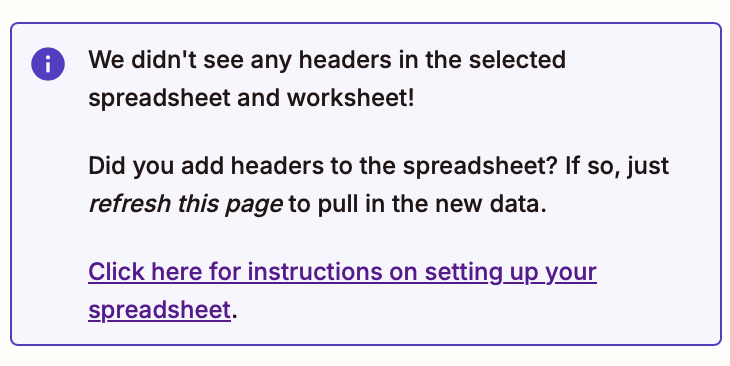
But this is what my Google sheet looks like -- shouldn’t “link” and “content” work as headers?
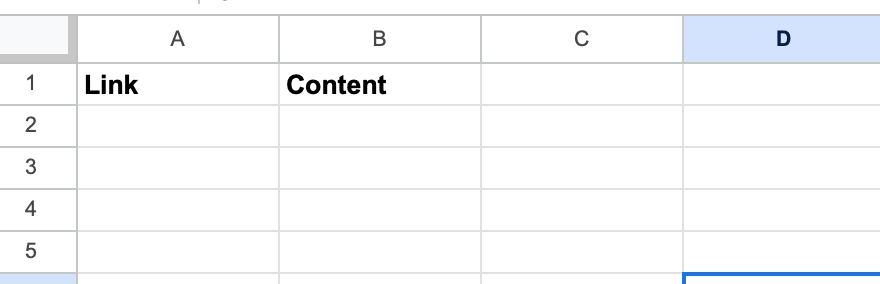
 

I’ve refreshed the page multiple times, switched sheets, and still seeing the same message. Any help? Thanks!


Best answer by Just trying here

Hi ​@Troy Tessalone ​@JammerS 

The fields are showing up now -- maybe just needed longer to refresh or something.

Thank you!


This post has been closed for comments. Please create a new post if you need help or have a question about this topic.

5 replies

Troy Tessalone
Zapier Orchestrator & Solution Partner
Forum|alt.badge.img+14
  • Zapier Orchestrator & Solution Partner
  • December 10, 2024

Hi ​@Just trying here 

Help us have more context by posting these screenshots:

  • Your GSheet title
  • Your GSheet worksheet title
  • How your GSheet Zap step is configured in EDIT mode

Troy Tessalone
Zapier Orchestrator & Solution Partner
Forum|alt.badge.img+14
  • Zapier Orchestrator & Solution Partner
  • December 10, 2024

@Just trying here 

Alternatives are to use these apps:


JammerS
Forum|alt.badge.img+6
  • Zapier Staff
  • December 11, 2024

Hi ​@Just trying here,
 
We just wanted to see how everything is going with your Zap. Did Troy's recommendation get the job done? Feel free to reach out if you need further assistance with your Zap. We're glad to address any concerns and assist you.
 
We're looking forward to your response.


Forum|alt.badge.img

Hi ​@Troy Tessalone ​@JammerS 

The fields are showing up now -- maybe just needed longer to refresh or something.

Thank you!


JammerS
Forum|alt.badge.img+6
  • Zapier Staff
  • December 13, 2024

Wow! Thank you for confirming that Troy’s resolution got the Zap running. This will significantly help our Community members to have as a reference for the same issue.


