Best answer

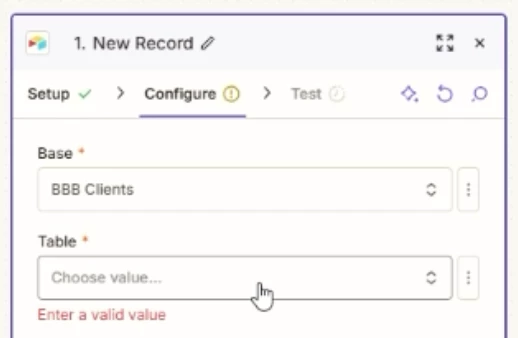
Zap config can't see tables in an Airtable base

  • June 18, 2026
  • 6 replies
  • 41 views

Forum|alt.badge.img

Hello!

I have done more Airtable + Zapier setups than I can count, but I’ve come across an issue I can’t seem to figure out. 

I have a base of which I am the owner.

My Zapier connecting is all current + future bases.

I’ve tested the connection, reconnected the connection, and my problem persists. 

I have a zap that I built. I want to edit it, but when I go to add an Airtable action step, I can find the base, but then Zapier finds 0 tables within that base. Yet for other bases, Zapier shows the tables. I can’t find any rhyme for reason for this, and now the whole zap doesn’t work. I’m guessing, because it no longer sees the configuration appropriately as it can’t see the tables of that base anymore. 

Has something changed with the Airtable + Zapier connection that has possibly caused this? Is this possibly a bug/issue that I should go to support with?

Curious if anyone else has run into this. I didn’t see any other community posts about such an issue.

Thanks in advance or your suggestions and proposed solutions.

Cole

Best answer by bluejeansboss

Hey ​@SamB 

It took a bit more digging as what Troy had suggested wasn’t working. It shouldn’t take all that to make a base, table, and fields show up, so I’m glad it didn’t work (No offense ​@Troy Tessalone! 😊)

Airtable has recently started truly enforcing Public API Call limits and it turns out the workspace we were using was at it’s cap for the month. Once that was resolved I was able to see all bases, tables, and fields without issue. 

Thank you, ​@Troy Tessalone, for all your suggestions though. I truly do appreciate it.

6 replies

Troy Tessalone
Zapier Orchestrator & Solution Partner
Forum|alt.badge.img+14
  • Zapier Orchestrator & Solution Partner
  • June 19, 2026

Hi ​@bluejeansboss 

Have you tried setting static values for these?

  • Base ID
  • Table ID

Forum|alt.badge.img
  • Author
  • Beginner
  • June 19, 2026

@Troy Tessalone 


Thanks for responding! I have tried that and it doesn’t work. It still won’t recognize it to pull in the table fields for mapping. 

Quick Soundless Video


Troy Tessalone
Zapier Orchestrator & Solution Partner
Forum|alt.badge.img+14
  • Zapier Orchestrator & Solution Partner
  • June 19, 2026

@bluejeansboss 

Things to check/try…

  • Try using a new/different private browser
  • Try clicking the refresh button in the Zap step
  • Try clicking the refresh button within the Table dropdown
  • Try using a static value for the Base AND Table AND View
    • Don’t select the Base from the dropdown
  • Try duplicating the Base


Workarounds

  • Create an Airtable Automation to trigger a Zap
    •  


SamB
Community Manager
Forum|alt.badge.img+11
  • Community Manager
  • June 23, 2026

Hi there ​@bluejeansboss 👋 Have you had a chance to give Troy’s suggestions a try yet?

Want to make sure the issue with selecting the Table and View gets sorted, so keep us posted on how it goes!


Forum|alt.badge.img
  • Author
  • Beginner
  • Answer
  • June 23, 2026

Hey ​@SamB 

It took a bit more digging as what Troy had suggested wasn’t working. It shouldn’t take all that to make a base, table, and fields show up, so I’m glad it didn’t work (No offense ​@Troy Tessalone! 😊)

Airtable has recently started truly enforcing Public API Call limits and it turns out the workspace we were using was at it’s cap for the month. Once that was resolved I was able to see all bases, tables, and fields without issue. 

Thank you, ​@Troy Tessalone, for all your suggestions though. I truly do appreciate it.


SamB
Community Manager
Forum|alt.badge.img+11
  • Community Manager
  • June 24, 2026

That’s great news ​@bluejeansboss, I’m so glad it’s sorted! 🎉 Thanks so much for sharing what caused it, this’ll be super helpful for others running into this in the future.

And thank you to ​@Troy Tessalone for helping out here. 🤗