Question

Will a filtered post re-enter the Zap for direct messaging in Bettermode?

  • December 4, 2025
  • 15 replies
  • 61 views

Hello Community!


I am working on a Zap for sending direct messages in Bettermode. 


What the Zap (should) do:

  • Send a direct message from me (in Bettermode) if a Bettermode post that is 7 days or older has not been marked as answered.

The problem I am running into:

  • If a post has entered the Zap and been filtered out, will it be able/eligible to re-enter the Zap? For instance, I don’t want a post that was created yesterday (T + 1 day) to receive a direct message yet. However, in 7 days (T + 7) I would like that post to receive a direct message. My question is: will that post go back through the Zap? 
  • If yes, how can I ensure the action only happens ONE TIME on a particular post? I don’t want that same post to receive multiple direct messages. 

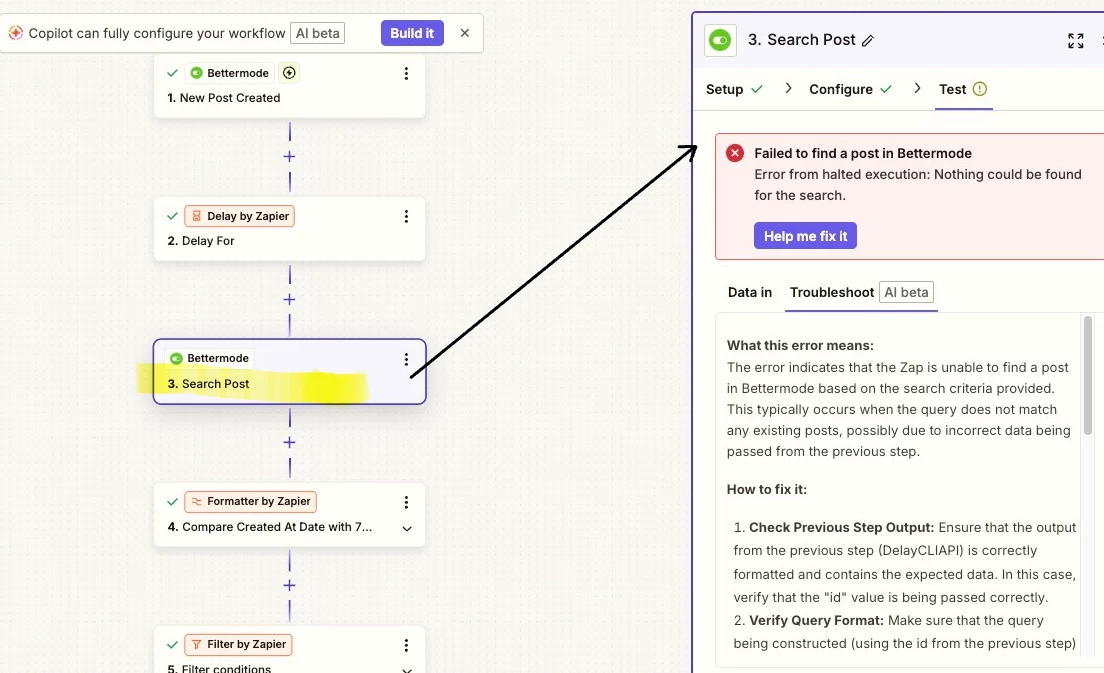
Our structure for the Zap: 

This structure is working as designed for new posts: 


15 replies

Troy Tessalone
Zapier Orchestrator & Solution Partner
Forum|alt.badge.img+14
  • Zapier Orchestrator & Solution Partner
  • December 4, 2025

Hi ​@Technolutions 

Zap trigger type is instant.

It fires when a new post created in Bettermode.

A post can only be created once in Bettermode, any updates after the post was created would be considered an update to the post.


Troy Tessalone
Zapier Orchestrator & Solution Partner
Forum|alt.badge.img+14
  • Zapier Orchestrator & Solution Partner
  • December 4, 2025

@Technolutions 

If you want to check on the status of a Post after 7 Zaps, then you probably need to use different Zap step logic.

  1. Trigger: Bettermode - New Post Created
  2. Action: Delay For
    1. Days: 7
    2. Help: https://zapier.com/apps/delay/integrations#help
  3. Action: Bettermode - Search Post
    1. Search by the Post ID from Zap step 1
  4. Action: Filter
    1. Help: https://zapier.com/apps/filter/integrations#help
  5. Action: Bettermode - Send Direct Message


TIP: Click field labels to see tooltips with more info.


  • Author
  • Beginner
  • December 4, 2025

@Troy Tessalone Awesome Troy!! Thanks for this thorough answer. I’m going to give this a shot! -Paige


  • Author
  • Beginner
  • December 5, 2025

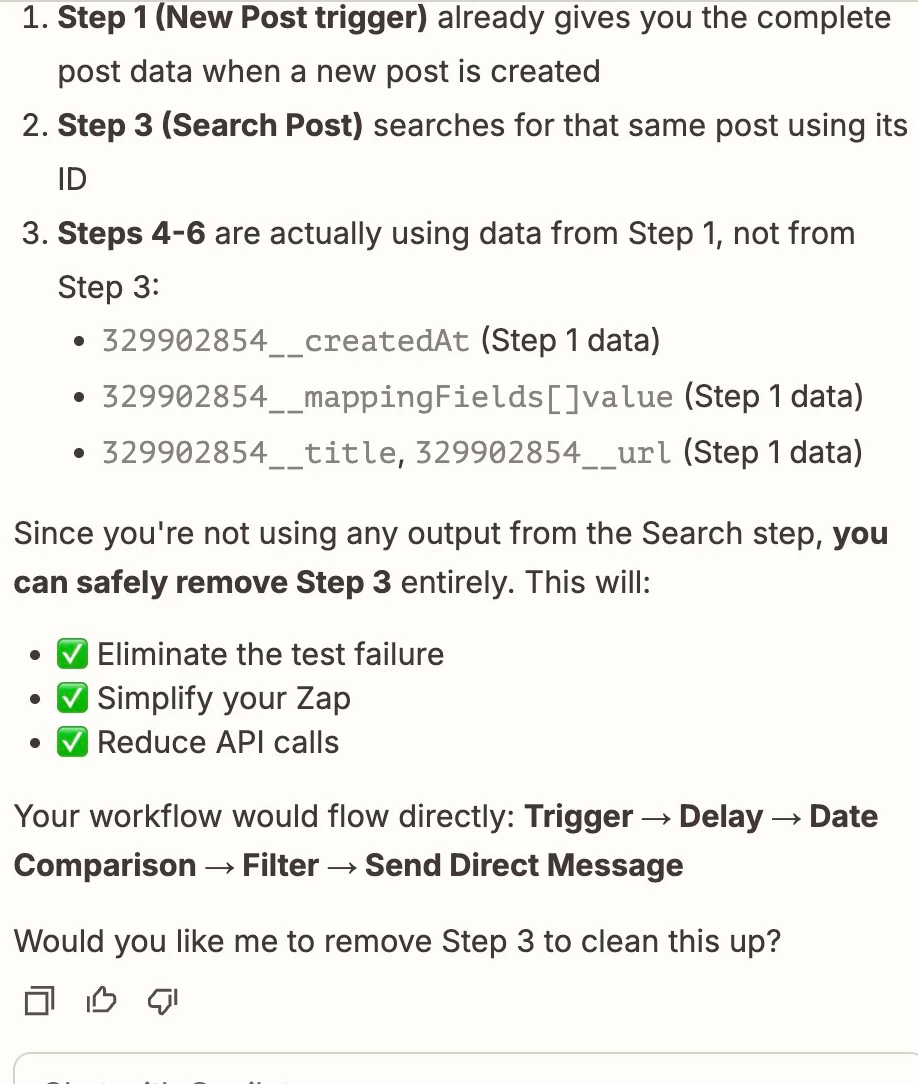
@Troy Tessalone  - can you shed some light on why you need to have step 3 (Bettermode - Search Post)? Doesn’t the Zap already delay the subsequent steps for that particular post? I tried adding in that step - and it kept saying “Safely Halted” and specifically “the step was safely halted in Bettermode because nothing was found”.  - Paige


Troy Tessalone
Zapier Orchestrator & Solution Partner
Forum|alt.badge.img+14
  • Zapier Orchestrator & Solution Partner
  • December 5, 2025

@Technolutions 

You need to find the post after the delay to get the current data about the post to be able to check the current post status to filter by in step 4.


Post screenshots showing how your Zap step 3 is configured in the CONFIGURE tab while in EDIT mode with the field mappings visible, along with the encountered error.


  • Author
  • Beginner
  • December 5, 2025

@Troy Tessalone - better yet, any idea how I can filter on “Answered” in Bettermode? This is not a field that is on every post type in Bettermode - rather only Question posts. As such, it doesn’t appear to be a field that displays under filters. I believe I’d have to use a webhook to search for this. 


Troy Tessalone
Zapier Orchestrator & Solution Partner
Forum|alt.badge.img+14
  • Zapier Orchestrator & Solution Partner
  • December 5, 2025

@Technolutions 

In Zap step 3, try searching for a “Question” post, then see if that field is returned to filter by.


For us to have more context, post screenshots that show how Zap step 3 is configured along with the DATA OUT.


  • Author
  • Beginner
  • December 8, 2025

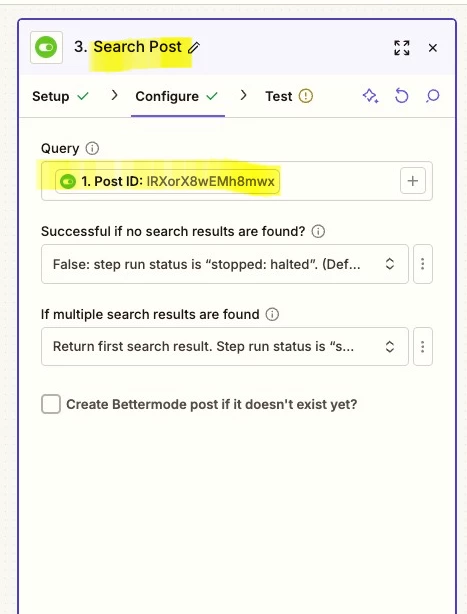
@Troy Tessalone Thanks again for the help. This is what I have for step 3: 


Troy Tessalone
Zapier Orchestrator & Solution Partner
Forum|alt.badge.img+14
  • Zapier Orchestrator & Solution Partner
  • December 8, 2025

@Technolutions 

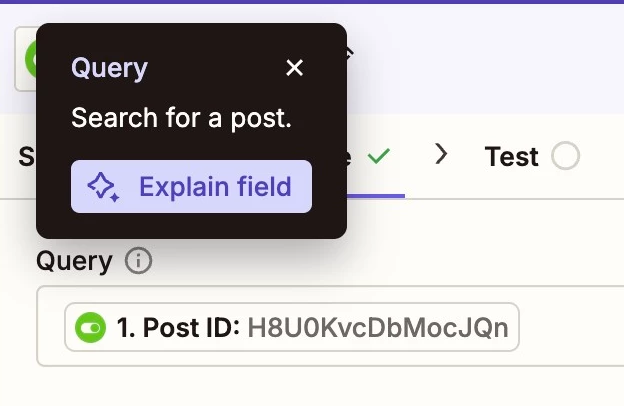
Click the Query field label to see a tooltip with more info.

Post a screenshot of what that shows to give us context.


  • Author
  • Beginner
  • December 9, 2025
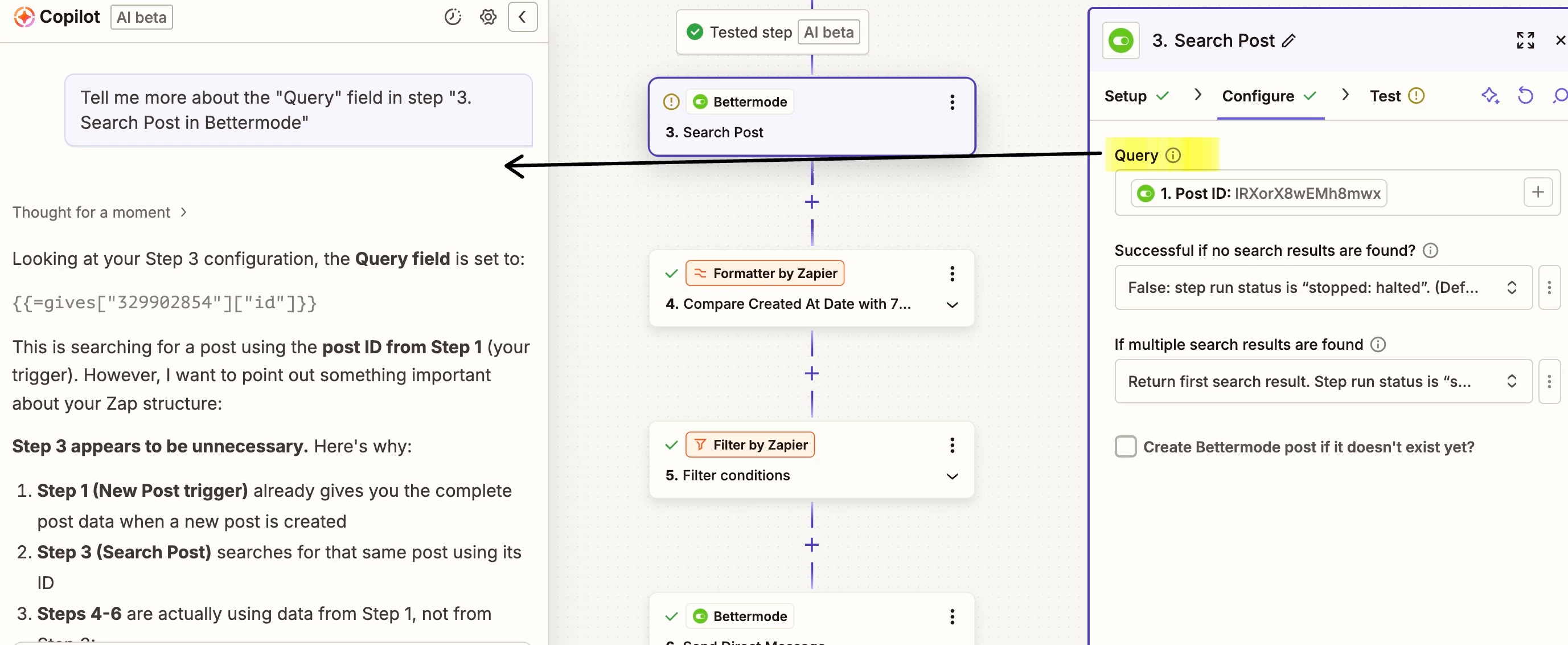
Clicking on the (i) of query

​​​​​


I am not using the outputs of the Search step as there are no working outputs from Test Runs/Data. So that could be partially why this is saying it’s redundant.


Troy Tessalone
Zapier Orchestrator & Solution Partner
Forum|alt.badge.img+14
  • Zapier Orchestrator & Solution Partner
  • December 9, 2025

@Technolutions 

Simply click the “Query” field label.

The tooltip is indicated by the ( i ) icon next to the word “Query”.

That will open a tooltip black box that has more info. (see example below)


  • Author
  • Beginner
  • December 10, 2025


Troy Tessalone
Zapier Orchestrator & Solution Partner
Forum|alt.badge.img+14
  • Zapier Orchestrator & Solution Partner
  • December 11, 2025

@Technolutions 

Is there a different Post ID variable you can try that is only a numeric value?


Or you can try reaching out to Bettermode Support for help with their Zap app integration and how to query for a Post by ID.


  • Author
  • Beginner
  • December 12, 2025

Sadly, there is no other Post ID variable (just that one!). I’ll try to reach out to Bettermode. I appreciate your help, ​@Troy Tessalone! This has been super useful. 


Troy Tessalone
Zapier Orchestrator & Solution Partner
Forum|alt.badge.img+14
  • Zapier Orchestrator & Solution Partner
  • December 12, 2025

@Technolutions 

If the Post names/titles will be unique, then you can try searching by that variable.