
Question

Vista Social “Create Post” step fails for OpusClip videos

  • September 22, 2026
  • 2 replies
  • 26 views

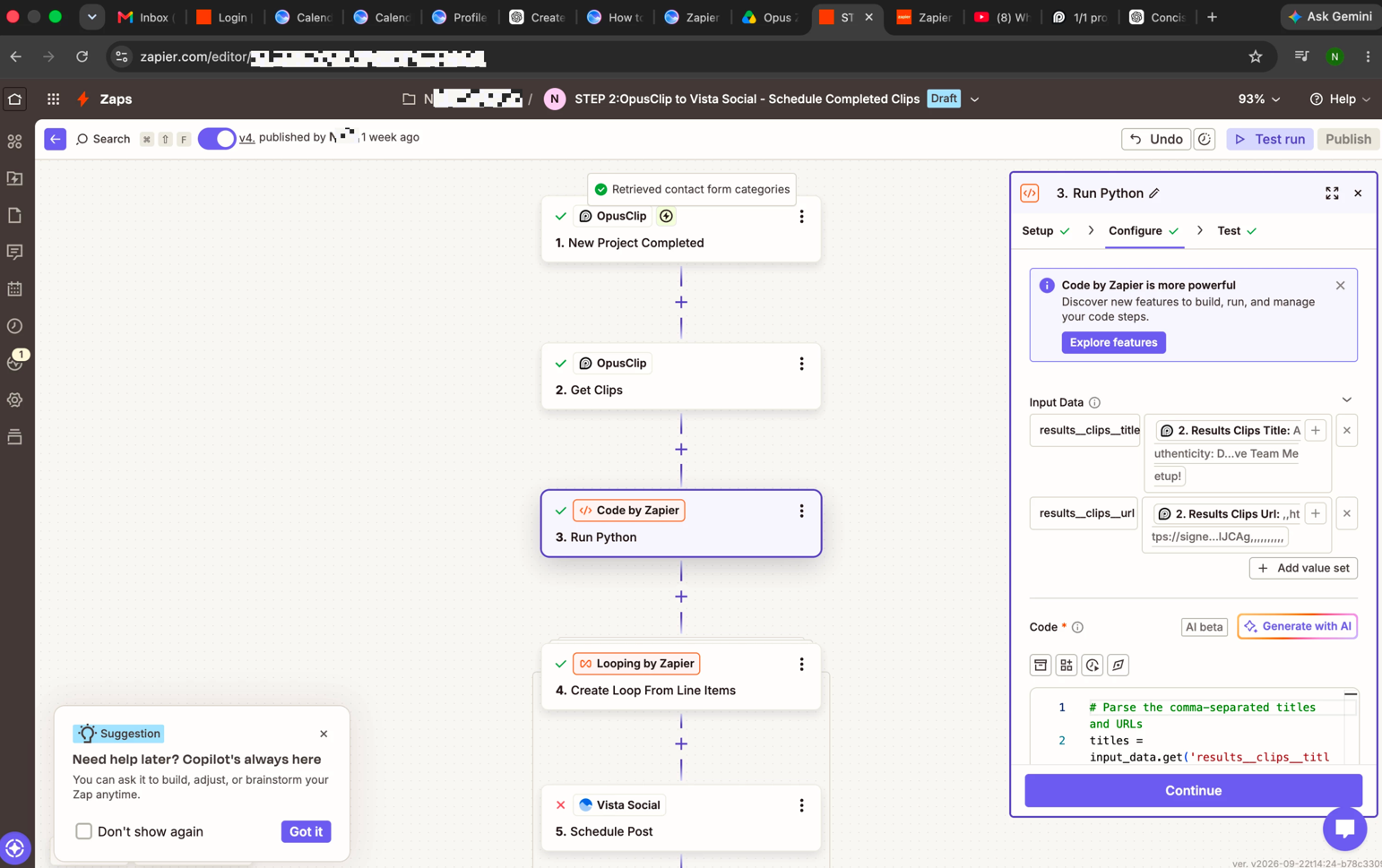
I’m building a Zap that triggers when an OpusClip project finishes, retrieves its clips, filters out empty URLs, and loops through each clip’s title and URL. The loop appears to pass both fields correctly, but the Vista Social Create Post step fails during testing.

I’ve mapped the clip title to Message and the clip URL to Media URL. The post is set to publish as an Instagram Reel and go through Assign Posts for Review. I’ve checked the mappings and reconnected Vista Social, but the step still fails.

Has anyone gotten this workflow working? Does Vista Social require a specific type of media URL or a different field configuration? The exact error message seems to change every time I have Copilot make an adjustment, but it’s always at step 5.
 

This post has been edited by a moderator to remove personally identifiable information (PII). Please remember that this is a public forum and avoid sharing personal or potentially sensitive details.


2 replies

Troy Tessalone
Zapier Orchestrator & Solution Partner
Forum|alt.badge.img+14
  • Zapier Orchestrator & Solution Partner
  • September 23, 2026

Hi ​@Nicki-Elevate Creative Talents 

Perhaps try these Zap steps:

  1. Trigger: OpusClip - New Project Completed
  2. Action: OpusClip - Get Clips
  3. Action: Looping - Create Loop from Line Items
    1. Map the vars from Zap step 2
      1. Like you attempted to do with the Code step
        1. NOTE: Code step should not be needed
  4. Action: Filter
    1. Filter out loop iterations where the URL is empty
  5. Action: Vista Social - Schedule Post
    1. Map variables from Zap step 3


NOTE: These apps count as 0 steps in Zap Runs

  • Looping
  • Filter


If you are still having issues configuring the Zap steps, post these screenshots:

  • Zap step > DATA IN
  • Zap step > DATA OUT

  • New
  • September 23, 2026

Troy's approach is spot on – the Code step is likely where things are getting messy, and looping directly from the Get Clips output should simplify things.

One thing I'd add: Vista Social is often picky about the media URL itself. It usually needs a direct, publicly accessible video file URL (like an .mp4), not a link to a page with a player. OpusClip's URLs sometimes expire or require authentication, which could explain why it fails even when the mapping looks correct.

I'd suggest:

  1. Test with one clip URL manually – paste it into a browser incognito to confirm it's publicly accessible and points directly to the video file.

  2. Check the Zap step's DATA OUT after the Vista Social step fails – the exact error usually tells you if it's a URL issue, a format issue, or something else.

  3. If the URL is fine, try using Schedule Post instead of Create Post – sometimes the field requirements differ between the two actions.

If you're still stuck, posting the screenshots Troy asked for (DATA IN and DATA OUT) would help narrow it down fast.


