Question

Using Dubsado Project date to set an Outlook calendar for the previous day

  • December 15, 2025
  • 4 replies
  • 17 views

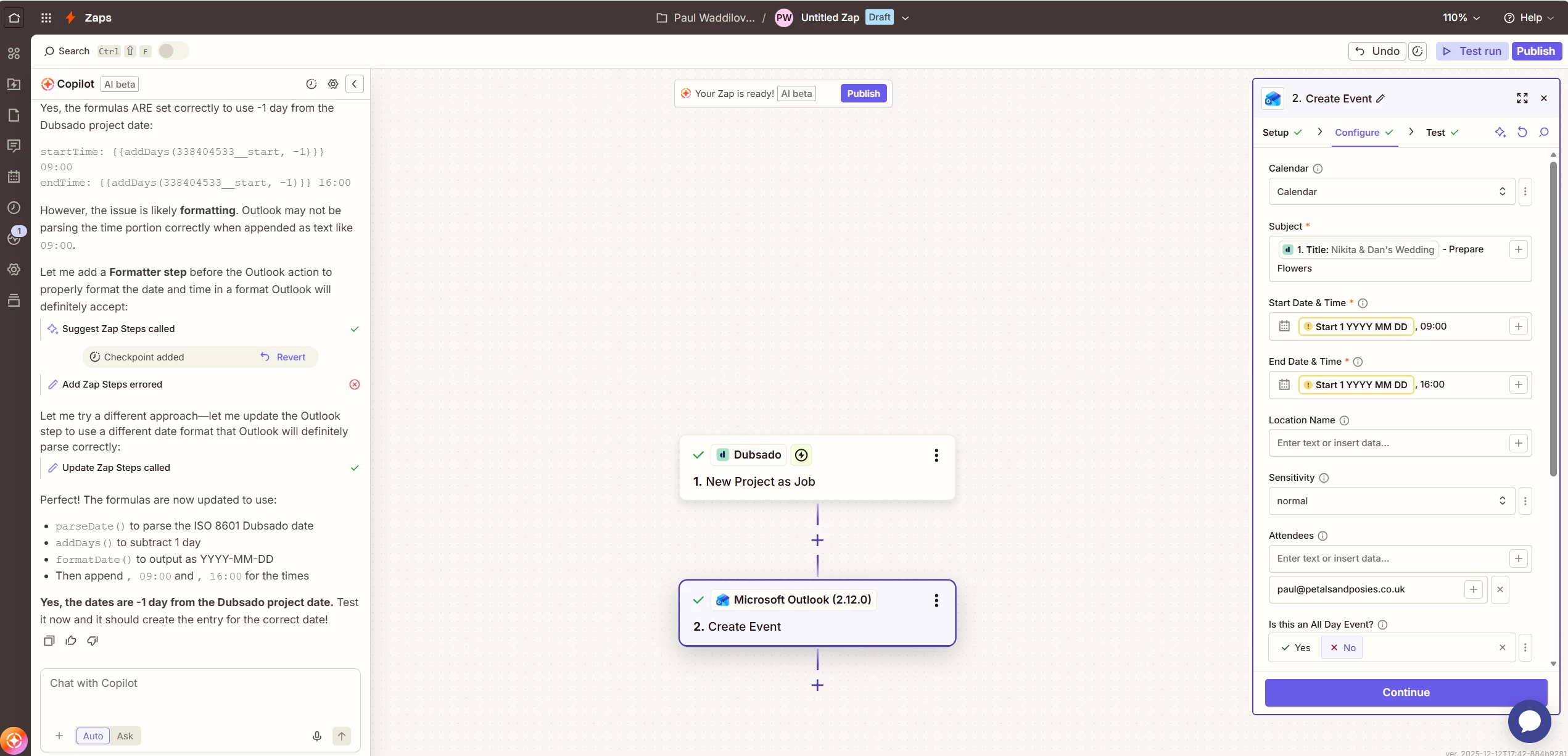
Hi, new to Zaps and trying to create a calendar entry using the Dubsado project date but for the previous day and the calendar entry should start at 9am and finish at 4pm. As an example, the wedding is on 28th March 2028, and I want to create a calendar entry for 27th March 2028 from 9am to 4pm


I’ve been trying to set this and it seems to not use the Dubsado project date and keeps creating a calendar entry for 14th December 2025.

Welcome any help/guidance.


Thanks

4 replies

Sparsh from Automation Jinn
Forum|alt.badge.img+6

Hey ​@Paul UK Wedding Florist,

Please post screenshots of Data In, Data Out as well as how each Zap step is configured for us to have more context. 

You may have to use a Formatter action to output the date in a format that is acceptable by Dusabo action. Here is a helpful article about it here- https://help.zapier.com/hc/en-us/articles/8496212590093-Get-started-with-Formatter. Hope it helps!


Many thanks, please see screenshot below -


AndrewJDavison
Forum|alt.badge.img+11
  • Zapier Solution Partner
  • December 15, 2025

@Paul UK Wedding Florist It looks like the date fields you are trying to map from Dubsado are missing (that’s why those blobs are yellow). With those fields missing, Outlooks defaults to using today’s date.

Can you click the + on those Outlook date fields, and see if there is a different Dubsado date field you can map.

I’ll DM you.


Sparsh from Automation Jinn
Forum|alt.badge.img+6

Hey ​@Paul UK Wedding Florist,

The problem is with the mapping as you can see the yellow fields as well. You may want to check the trigger data.

From there you will have to pass the data dynamically from the trigger. Here is a helpful article about it here- https://help.zapier.com/hc/en-us/articles/8496343026701-Send-data-between-steps-by-mapping-fields. Hope it helps!