Question

Understanding the step output content category when posting from Mighty Networks to LinkedIn

  • May 9, 2026
  • 3 replies
  • 23 views

When sending a quick post in Mighty Networks to LinkedIn what does the “step output” content category shown by the Mighty Networks drop down menu mean when it comes showing the quick post’s contents on LinkedIn?

 

3 replies

Troy Tessalone
Zapier Orchestrator & Solution Partner
Forum|alt.badge.img+14
  • Zapier Orchestrator & Solution Partner
  • May 10, 2026

Hi ​@charlieu 

Post screenshots for us to have more info about what you are referring to.

Check if there are field tooltips to reference.


SamB
Community Manager
Forum|alt.badge.img+11
  • Community Manager
  • May 12, 2026

Hi ​@charlieu, welcome to the Community! 😁

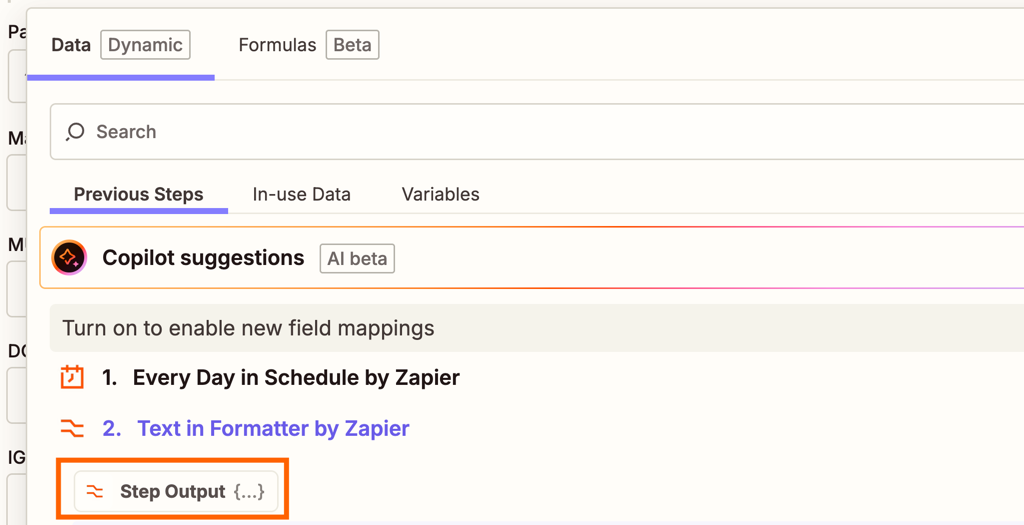
Each step in a Zap has a Step Output field that includes its entire output, which would look something like this:

c1c4c1e336b719d1ea92c8d407a8bc95.png
 

Generally you'd want to select this field if you need to pass the full context to AI actions or other steps that work better with structured data all at once.

Let us know if you have any more questions.


drtanvisachar
Forum|alt.badge.img+5
  • Zapier Solution Partner
  • May 13, 2026

Hey ​@charlieu !
 

“Step output” just means the data coming from the previous Zap step. So in your case, it is the actual content from the Mighty Networks quick post, like the text, title, link, or media that Zapier pulled in from the trigger. The dropdown is basically asking which piece of that data you want LinkedIn to use in the post. For example, you might choose:

  • the post body as the LinkedIn text

  • the post title as the headline

  • the image URL as the media

It does not change the formatting on LinkedIn by itself, it just controls which data from Mighty Networks gets mapped into the LinkedIn post fields.\


Ethan Marcellus- Automation Expert at Tuesday Wizard | Top Zapier Solution Partner | Zapier Community Contributor