
Question

Unable to "Find Account on QuickBooks" because of the "&" (ampersand) Symbol

  • October 28, 2024
  • 2 replies
  • 58 views

This is the most common error we are receiving concerning QuickBooks. Anything with the "&" symbol often fails and turns into code (as below).

We only used to see the error occur on Vendor / Payee names that include the symbol, but now our recent errors occurred on an Account / Expense Type name.

So far, whenever we’ve encountered this error, we would just manually create the submission on the our ledgers.

We’ve been seeing that our only option is to change all the ampersand symbols in the names on all our ledgers to the code as shown in the screenshot below. Does anyone else experience this and do you have any permanent solutions?
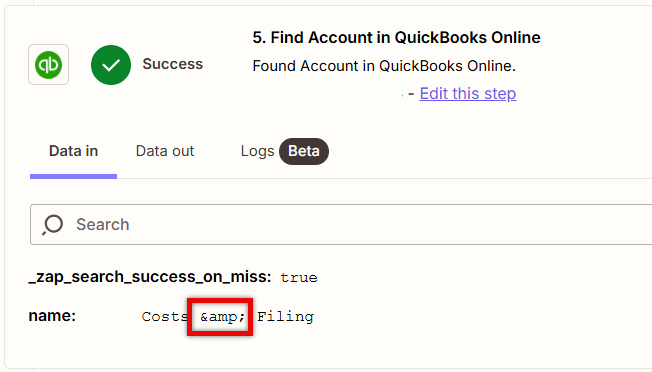
 

ampersand code


This post has been closed for comments. Please create a new post if you need help or have a question about this topic.

2 replies

Troy Tessalone
Zapier Orchestrator & Solution Partner
Forum|alt.badge.img+14
  • Zapier Orchestrator & Solution Partner
  • October 28, 2024

Hi @yssiadalawatatlo 

Try adding this Zap action: Formatter > Text > Replace

Replace: &

With: &


SamB
Community Manager
Forum|alt.badge.img+11
  • Community Manager
  • November 1, 2024

Hi there @yssiadalawatatlo! 🙂

Just came across this and wanted to ask how you got on with that Formatter action Troy suggested using - did it do the trick?

If so, we’d love to get it marked as the best answer to better surface it to others in the Community. And if you need any further assistance at all, just say the word!





