Answer

Twitter to Gmail or text zap

  • May 1, 2020
  • 10 replies
  • 546 views

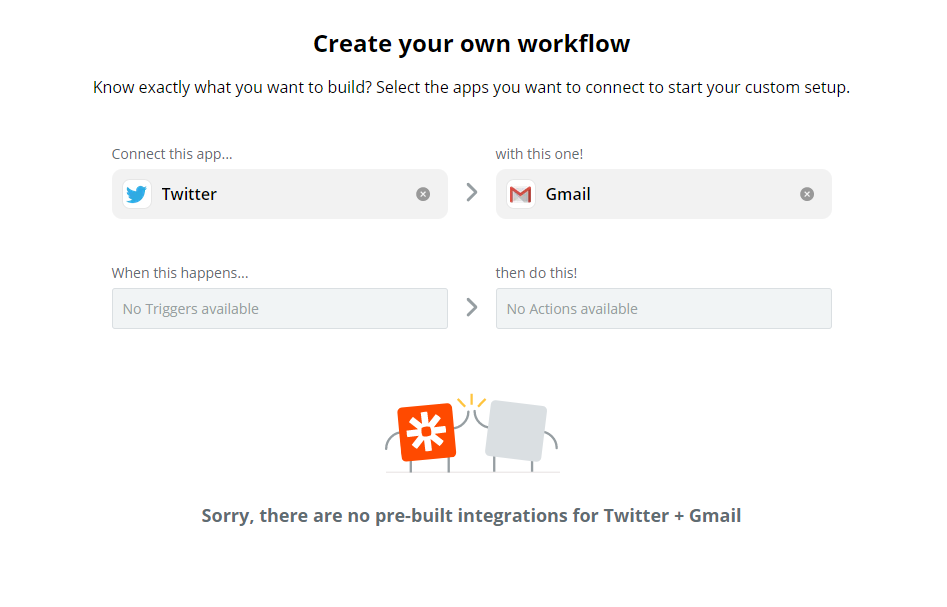
I’m trying to create a zap to get an email or text message whenever certain accounts post a tweet. It doesn’t seem to be working. Anyone know why?

Best answer by jesse

Hopping in here to close the loop on this issue! This looks to have been a temporary bug that has since been resolved. Should this happen again, the best thing to do would be to go directly to this URL to create a new Zap: zap.new

This post has been closed for comments. Please create a new post if you need help or have a question about this topic.


10 replies

ForYourIT
Forum|alt.badge.img+7
  • Tinkerer
  • May 1, 2020

Hi there @asheryurowitz ,


Could you be a bit more specific? What exactly doesn't work? You getting error messages, or nothing at all? What kind of trigger / actions are you using?


~Bjorn


In creating a new zap, I choose an app (Twitter), the try to type in the trigger event, but it doesn’t let me type in that box.


ForYourIT
Forum|alt.badge.img+7
  • Tinkerer
  • May 1, 2020

It looks like you are having issues selecting the Twitter Trigger Event, correct?

It could be a browser issue or something, Zapier is a bit buggy sometimes. Try the following: 

  • Logout of Zapier
  • Remove any cache, cookies etc.
  • Login
  • Re-open your Zap

Let me know if that works


I’m getting this error code: “Network error: Unexpected token < in JSON at position 0”

Is it possibly because of an internet filter?


ForYourIT
Forum|alt.badge.img+7
  • Tinkerer
  • May 3, 2020

Hi,


Could you make a screenshot of your action and events? What kind of error are you getting?


Let me know


ForYourIT
Forum|alt.badge.img+7
  • Tinkerer
  • May 4, 2020

In your Zap workflow (the attachment you placed), could you click on the “Choose Trigger Event” menu? It should dropdown with some options to choose from.


Nope. It’s not clickable.


AndrewJDavison
Forum|alt.badge.img+11
  • Zapier Solution Partner
  • June 22, 2020

Hi @asheryurowitz 

Hopefully this was a temporary issue - did you get it working?


jesse
Forum|alt.badge.img+9
  • Architect
  • Answer
  • May 23, 2022

Hopping in here to close the loop on this issue! This looks to have been a temporary bug that has since been resolved. Should this happen again, the best thing to do would be to go directly to this URL to create a new Zap: zap.new