Question

Troubleshooting OneDrive folder creation in Zapier with shared folders

  • January 21, 2026
  • 6 replies
  • 19 views

Juan CyM

Hi eveyone, I´m really bummed 😞 about not being able to get this very basic automation done in Zapier. It´s been a month and nobody in support seems to get why or how to fix it… A

I want to create a one-drive folder inside an existin “shared” one drive folder. However Zapier is not able to find/access the desired folder. I´ve entered the folder URL as a “custom” value in the folder as per support suggested and didn´t work, the copilot suggested just putting the folder addres wihtout the URL (example: “/FolderA/FolderAB”) to make it work. The zap, tested it and seem to work, but when going live it failed and sent me a “ Invalid request" error message. In the One-Drive step… 

Funny part is that I was able to create this same zap months ago!  when the UX showed a specific  "Shared Folder" field that is no longer avaible, where I was able to map to the specific shared folder. I wanted to create the new folder. 



6 replies

Troy Tessalone
Zapier Orchestrator & Solution Partner
Forum|alt.badge.img+14
  • Zapier Orchestrator & Solution Partner
  • January 21, 2026

Hi ​@Juan CyM 

Help links for using OneDrive in Zaps: https://zapier.com/apps/onedrive/integrations#help


For us to have more info, post screenshots showing:

  • how your Zap steps are outlined
  • how your Zap steps are configure in the CONFIGURE tab while in EDIT mode with the field mappings visible
  • any encountered errors testing Zap steps

SamB
Community Manager
Forum|alt.badge.img+11
  • Community Manager
  • January 22, 2026

Hey there ​@Juan CyM 👋

I’ve just been looking into your tickets with our Support team and saw they’ve identified that there’s more than one issue that’s causing the trouble here. Not sure if you’ve had a chance to see their latest reply yet but wanted to share the key details from it here in case it’s helps:

I've taken a close look at your Zap and can see three specific issues that are working together to cause these problems. Let me break down what I found and give you a clear path forward:

The Primary Issue: Mixed OneDrive API Versions

Your main folder creation step (step 2) is using OneDrive version 3.1.1, while your subfolder creation steps (steps 4-6) are using the older version 2.5.3. This version mismatch is creating compatibility issues, especially with shared folders.


Here's what you'll want to do first:

  • Click on each of your OneDrive steps (steps 4, 5, and 6)
  • Look for a version update notification at the top
  • Update all of them to use the same version (3.1.1) as your main folder step
  • Reconfigure any fields that may have changed after the update


The Secondary Issues We'll Address Next:

Once you've standardized the versions, we'll tackle two other configuration problems:

  • Your "RFQ" folder creation step has a blank destination field, so it doesn't know where to create the folder
  • The folder path format for your shared folder location may need adjustment


Can you give that a try and let us know what happens after you update the OneDrive steps to the latest version

If it still doesn’t work, your quickest option may be to follow up with our Support team via email since they’ll have the most context and can access your Zaps. But we’re also happy to help here in the Community if you’d prefer. If so, please share some screenshots as Troy mentioned and we’ll take a look! 🙂


Juan CyM
  • Author
  • Beginner
  • January 22, 2026

hi, yes so. there are two problems. First that I was using and old One-Drive api version, i´ve updated all the steps the most current one 3.1 . However the main issue persists, that the folder field where it locates the “shared” onedrive folder where it will create the new folder, cannot be located. Posting a url as cutom field wont´work and neither just the folder address in this format “/FolderA/FolderB/FolderC“.

Copilot goes around in circles and tell me to put the fodler ID excracting it from teh URL, but i do not know what the ID and copilot can´t seem to know how to extract it either altough it suggested to do so. 

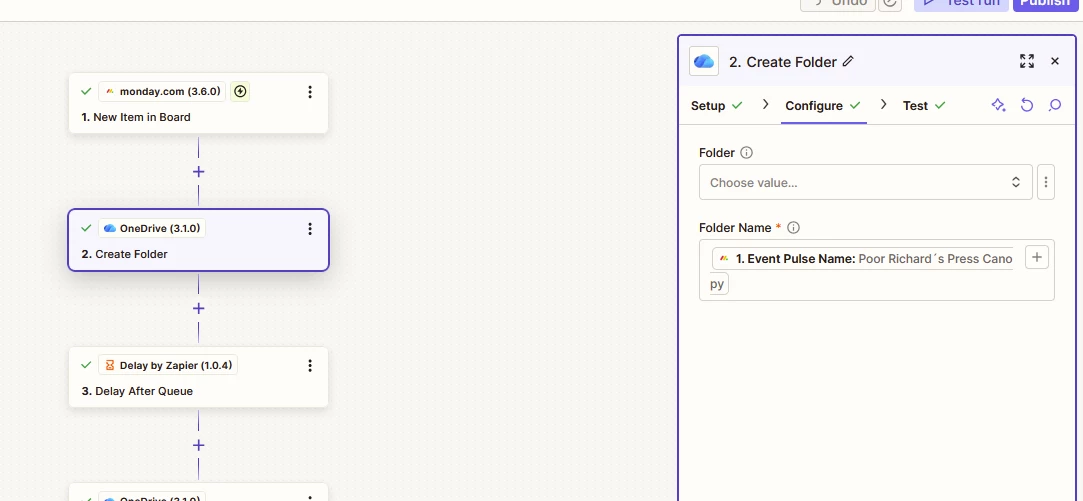
As you can see in the screenshot, the problem is th “Configure” tab, Folder…. 


SamB
Community Manager
Forum|alt.badge.img+11
  • Community Manager
  • January 23, 2026

Thanks for sharing that helpful screenshot ​@Juan CyM. 🤗

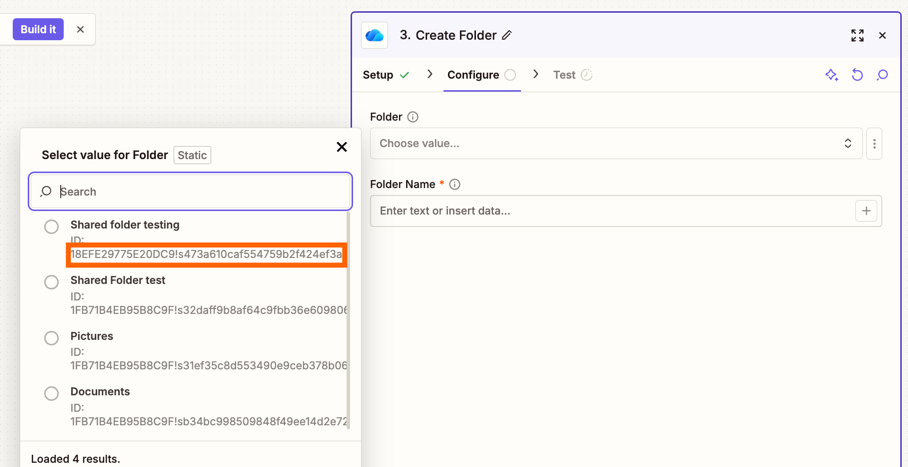
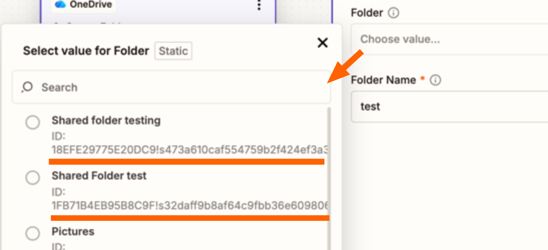
I did some testing with my own account and its appears its an ID rather a folder path that it would expected if you want to manually select the folder:

1579567cc89bdf1250e45ff68302dac7.png

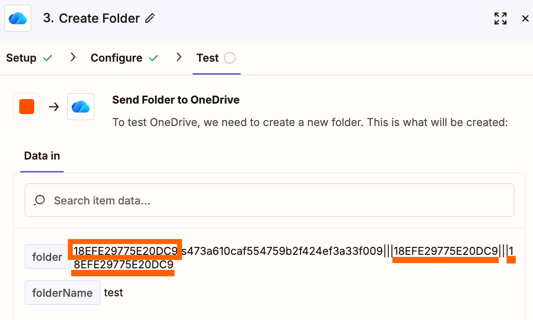
But the ID weirdly appears to be made up of different parts with the first part repeated:

597d31e6289ce435b88687a44fc75015.png
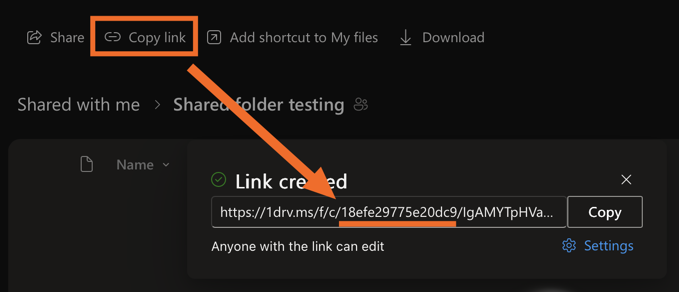
I tried confirming the ID by opening a shared folder in OneDrive and clicking on Copy link and the URL it gave had the repeated section from the ID shown above:
4de379260e15a02845f8600a410232a2.png

So that ID reference must be the actual folder ID, but the ID that appears in the Zap when a folder is selected must be a combination of the folder ID and some other ID, perhaps the account ID 🤔

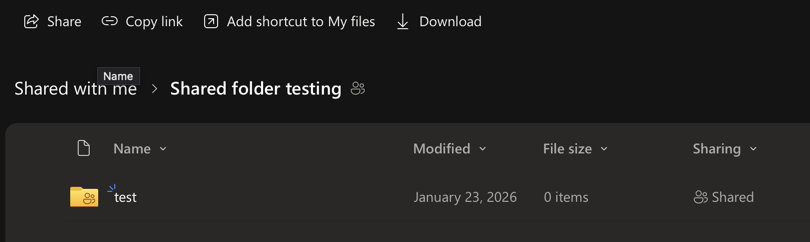
That said, in testing I made two test accounts, sharing folders between them and was able to locate the shared folder in the Zap and create a folder within that shared folder so it appears to work:

f5ae579f35316e59681a58a8a9d0f38f.png

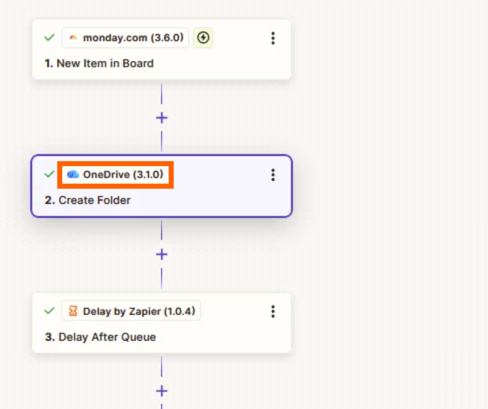
Which makes it odd that your Zap isn’t able to locate shared folder but this could still be due to an earlier version of the OneDrive app being used. In your screenshot the Zap appears to be using version 3.1.0 of the OneDrive app: 

b35d270c12cb89c69f0de88cb7c20776.png
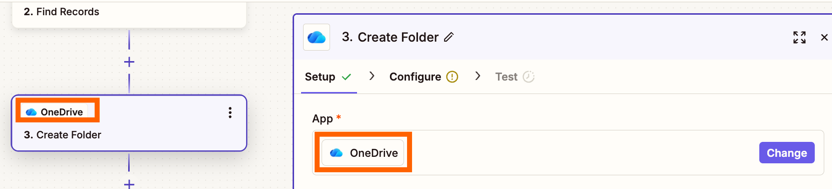
The most latest version of an app will not have a version number appear next to it’s name. It should look like this:

286096512c00ede0ccefe13e6c596edb.png


Did you ask Copilot to update the OneDrive actions on your behalf? If so, can you try manually updating the action instead to see if that sorts it.

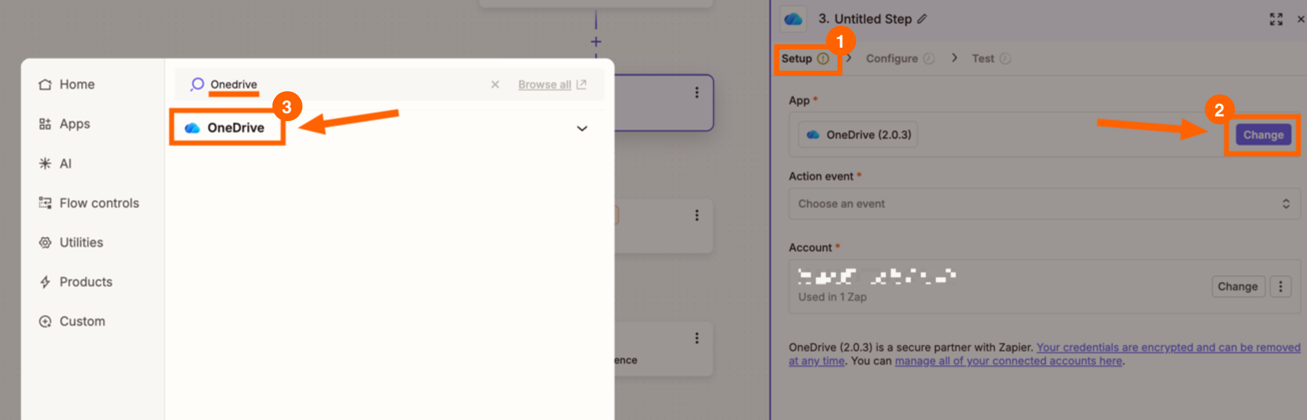
To do that you’d need to go to the Setup section on your Create Folder action in your Zap. Click on Change which will open a pop-up window where you can select different apps. Then search for “OneDrive” and reselect the app that doesn’t have any version numbers next to it’s name:

7dacc4f4c26aa4bc2fdae97aa3b8cf87.png
 

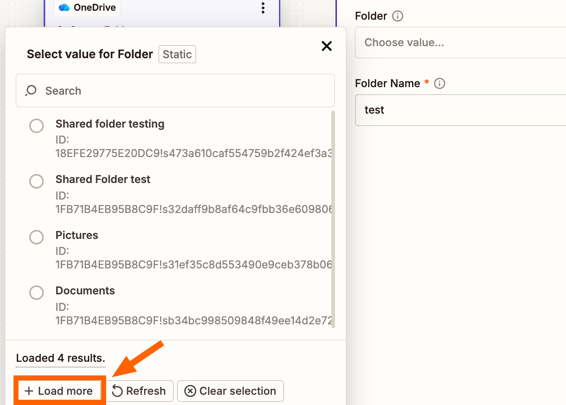
If it still doesn’t allow you to select the folder it could be that there’s a large number of folders so it’s not been able to load it in on the first go. In which case, I’d suggest clicking the Load more button from the Folder field dropdown menu:

b67cdad2af809f72dbd2109c2f5b0a85.png
It may take a few clicks to get the folder appearing depending on how many folders you have access to.  

Keep me posted on how that goes! 🤞


Juan CyM
  • Author
  • Beginner
  • January 23, 2026

I´ve updated the Onedrive version and also tried to modify the folder ID. In my case the URL doesn´t how the same structure as the URL you showed me, my URL IS: 

https://XXXXXXXXXXXXX:f:/r/personal/data-omni_omnidesign_us/Documents/ODI/Marketing/Proposals/2026?csf=1&web=1&e=69dAGJ

I tried using several parts of the string after teh f:/r/ and none works… the Zapier support team said it was becuause i had a “/” before “Documents/….”  but i´ve tried that as well and that´s not the issue. 


SamB
Community Manager
Forum|alt.badge.img+11
  • Community Manager
  • January 26, 2026

Thanks for getting back to me on this ​@Juan CyM. Yes you’re right, the URL you’ve got looks like it’s formatted differently than the link that I shared, it doesn’t appear to contain the ID for the folder in the URL at all. Did you get that URL by opening the shared folder in OneDrive to view its contents, and then clicking on Copy link? Or is that URL a shortcut link to the shared folder?

I tried using several parts of the string after teh f:/r/ and none works… the Zapier support team said it was becuause i had a “/” before “Documents/….”  but i´ve tried that as well and that´s not the issue. 

I don’t think it would be to do with the “/” before “Documents” as it would need to be the ID for the folder not the folder path. If it required a folder path to be entered then in the list of available folders,  I’d expect to see a folder path displayed under each folder name, not ID values:

c21e6b47bb42b2e15d31c693a12d2370.png
 

You mentioned earlier that you had another Zap that was able to access the folder so I’m wondering if perhaps you can get the necessary folder ID from a Zap run of the old Zap. Under the Data In section for the OneDrive action in a Zap run of the old Zap, you’d want to copy the value that’s shown next to the Shared Folder field. Then, paste that copied value directly into the Folder field on the new Zap. Assuming the old version and the new version of the OneDrive app use the same ID format then that should allow you to manually select the shared field in the new Zap. 

Can you give that a try and let me know if that does the trick?