Best answer

Troubleshooting folder duplication in Zap from Notion to Google Drive

  • November 14, 2025
  • 6 replies
  • 31 views

Forum|alt.badge.img

Hello,

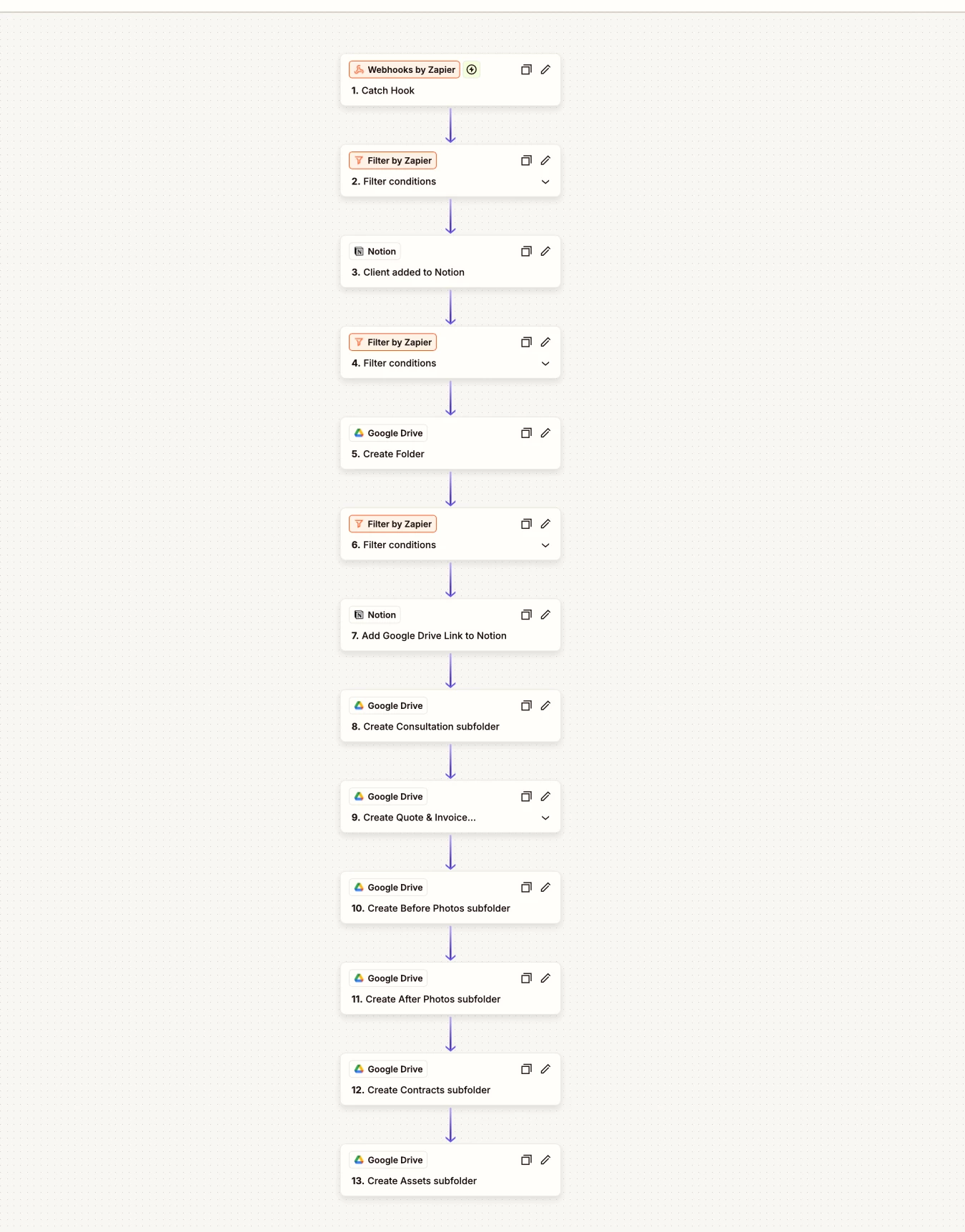
I need some help troubleshooting this zap (image attached).

This zap is meant to:

  1. get some data via a webhook (website form) 
  2. insert the data into Notion
  3. crate a client folder in google drive
  4. send the url of the client folder in google drive back to notion
  5. create 6 subfolders

This zap works. Except the zap is extra generous and goes ahead to create a duplicate client folder including sub folders. I can't figure out why this duplication is happening.  Any ideas?

I have created a similar zap using notion to google drive doing the same thing and it works. No duplicates.



Best answer by MM25

Figured it out. Silly rabbit that I am.

It turns out that using a zap to add to Notion and creating google folders, triggers another zap that detects new additions to Notion and completes similar tasks.

Thanks for your help Troy and Sparsh.

6 replies

Troy Tessalone
Zapier Orchestrator & Solution Partner
Forum|alt.badge.img+14
  • Zapier Orchestrator & Solution Partner
  • November 14, 2025

Hi ​@MM25 

Check your Zap Run history to see the activity and the DATA IN/OUT for each Zap step: https://zapier.com/app/history/

It may be that the Zap is triggering multiple times for the same client.

The Zap steps are configured to Create instead of Find/Create, which would prevent duplicates.

You probably want to add logic that checks if the Client exists in Notion before continuing with the rest of the Zap action steps.


Forum|alt.badge.img
  • Author
  • Beginner
  • November 17, 2025

Thanks for the tips Troy.

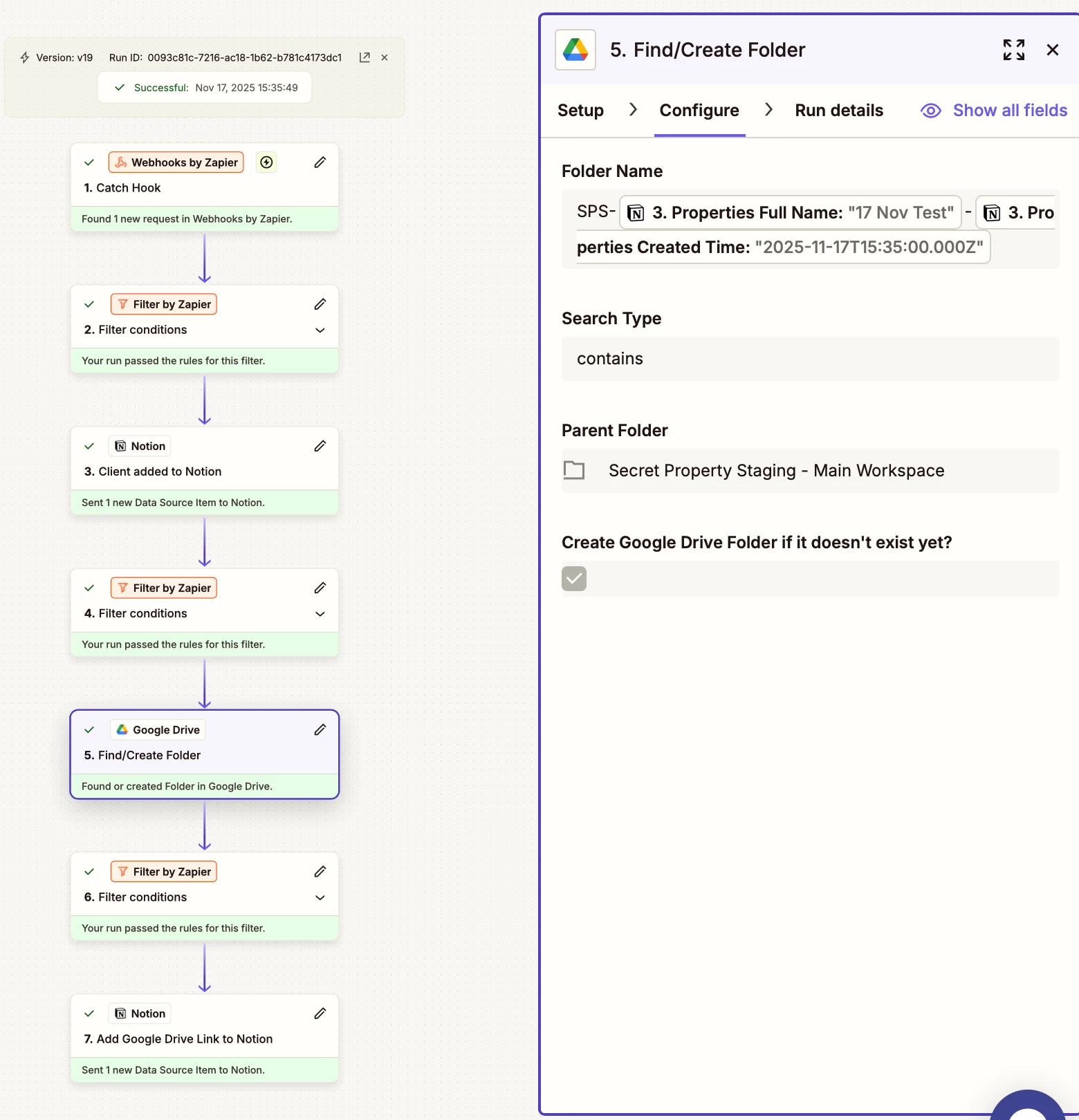
I amended the zap by excluding the creation of the subfolders, changes to the ‘Find/Create folder’ and I also checked the run history. All seems well and no steps seem to be repeating itself (that I can see). However the duplicate folder still appears after a few minutes in google drive. See attached images. Any other ideas?

Thanks again


Troy Tessalone
Zapier Orchestrator & Solution Partner
Forum|alt.badge.img+14
  • Zapier Orchestrator & Solution Partner
  • November 17, 2025

@MM25 

Find the GDrive Folder IDs in the browser URL of a GDrive Folder.

Then you can search the Zap Run history for the GDrive Folder ID to see which Zap Run is creating the duplicate GDrive Folder and when.


If you need to hire help, there is a directory of Zapier Partners: https://zapier.com/partnerdirectory


Sparsh from Automation Jinn
Forum|alt.badge.img+6

Hey ​@MM25,

See if your Webhook is firing twice so that it’s creating duplicate. Can you try adding a slight delay before Find/ Create action and change contains to exactly matches to see if it fixes your issue? Hope it helps!


Forum|alt.badge.img
  • Author
  • Beginner
  • Answer
  • November 17, 2025

Figured it out. Silly rabbit that I am.

It turns out that using a zap to add to Notion and creating google folders, triggers another zap that detects new additions to Notion and completes similar tasks.

Thanks for your help Troy and Sparsh.


SamB
Community Manager
Forum|alt.badge.img+11
  • Community Manager
  • November 18, 2025

Thanks for the update ​@MM25 🤗 Glad to hear you were able to get to the bottom of it! And a big thank you to ​@Troy Tessalone and ​@Sparsh from Automation Jinn for jumping in to help. 🧡

Feel free to reach out anytime if you need a hand with anything else. In the meantime, happy Zapping! ⚡