Question

Trouble reconnecting my 365 account due to admin approval issues

  • July 20, 2026
  • 2 replies
  • 16 views

I am trying to reconnect my 365 account- never had any issues before.
It now asks for Admin approval everytime. Even after my 365 administrator approves the request, it keeps asking. Can anyone help?
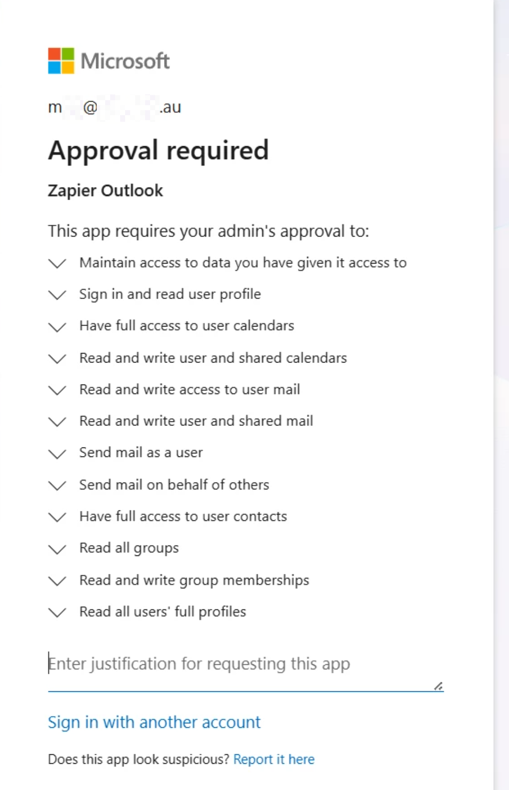
09039b64502a8398788c657cbc6dc649.png
 

This post has been edited by a moderator to remove personally identifiable information (PII). Please remember that this is a public forum and avoid sharing personal or potentially sensitive details.


2 replies

Troy Tessalone
Zapier Orchestrator & Solution Partner
Forum|alt.badge.img+14
  • Zapier Orchestrator & Solution Partner
  • July 20, 2026

Hi ​@MLH_1986 

Help links for using Microsoft 365 in Zaps: https://zapier.com/apps/office-365/integrations#help


SamB
Community Manager
Forum|alt.badge.img+11
  • Community Manager
  • July 22, 2026

Hi ​@MLH_1986 👋

I did some checking and found similar reports of this happening. Here’s the steps our Support team suggested which got things sorted:

Here's what I'd recommend, with your admin handling it:

  1. In the Microsoft Entra admin center, go to Enterprise applications and remove the existing "Zapier" entry (and any "Zapier Outlook" entry) to reset the consent state.
  2. In Zapier, remove the current Microsoft Outlook connection.
  3. Have your admin start a fresh Microsoft Outlook connection in Zapier (Apps -> Add connection -> Microsoft Outlook). On Microsoft's consent screen, tick "Consent on behalf of your organization" before approving. This is the step that grants the full permission set at the admin level rather than the partial one.
  4. Once that admin connection goes through, you and other users should be able to connect normally.

For the admin consent process from Microsoft's side, this Microsoft admin consent workflow guide walks through all the options.


Can you give those steps a try and let us know whether that fixes it?