Question

Ticket Tailor orders are not adding or updating contacts in Brevo

  • January 12, 2026
  • 10 replies
  • 51 views

Hi, I’m having trouble connecting Ticket Tailor to Brevo using Zapier, and I’m hoping for some help.

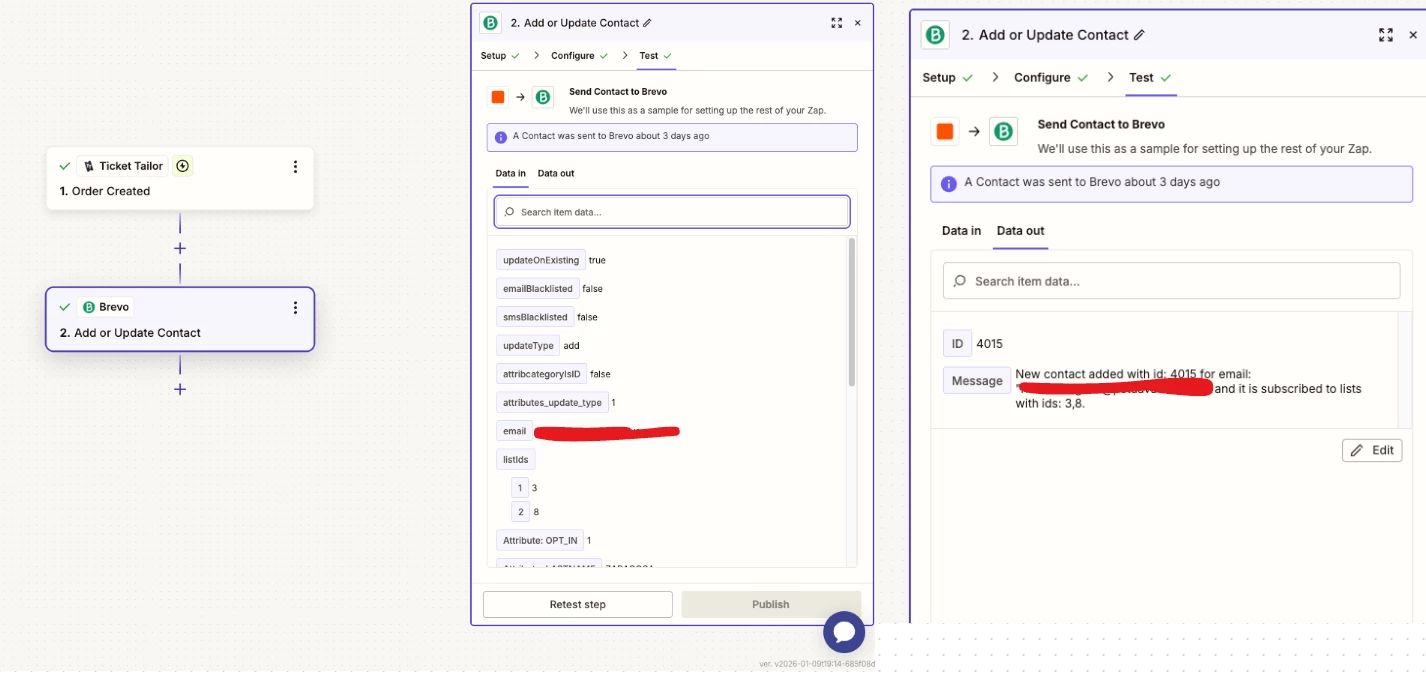
When a ticket is purchased in Ticket Tailor, the buyer is not being added or updated in my Brevo contact list, even though the Zap is published.


My setup:

  • Trigger: Ticket Tailor – Order Created

  • Action: Brevo – Create or Update Contact

  • I gave the right permission to every application

  • The buyer’s email is mapped correctly to the Brevo email field

  • The Zap is turned on and tests successfully in Zapier

What’s the problem (summary):

  • The Zap does not trigger at all when a real Ticket Tailor order is created.

  • When a real ticket is purchased, the contact does not appear in Brevo 

10 replies

AndrewJDavison
Forum|alt.badge.img+11
  • Zapier Solution Partner
  • January 12, 2026

@Bansko Nomad Fest There could be a few things going on here.

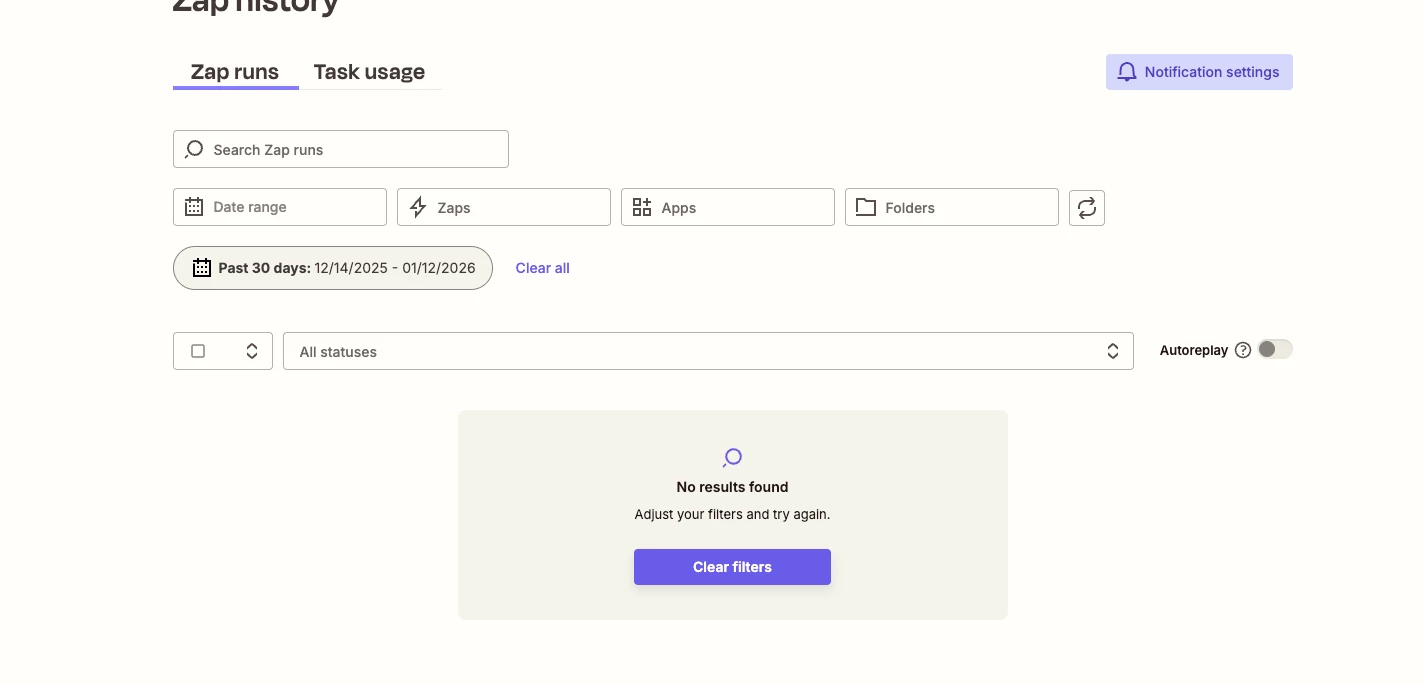
Can you check the History page - is there anything showing at all? 


Sparsh from Automation Jinn
Forum|alt.badge.img+6

Hey ​@Bansko Nomad Fest,

Please post screenshots of Data In, Data Out as well as how each Zap step is configured for us to have more context.

For Live Zaps, you may want to look into Zap history(https://zapier.com/app/history) to spot any issues there. Hope it helps!


Forum|alt.badge.img

It sounds like the Zap isn’t triggering on live orders. Make sure the Ticket Tailor trigger is set to “New Order” for the correct event and that the orders you’re testing with are fully processed. Sometimes Zapier only picks up orders after the payment is completed. Check Task History to see if the trigger fires at all when a real ticket is purchased.


@Bansko Nomad Fest There could be a few things going on here.

Can you check the History page - is there anything showing at all? 

There’s nothing in the history page..


Hey ​@Bansko Nomad Fest,

Please post screenshots of Data In, Data Out as well as how each Zap step is configured for us to have more context.

For Live Zaps, you may want to look into Zap history(https://zapier.com/app/history) to spot any issues there. Hope it helps!

The history is empty


It sounds like the Zap isn’t triggering on live orders. Make sure the Ticket Tailor trigger is set to “New Order” for the correct event and that the orders you’re testing with are fully processed. Sometimes Zapier only picks up orders after the payment is completed. Check Task History to see if the trigger fires at all when a real ticket is purchased.

Isn’t supposed to be the trigger is “Order Created” instead of “New Order”? If I am wrong, can you tell me the difference.😅 but I will try  the trigger“New Order”.


Sparsh from Automation Jinn
Forum|alt.badge.img+6

 Hey ​@Bansko Nomad Fest,

If there is no data in the history page, it means the Zap is not even triggering.

You may want to test the trigger and see if it can retrieve the latest data. Make sure to sure give your API endpoint the Admin access as well as uncheck the Hide personal data from responses option. Here is a helpful article about how to connect Teamtailor to Zapier- https://help.tickettailor.com/en/articles/951067-how-to-connect-ticket-tailor-to-your-other-apps-using-zapier. Hope it helps! 


 Hey ​@Bansko Nomad Fest,

If there is no data in the history page, it means the Zap is not even triggering.

You may want to test the trigger and see if it can retrieve the latest data. Make sure to sure give your API endpoint the Admin access as well as uncheck the Hide personal data from responses option. Here is a helpful article about how to connect Teamtailor to Zapier- https://help.tickettailor.com/en/articles/951067-how-to-connect-ticket-tailor-to-your-other-apps-using-zapier. Hope it helps! 

I did, and it got the latest data when i did some test, but there’s no data in the history page. 


Sparsh from Automation Jinn
Forum|alt.badge.img+6

Hey ​@Bansko Nomad Fest,

It’s strange. Did you do the steps what I said for the API endpoint-


Make sure to sure give your API endpoint the Admin access as well as uncheck the Hide personal data from responses option.


Also make sure your Zap is turned On so it can trigger. Hope it helps!


SamB
Community Manager
Forum|alt.badge.img+11
  • Community Manager
  • January 20, 2026

Hi there ​@Bansko Nomad Fest 👋

Did Sparsh’s suggestion of ensuring that the role to 'Admin' was set for the API Key and unchecking that “Hide personal data from responses option” option, before switching the Zap, on do the trick? Or is the Zap still not triggering?

Keep us posted on your progress, want to make sure this gets sorted!