Best answer

Square Item ID not recognized in testing

  • January 24, 2026
  • 12 replies
  • 39 views

Forum|alt.badge.img

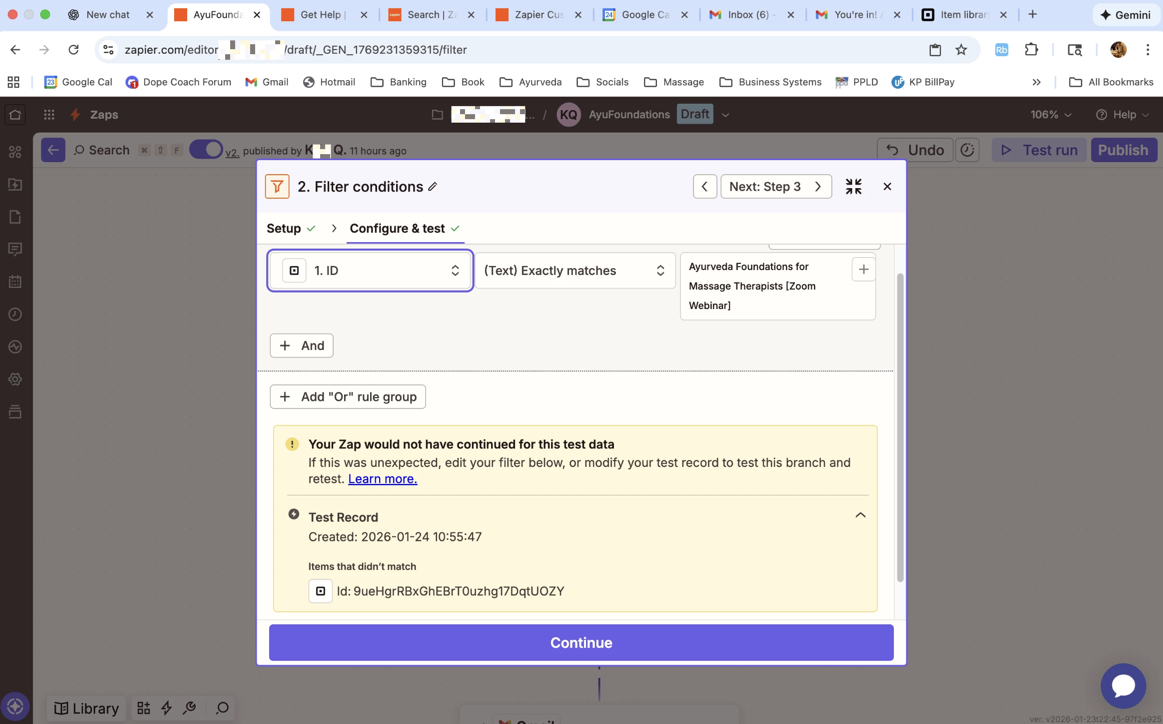
 While defining a filter in my Zap, for after my trigger (Square Purchase) :

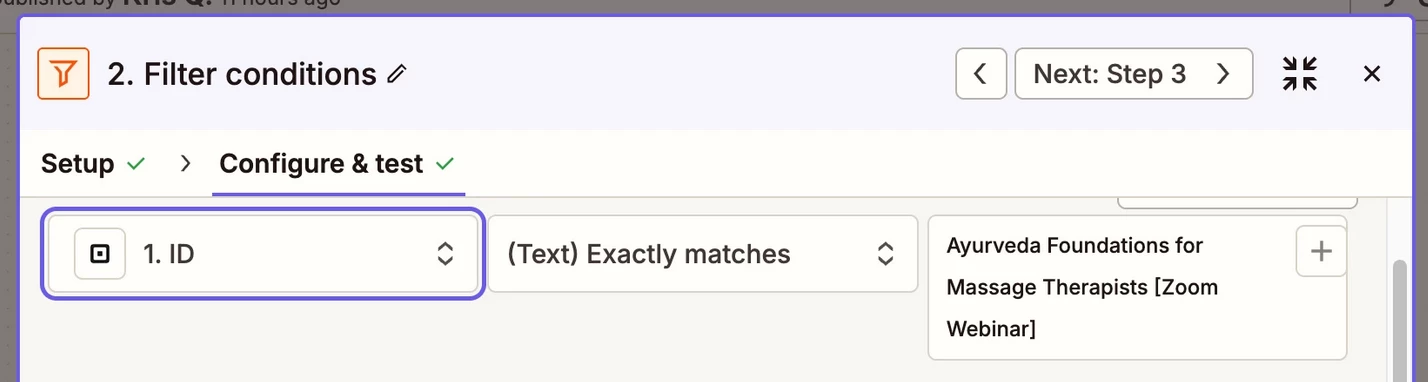
Despite using the EXACT name of the Square item I'd like to filter by (i was sure to copy & paste directly from my Square item library), testing gave an error saying it can't find the ID.  

I cannot use an alternate ID such as Customer ID or Order ID. Help!  I started my FREE TRIAL but Zap Chat/Bot advised against starting Pro subscription for the sole reason of find immediate human support.  I searched the Zap Community Forum on this topic first and didn't see any existing post/question on, so I’m asking here and a newbie. BE KIND   

Would love to resolve this ASAP so I can begin Facebook Ad testing and have my systems set up for a public appearance next week. 
 

f449823fc3a63e60009206b11c6c37ec.png
 

This post has been edited by a moderator to remove personally identifiable information (PII). Please remember that this is a public forum and avoid sharing personal or potentially sensitive details.


Best answer by KaliMa

Yes!  Thank you!  A support team member piped in and walked me through. I needed to use the Order ID selection and tweak it to “includes the words” vs. “only these words”.  The ticket was closet and my Zap is in progress.  

12 replies

drtanvisachar
Forum|alt.badge.img+5
  • Zapier Solution Partner
  • January 24, 2026

Hello ​@KaliMa  

Your Filter is checking the ID field, but the incoming record’s ID is an autogenerated value, not the event name. That’s why it’s failing.

If you want to filter by “Ayurveda Foundations for Massage Therapists (Zoom Webinar)”, switch the left field from ID to the field that actually contains that text like Event Name or Title.

If you truly need to filter by ID, paste the exact ID from a record that should pass. “Exactly matches” requires a perfect match. You can also use “Contains” if the field includes extra text.

Dr. Tanvi Sachar
Monday Certified Partner, Tuesday Wizard


Troy Tessalone
Zapier Orchestrator & Solution Partner
Forum|alt.badge.img+14
  • Zapier Orchestrator & Solution Partner
  • January 24, 2026

Hi ​@KaliMa 

FYI: To turn ON Zaps that use Filter steps, you need a Zap paid plan.


The ID from Square is likely a numeric or alphanumeric value.

That means the ID value will not exactly match the filter condition you configured.

You need to use a different variable on the left side of the filter condition OR a different value on the right side of the filter condition.


Help links for using Filter: https://zapier.com/apps/filter/integrations#help


You’ll need to confirm with screenshot which Square Zap trigger step you are using.

Also, post screenshots showing the DATA OUT from Zap step 1 in the TEST tab so we can see the returned fields and values.


Forum|alt.badge.img
  • Author
  • Beginner
  • January 25, 2026

I appreciate your response, thanks.  You’re right that I have to match the criteria.  My problem is nothing in these columns seems to meet my criteria need - which is for the Zap filter to apply to a specific item in my Square library, not to every/any sale within Square library. 

I got a response from the ticket I submitted, asking me for a screenshot of the Square URL, so hopefully we’ll sort it there.   I’ll keep you posted! Thanks again. 😊


Troy Tessalone
Zapier Orchestrator & Solution Partner
Forum|alt.badge.img+14
  • Zapier Orchestrator & Solution Partner
  • January 25, 2026

@KaliMa 

You’ll need to confirm with screenshot which Square Zap trigger step you are using.

Also, post screenshots showing the DATA OUT from Zap step 1 in the TEST tab so we can see the returned fields and values.


Forum|alt.badge.img
  • Author
  • Beginner
  • January 25, 2026

Hi,


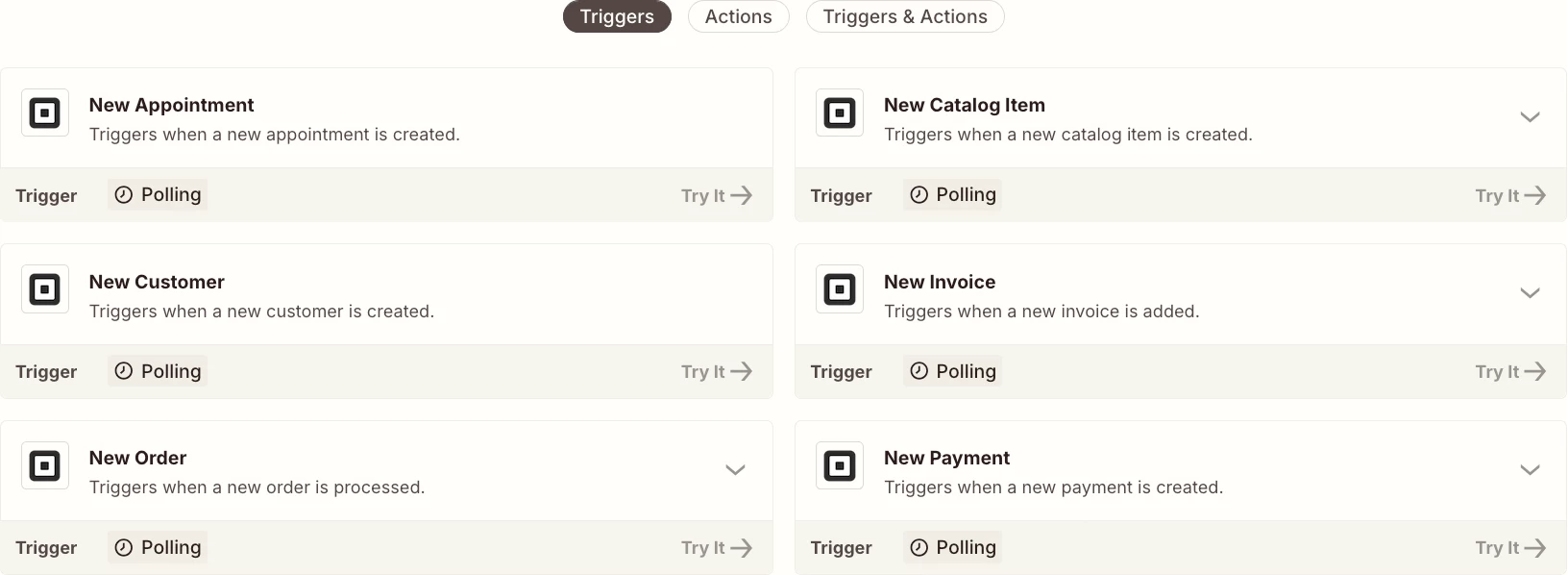
I’m using the “New Payment” Zap w/ Square as my trigger. Tried to take a screenshot of DATA OUT from Zap step 1 (or Step 2) but it’s not appearing on right hand side like it did before. I wonder if Support Tix team is doing something with the info I sent them earlier today (Square Item screenshot w/ URL). Guess I just have to wait right now.


Troy Tessalone
Zapier Orchestrator & Solution Partner
Forum|alt.badge.img+14
  • Zapier Orchestrator & Solution Partner
  • January 25, 2026

@KaliMa 

Help link for how to test a Zap step and see the DATA IN/OUT: https://help.zapier.com/hc/en-us/articles/18811411817741-Test-Zap-steps#h_01JVZF37AVFCHYETQ0DG4W8NST


Forum|alt.badge.img
  • Author
  • Beginner
  • January 27, 2026

I appreciate everyone’s help, and must reiterate I’m clear that the fields needs to match.  The bottle neck appears to be that there is no such option from the the first column, that fits my need for a specific item purchase (not order ID, which is unique to each buyer).


Troy Tessalone
Zapier Orchestrator & Solution Partner
Forum|alt.badge.img+14
  • Zapier Orchestrator & Solution Partner
  • January 27, 2026

@KaliMa 

Help us help you by posting screenshots showing:

  • how your Zap steps are outlined
    • so we can see which Zap trigger step you are using (app/event)
  • DATA OUT from Zap step 1 under the TEST tab for a sample record
    • so we can see the returned data points and the structure of the data

SamB
Community Manager
Forum|alt.badge.img+11
  • Community Manager
  • February 2, 2026

Hey there ​@KaliMa 👋

Were you able to locate the relevant field to filter on? 

If not, perhaps you could try the New Order trigger instead. That trigger should be able to output the items that were purchased which would then allow you to filter out orders where the specific Zoom webinar wasn’t purchased. 

Keep us posted on how you get on, want to make sure you’re all set!


Forum|alt.badge.img
  • Author
  • Beginner
  • Answer
  • February 2, 2026

Yes!  Thank you!  A support team member piped in and walked me through. I needed to use the Order ID selection and tweak it to “includes the words” vs. “only these words”.  The ticket was closet and my Zap is in progress.  


SamB
Community Manager
Forum|alt.badge.img+11
  • Community Manager
  • February 3, 2026

Yay! 🎉 That’s great news ​@KaliMa. So pleased our Support team were able to help you get it sorted.

Feel free to reach back out if we can help with anything else. In the meantime, happy Zapping! 😁⚡


Forum|alt.badge.img
  • Author
  • Beginner
  • February 3, 2026

Yeah, thanks SamB!  What was particularly helpful in solving the issue is your support team member’s use of video messaging. It really told me exactly how to adapt the filter as I needed.  People had rec’d I use Order ID, but your person included a video showing how I needed to modify another condition too.  Glad it all worked out.