Question

Spreadsheet row not found, but for no reason?

  • Oct 27, 2026 7:18 PM UTC
  • 13 replies
  • 38 views

Forum|alt.badge.img+2

I reached out to Zapier support a little while ago with this same issue and never found a resolution. Here is my basic workflow:

  1. Customer signs up for our program using gravity forms
  2. Customer added to our master student list based on the information from the gravity form
  3. Customer profile created in our scheduling system under the email that was used on the gravity form (to ensure that the email matches what can be found on the master student list spreadsheet)
  4. Customer must log in to the scheduling system to book with us using said email
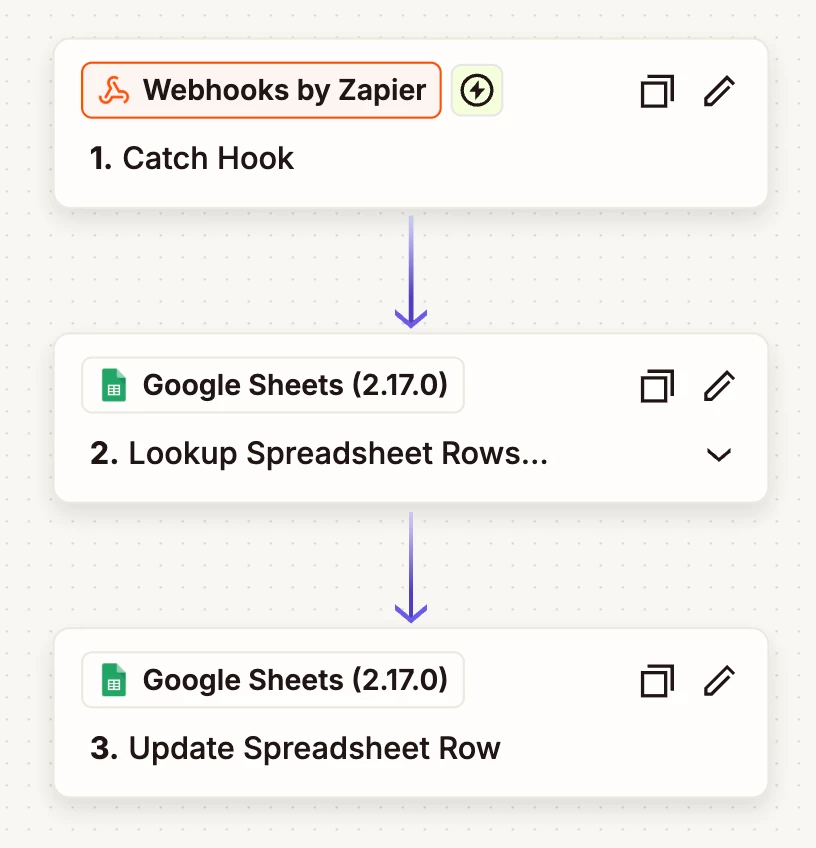
  5. Once they schedule, Zapier is supposed to look up that email on the master student list, identify the row, and then update the start date

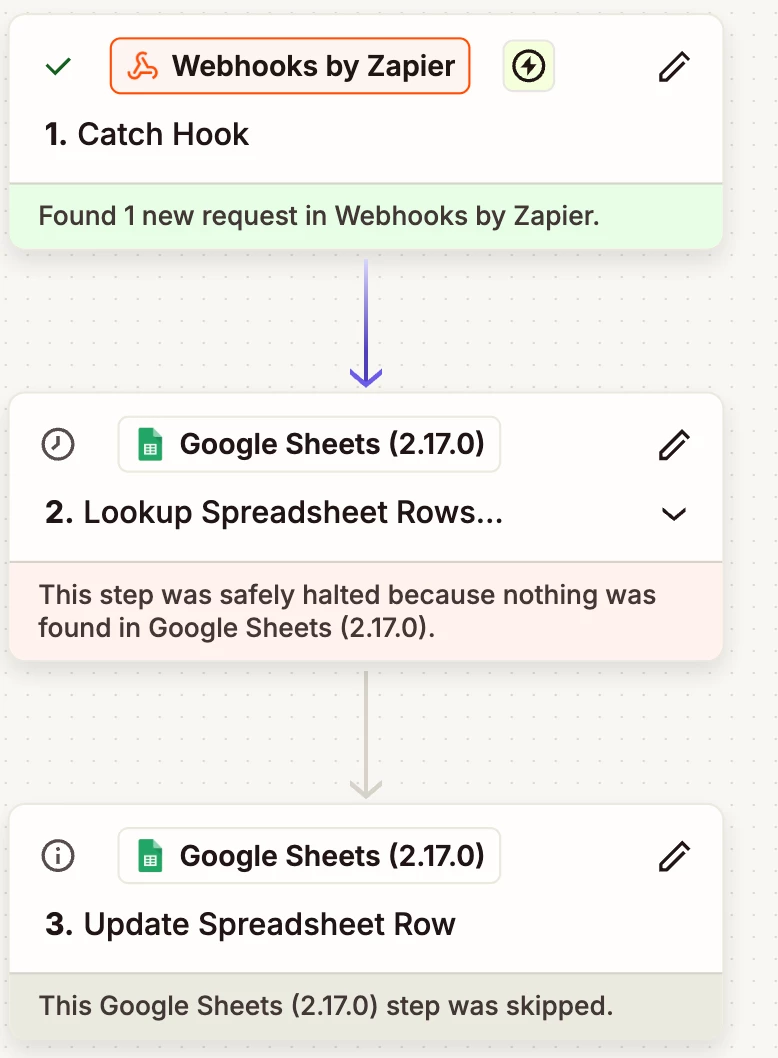
A few times now, in no specific pattern, there have been zap runs that are “safely halted” because no spreadsheet row could be found. But, the emails so match, and the row should have been found.


I have already checked the basics - there is no extra space anywhere, there’s no formula on the cell, there’s no weird formatting applied. Does anyone have any ideas?


13 replies

Troy Tessalone
Zapier Orchestrator & Solution Partner
Forum|alt.badge.img+14
  • Zapier Orchestrator & Solution Partner
  • Oct 28, 2026 4:17 PM UTC

Hi ​@Maddie Webb 

Check the timestamps on the Zap steps to see when they ran to make sure the order of operations happened as expected so that the email was on the spreadsheet to be found.


For us to have more info, post screenshots showing:

  • how your Zap steps are outlined and configured
  • an example where a record/row was not found

Forum|alt.badge.img+2
  • Author
  • Beginner
  • Oct 28, 2026 4:24 PM UTC

Clients are given access to the scheduling link 24-hours to 1 week after sign up, so the order of operations is not the issue.


Troy Tessalone
Zapier Orchestrator & Solution Partner
Forum|alt.badge.img+14
  • Zapier Orchestrator & Solution Partner
  • Oct 28, 2026 4:47 PM UTC

​@Maddie Webb 

Without more context about how your Zap steps are outlined and configured along with example of a Zap Run data where there was an issue, it’s hard for us to evaluate and advise.


Forum|alt.badge.img+2
  • Author
  • Beginner
  • Oct 28, 2026 6:25 PM UTC


Forum|alt.badge.img+2
  • Author
  • Beginner
  • Oct 28, 2026 6:27 PM UTC

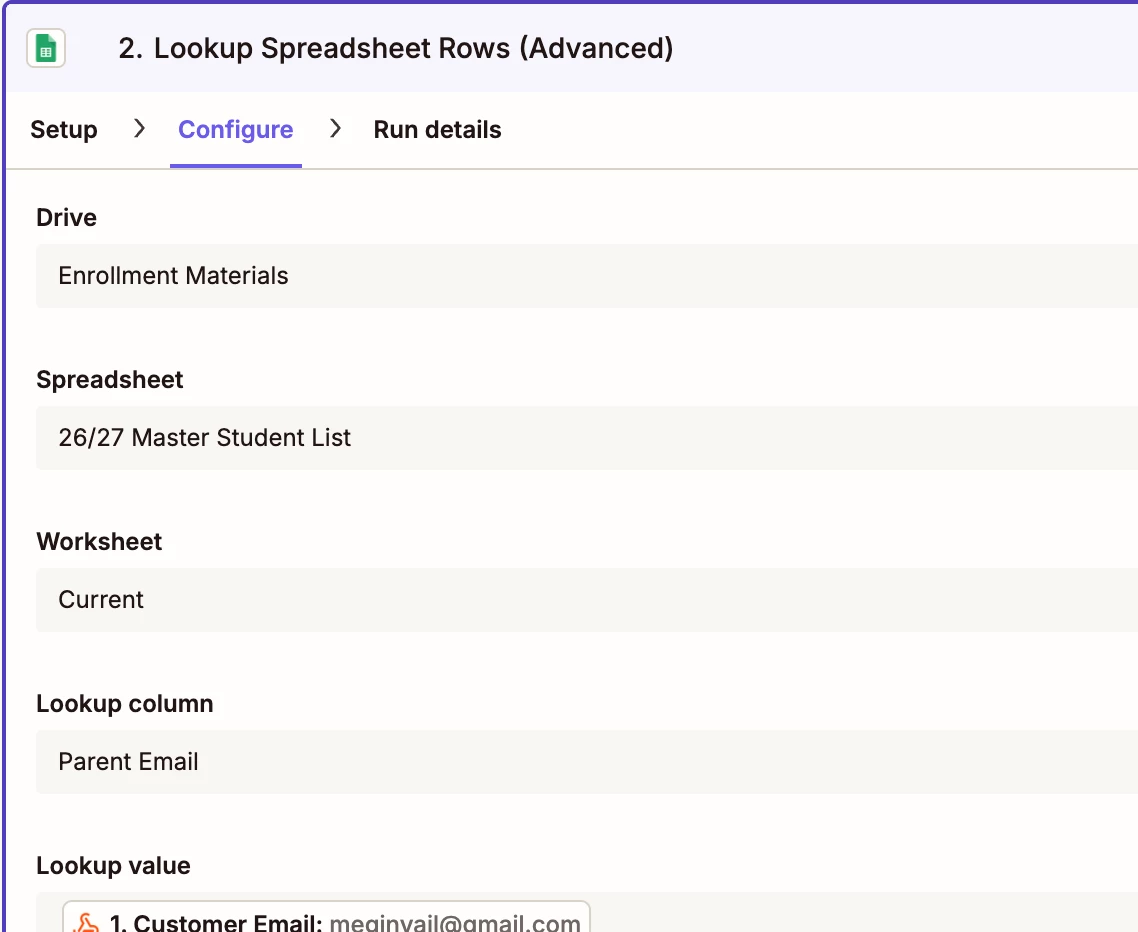
The above customer signed up for our program in June, and only just got started, so their email has been on our list for months. I tried to show that the emails match without giving away personal info. It is a simple zap with lookup spreadsheet row, update spreadsheet row steps. This has run about 500 times, and 10 of the runs have been “safely halted” for no reason. So, the zap is configured correctly. I just want to know why those 10 rows didn’t go.


WebhookEngineer

The June example makes signup timing a much less likely explanation. The 490 successful runs show that the workflow generally works, but they don't tell us whether these failures are specific to certain records or intermittent.

Are the ten missed emails grouped in one part of the sheet, or scattered among rows that were found successfully?

For one failed run, compare the lookup step's recorded input with the corresponding value in the sheet and the input from a successful run. Use the failed run's details rather than relying only on the current editor configuration, so you're checking what that execution actually searched for.

If those values match, test just the lookup for the affected email without rerunning the update. Keep the original failed-run details. Whether that same lookup fails again or succeeds now gives support a much narrower issue to investigate.


Troy Tessalone
Zapier Orchestrator & Solution Partner
Forum|alt.badge.img+14
  • Zapier Orchestrator & Solution Partner
  • Oct 28, 2026 6:46 PM UTC

​@Maddie Webb 
Screenshots do not show how the Zap steps are configured in the CONFIGURE tab while in EDIT mode.
Screenshots do not show the DATA IN/OUT for the Zap step with an error in the Zap Run.
 

Make sure you updated the GSheet steps to use the current GSheets Zap app version.


Forum|alt.badge.img+2
  • Author
  • Beginner
  • Oct 28, 2026 8:16 PM UTC

The configure screenshot did not attach


Forum|alt.badge.img+2
  • Author
  • Beginner
  • Oct 28, 2026 8:19 PM UTC

The failures are spread out in time and in position on the spreadsheet. I replayed one of the zap runs that failed and it was still safely halted.


Troy Tessalone
Zapier Orchestrator & Solution Partner
Forum|alt.badge.img+14
  • Zapier Orchestrator & Solution Partner
  • Oct 28, 2026 8:22 PM UTC

​@Maddie Webb 

Help links for using GSheets on Zaps: https://zapier.com/apps/google-sheets/integrations#help


Things to check: 

  • Do a copy and ctrl find to make sure the values match
  • Make sure the spreadsheet has no filters applied to the data
  • Make sure the spreadsheet has no hidden columns/rows
  • Make sure the spreadsheet has no gap columns/rows
  • Check the mapped variable in the Zap step lookup value field has no leading/trailing spaces
  • Check the submitted lookup value has no leading/trailing whitespace
  • Check the expected matching spreadsheet cell value has no leading/trailing whitespace
  • Check the capitalization of the values trying to be matched
    • Either lowercase or uppercase the values

Forum|alt.badge.img+2
  • Author
  • Beginner
  • Oct 28, 2026 8:30 PM UTC

Yes, I have already checked these things, and went and checked them again. Non of them are the culprit


WebhookEngineer

Thanks for checking. Since that run still fails on replay, we have a repeatable example to isolate.

I'd try changing just the lookup value in a separate test copy of the lookup step. Keep the spreadsheet, worksheet, lookup column and all other settings unchanged, but replace the mapped email with a literal value copied directly from the affected spreadsheet cell. Test only the lookup, not the downstream update, and leave the live Zap unchanged.

If it finds the row, that points toward a difference in the incoming value or mapping. If it still misses, I'd focus the next check on the destination/search setup. Neither result proves the cause, but either narrows the next check without repeating the whitespace checklist.

Does that literal-value lookup find the row?


Troy Tessalone
Zapier Orchestrator & Solution Partner
Forum|alt.badge.img+14
  • Zapier Orchestrator & Solution Partner
  • Oct 28, 2026 9:41 PM UTC

​@Maddie Webb 

If you are looking to hire help for troubleshooting your Zap issue, there is a directory of Zapier Partners: https://zapier.com/partnerdirectory