

Answer

Some of the Email Parser fields are missing in My Zap.

  • September 18, 2023
  • 3 replies
  • 126 views


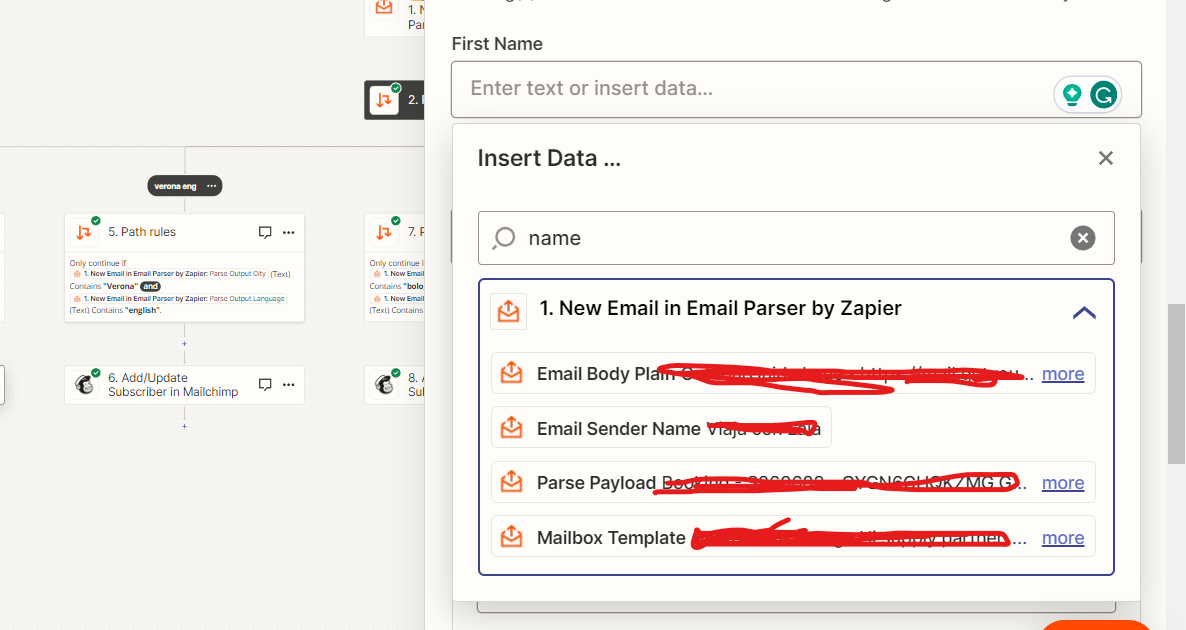
I’m using the email parser with discrete success in some Zaps. The problem I’m having is that some of the fields I create in the Email Parser app are not shown as options to select when I’m building the zaps. 


The problem is presented in a very similar fashion for different Zaps and email parser mailboxes. I’m selecting the corresponding text in the template and giving this-name "name" to the field, but then when I go in the Zap and i want to add "name" as "first name" in the mailchimp options, I can't find the field "name" in the option given by the email parser app. I expected the field to appear in one of the lines I canceled in the screenshot above.


I’m pretty new to Zapier, so I believe there is something I’m missing, but I can’t find an answer in the documentation. Or is it a sync problem (and I’m speaking of hours) 

Thanks for the help


Best answer by Troy Tessalone

Hi @Paolo Confa 

Good question.

In my opinion, the free Zapier Email Parser is not robust or reliable.

I’d recommend using a different approach:

  • Mailparser
  • AI
    • ChatGPT - Extract Structured Data
  • Code
    • JavaScript / Python
This post has been closed for comments. Please create a new post if you need help or have a question about this topic.

3 replies

Troy Tessalone
Zapier Orchestrator & Solution Partner
Forum|alt.badge.img+14
  • Zapier Orchestrator & Solution Partner
  • Answer
  • September 18, 2023

Hi @Paolo Confa 

Good question.

In my opinion, the free Zapier Email Parser is not robust or reliable.

I’d recommend using a different approach:

  • Mailparser
  • AI
    • ChatGPT - Extract Structured Data
  • Code
    • JavaScript / Python

  • Author
  • Beginner
  • September 19, 2023

Thanks for the answer. I had tried making a bunch on template from other email received and now it’s working better... 


ken.a
Forum|alt.badge.img+6
  • Zapier Staff
  • September 21, 2023

That’s great news @Paolo Confa! Glad to hear Troy was able to provide you a workaround.

If you have any other questions, please don’t hesitate to reach out to the Community. We’re always happy to help! 🤗





