Hi,
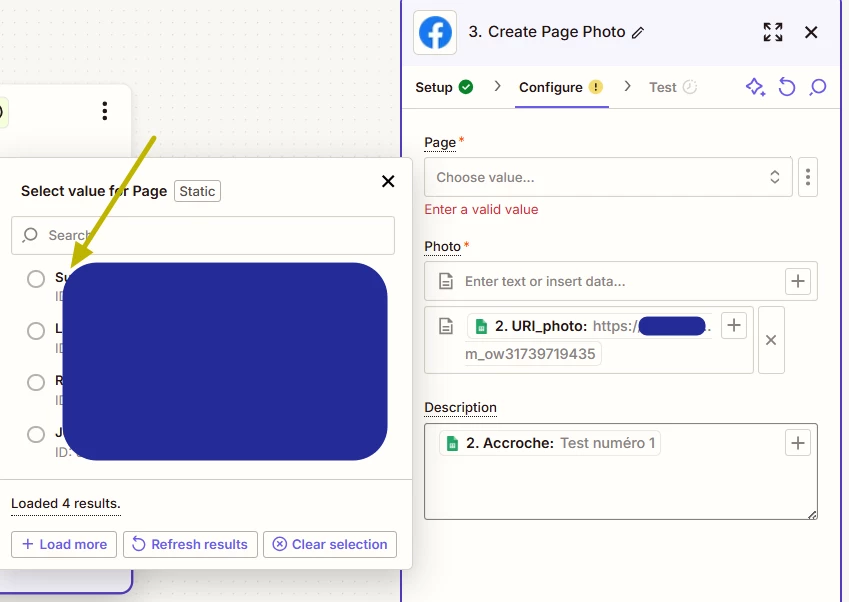
I'm having trouble with the Facebook Pages app in Zapier. When I try to select a Page in my Zap, I can only see some of my pages, but not all. The ones that appear are those not managed through Facebook Business Manager, while the ones inside Business Manager do not show up at all.
What I've already tried (nothing worked):
- Checked Facebook permissions here: https://www.facebook.com/settings/?tab=business_tools
- Zapier has all possible permissions (Manage Pages, Publish Content, etc.).
- Deleted & reconnected my Facebook account in Zapier multiple times.
- Verified my role in Facebook Business Manager:
- I am admin on the missing pages.
- Tried manually entering the Page ID using "Custom" input in Zapier:
- It does not work either.
- Tested with another Facebook admin account:
- Same issue: Business Manager pages do not show up.
- Refreshed and loaded more results in Zapier:
- No change, missing pages do not appear.
- Checked Facebook Developer Logs (https://developers.facebook.com/):
- No errors related to Zapier or my pages.
- Tried creating a brand new Zap from scratch:
- The problem remains.
- Followed the steps in this Zapier Community post: https://community.zapier.com/troubleshooting-99/facebook-page-not-showing-as-option-when-creating-zap-23661?tid=23661&fid=99
- Still does not fix the issue.
Key issue:
- Zapier only displays pages NOT managed in Facebook Business Manager.
- Any page inside Business Manager does not appear in the dropdown list.
- Even with full admin rights, they cannot be selected manually with their ID.
Has anyone encountered this before? Is there a workaround or an issue with Zapier's integration with Business Manager pages?
Thanks for your help!