Question

Smartsheet's Zaps not working with other users

  • March 12, 2026
  • 7 replies
  • 26 views

My zapier Zap isn't triggering when other users besides me update the row in smartsheet. Is there a setting I need to turn on to make it run for all users at my company?

7 replies

Sparsh from Automation Jinn
Forum|alt.badge.img+6

Hey ​@BChip,

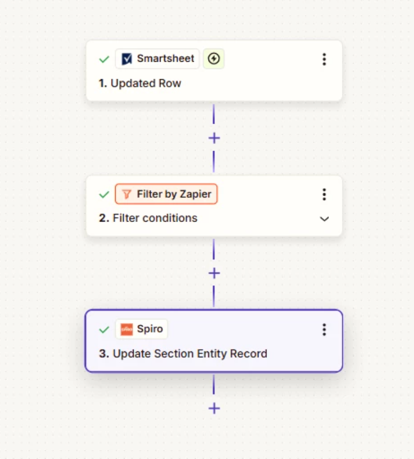
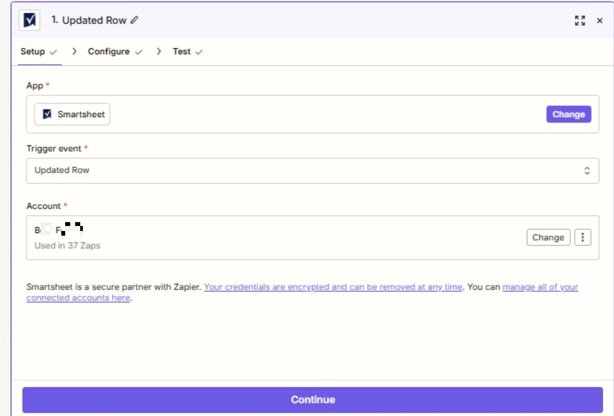
Make sure that you are using the Updated Row trigger. Please post screenshots of Data In, Data Out as well as how each Zap step is configured for us to have more context. 


  • Author
  • New
  • March 12, 2026

Data In 

custom_object__custom_field_id

59452

custom_object__resource_id

3551977

custom_object__custom__so

https://XXXXXXXX.sharepoint.com/:b:/s/XXXXXXXXXXOrderManagement/XXXXXX_XXXXXXX-XXXXXXXXXXXXXXXX_XXXXXXXXXXXXXXXX?e=XXXXXX

custom_object__custom__so_1_link

https://XXXXXXXX.sharepoint.com/:b:/s/XXXXXXXXXXOrderManagement/XXXXXX_XXXXXXX-XXXXXXXXXXXXXXXX_XXXXXXXXXXXXXXXX?e=XXXXXX

Empty fields:

Updated Date

empty (optional)

Updated By

empty (optional)

ID

empty (optional)

Tracking 1

empty (optional)

Tracking 2

empty (optional)

Tracking 3

empty (optional)

If Ocean Container

empty (optional)

If Ocean Date to Port

empty (optional)

Tracking 4

empty (optional)

SO #2 Link

empty (optional)

SO #3 Link

empty (optional)

SO #4 LINK

empty (optional)


Data Out 

section

Section Id

274273769

Section Resource Id

3551977

Section Resource Type

Opportunity

custom

Section Custom Tracking

PENDING

Section Custom So

https://XXXXXXXX.sharepoint.com/:b:/s/XXXXXXXXXXOrderManagement/XXXXXX_XXXXXXX-XXXXXXXXXXXXXXXX_XXXXXXXXXXXXXXXX?e=XXXXXX

Section Custom So 1 Link

https://XXXXXXXX.sharepoint.com/:b:/s/XXXXXXXXXXOrderManagement/XXXXXX_XXXXXXX-XXXXXXXXXXXXXXXX_XXXXXXXXXXXXXXXX?e=XXXXXX

Section Custom Custom Object Id

274273769

Section Custom Created At

2026-03-09T15:43:23.174Z

Section Custom Updated At

2026-03-11T18:18:04.358Z

Section Custom Created By

Monica Cirone

Section Custom Updated By

Section Custom Field Id

59452

Section Resource Name

SMALLER FORMAT KAY BASE PAD

Section Resource Link

https://app.spiro.ai/opportunities/XXXXXXX

This post has been edited by a moderator to remove personally identifiable information (PII). Please remember that this is a public forum and avoid sharing personal or potentially sensitive details.


450ec2799c3e5bf448ac7e9878618a93.png


  • Author
  • New
  • March 12, 2026


This post has been edited by a moderator to remove personally identifiable information (PII). Please remember that this is a public forum and avoid sharing personal or potentially sensitive details.


Forum|alt.badge.img
  • New
  • March 12, 2026

Hi ​@BChip 

The problem is that when you first set up your Zap, it creates a webhook that's basically "listening" only through your user account.

Try this - it usually fixes it:

  1. Go into your Zap and reconnect your Smartsheet account on the trigger step. Not just refresh - actually disconnect and reconnect. This forces a fresh webhook to register.

  2. Double-check that everyone who needs to trigger the Zap has Editor access to the actual sheet (not just the workspace). Smartsheet gets picky about this.

  3. If that doesn't work, honestly the quickest fix is just building a brand new Zap from scratch. Copying/duplicating seems to carry over the same webhook issue, but a fresh start usually catches all updates.

Let me know if this works for you!

If you're still stuck, I offer a free 20-min Zapier troubleshooting call. Book it through my Zapier Directory profile — it's listed under Resources on the left side: https://zapier.com/partnerdirectory/automatemybiz!-->


Sparsh from Automation Jinn
Forum|alt.badge.img+6

Hey ​@BChip,

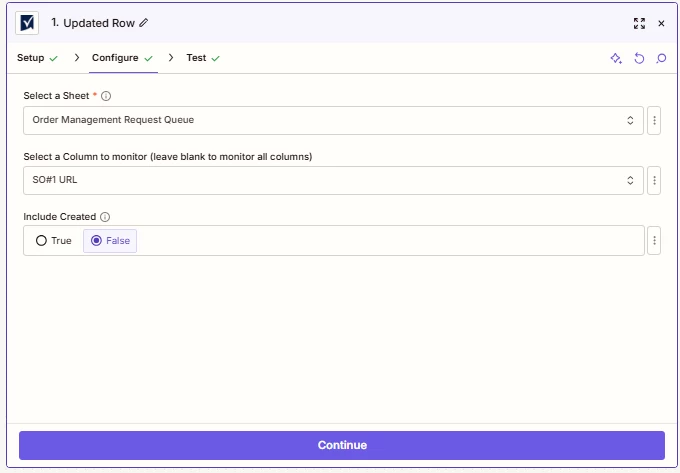
Try leaving the Select a Column to monitor blank so it can trigger for all columns because right now it will only trigger a row when SO#1 URL is updated. Also for live zaps, see the Zap history page here- https://zapier.com/app/history to spot any issue there.

Hope it helps!

PS: If you need more active help, I’m happy to connect through my Zapier Solution Partner page if you’d like to reach out here- https://zapier.com/partnerdirectory/automation-jinn


Forum|alt.badge.img+1

There usually isn’t a special setting for that.

If the Zap is set up right, it should trigger when other people update the same Smartsheet too, not just you.

I’d check these first:

  • make sure they’re editing the exact same sheet

  • make sure the Zap is turned on

  • test with a new update, not an old row change

  • look in Zap History to see if the trigger is being picked up at all

So most likely it’s not a permissions setting it’s usually the sheet, trigger, or test setup.


SamB
Community Manager
Forum|alt.badge.img+11
  • Community Manager
  • March 16, 2026

Hey there ​@BChip 👋 Just wanted to check how things went with the suggestions from everyone here. Have you seen any activity from other users appearing in the Zap history or is it still only triggering on your updates?  

Let us know what worked, or if you could do with some more help with this. 🙂