Question

Schedule trigger test and webhook to OpenAI failing, causing Glide action errors

  • November 14, 2025
  • 2 replies
  • 11 views

Zapier Support From: TXXXXXX DXXXX, Executive Director, North Idaho Alliance of Care Email:  Zap Name: North Thread Chat Bot Zap Status: Draft Mode (Blocked by Testing Errors)

I'm Theresa , founder of North Thread™, a trauma-informed digital recovery program serving rural young adults ages 18–30. I hold paid subscriptions to Zapier and OpenAI and have configured a chatbot workflow that is fully scoped, branded, and verified.

Despite correct configuration, Zapier’s testing infrastructure is failing across multiple steps:

  • Step 1: Schedule trigger test fails
  • Step 4: Webhook to OpenAI fails despite valid API key and JSON structure
  • Step 5: Glide Edit Row test fails due to missing response fields from Step 4

These failures are not due to user error. They reflect platform-level instability that is actively blocking the deployment of essential mental health technology.

Business Impact:  This delay prevents trauma-informed digital support from reaching vulnerable rural youth. North Thread™ is not a hobby project — it is healthcare infrastructure. I am delivering scope-safe, non-clinical emotional support in real time, and your platform is the bottleneck.

Configuration Verified:

  • API key: Valid and active
  • Endpoint: https://api.openai.com/v1/chat/completions
  • Headers: Proper Authorization and Content-Type
  • JSON: Structured correctly
  • Field mappings: Accurate
  • Glide connection: Live and authenticated

Request:  Immediate technical escalation and manual override to publish the Zap despite test failures. I am not requesting troubleshooting guides — I am demanding resolution and accountability for a paid service that is blocking healthcare delivery.

Respectfully,

This post has been edited by a moderator to remove personally identifiable information (PII). Please remember that this is a public forum and avoid sharing personal or potentially sensitive details.


2 replies

Troy Tessalone
Zapier Orchestrator & Solution Partner
Forum|alt.badge.img+14
  • Zapier Orchestrator & Solution Partner
  • November 17, 2025

Hi ​@TRMD 

If you are looking to hire help, there is a directory of Zapier Partners: https://zapier.com/partnerdirectory


Otherwise, for us to have more context, you will need to post screenshots showing how your Zap steps are outlined and configured in the CONFIGURE tab while in EDIT mode so we can see the field mappings and field types, along with any encountered errors.


SamB
Community Manager
Forum|alt.badge.img+11
  • Community Manager
  • December 3, 2025

Hey there ​@TRMD 👋

Sorry to hear that your Zap was running into issues when testing. Did you manage to solve things by reaching out to a Zapier Solution Partner as Troy suggested?

If not, I saw you reached out to our Support team about this as well and they were able to identify what was potentially causing some trouble. I couldn’t see a reply from you to their email so wanted to share the main details from it here, in case it’s helpful to you or others running into similar issues this in the future:

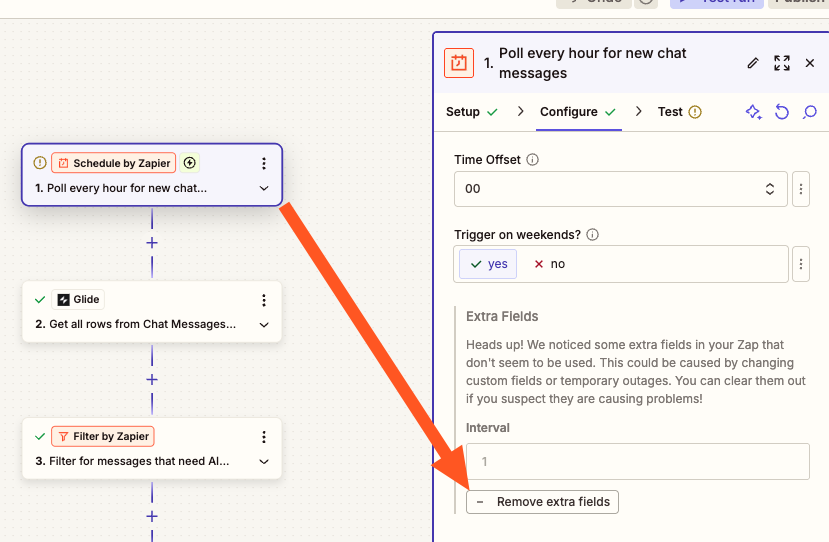
Step 1: Schedule Trigger
Try clicking on "Remove Extra Fields" in your Schedule step. This often resolves testing failures.
 
84c1b096c262c13573f66fe737f189e5.png

(view larger)
 
Step 4: OpenAI Webhook
While your configuration appears correct, I'd like to suggest an alternative that might be more reliable for your use case. Instead of using Webhooks by Zapier for the OpenAI call, consider using our native AI by Zapier action. This handles the API connection internally and tends to be more stable for AI workflows.
 
If you want to continue with Webhooks by Zapier, can you confirm whether you're able to make successful API calls to OpenAI using the same credentials through Postman or another tool? This will help us isolate whether the issue is with the API key or the webhook configuration.
 
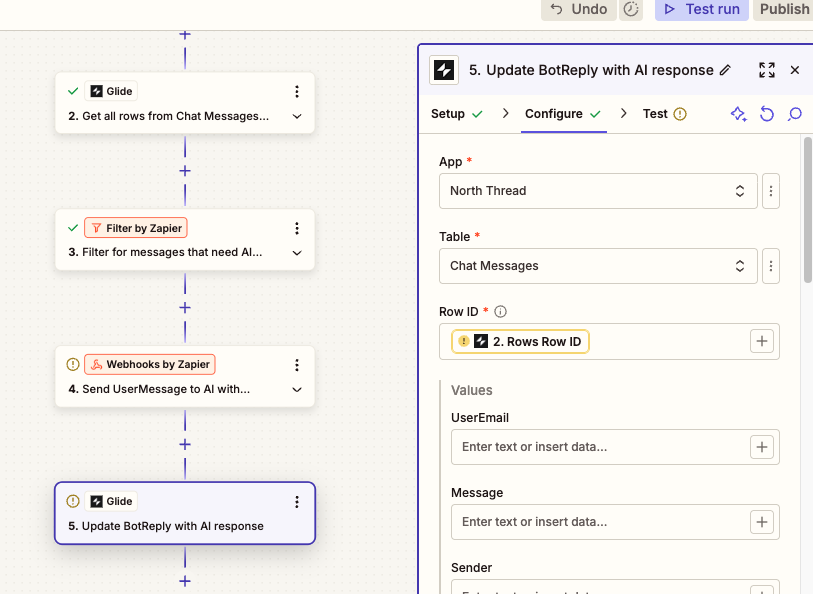
Step 5: Glide Edit Row
I can see that the Row ID field is showing as null, which is likely causing the failure.
 
ffbe75262456614de9c665279d73a751.png

(view larger)
 
Could you share a screenshot of the exact error you're seeing in Step 5? This will help me provide more targeted guidance for the Glide integration. Once we address the OpenAI step (Step 4), that should provide the proper response data needed for Step 5 to function correctly.


Want to make sure you’re all set so please let us know whether the Support team’s suggestions solved things, or whether you were able to get it sorted with some help from a Solution Partner 🙂