Question

Problem with Zapier not pulling titles given to PreciseFP form elements

  • December 4, 2025
  • 5 replies
  • 26 views

I’m trying to map data from a Precise FP form after it’s been completed but I’m having an issue with the way Zapier is labeling the elements in the form when I’m trying to map the data. Instead of putting the Title of the element that is typed in Precise FP, it puts out CLIENT| then a long string of numbers. This is making it difficult because there are a lot of Yes/No multiple choice elements and it’s impossible to know which belongs to which element. I’ve attached pictures with colored circles around the elements in my Precise FP form and what they look like when Zapier pulls those elements. I need help to know how to get the title I typed in Precise to appear in the data that Zapier pulls and presents.
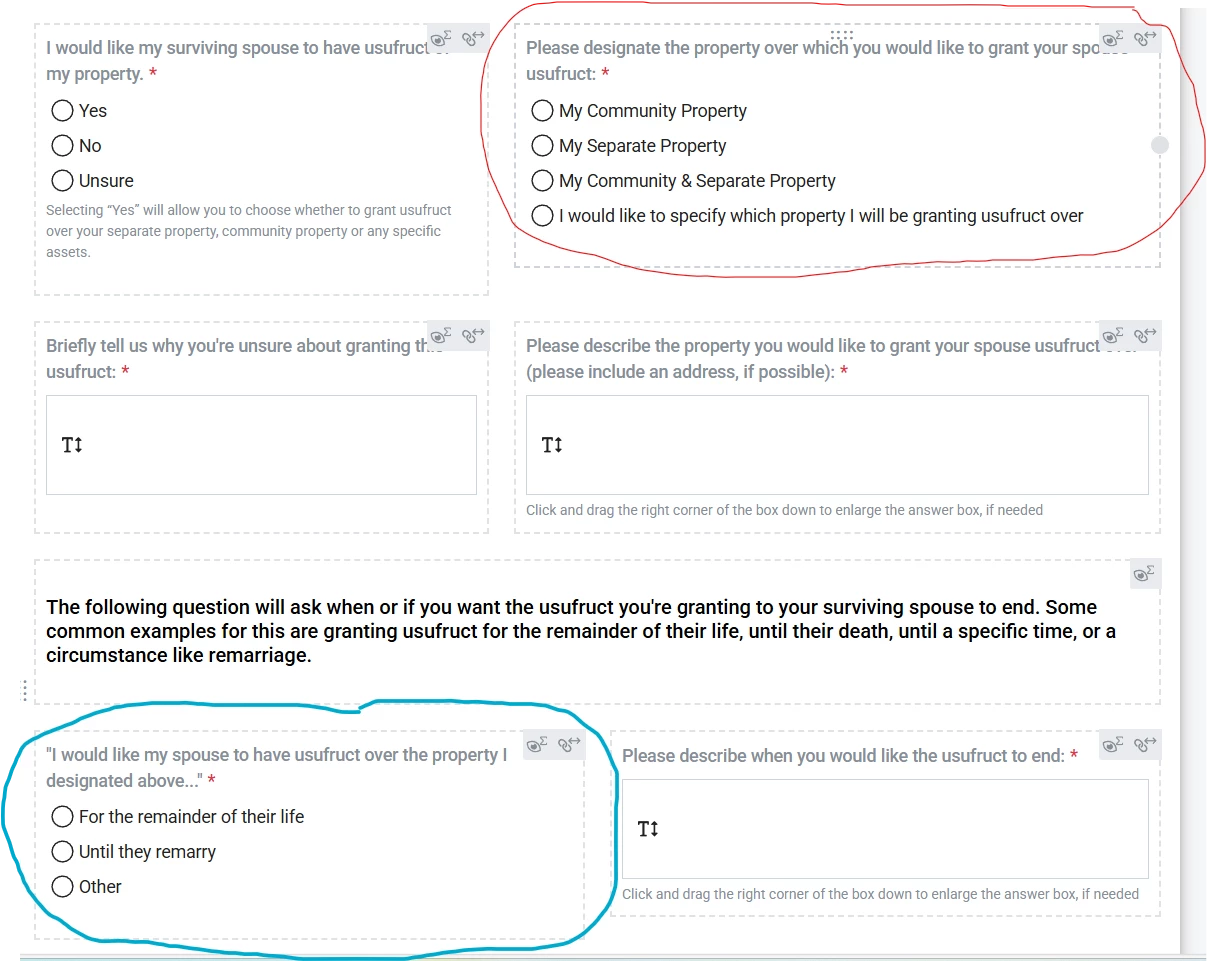
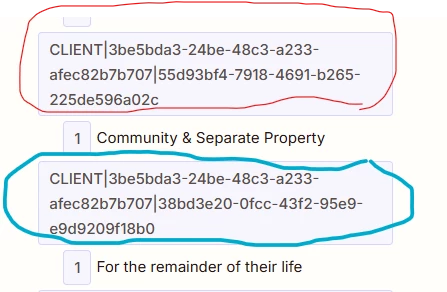
The first picture is from Precise FP and the one below it is how that circled info appears in Zapier


5 replies

moid-space
Forum|alt.badge.img
  • New
  • December 4, 2025

Zapier is showing PreciseFP’s internal field IDs (CLIENT|####), not your question titles, that’s normal for this integration. The only workaround right now is to use a test form submission, note which ID matches which question, and rename those fields inside your Zap so they’re human-readable when you map them.


Troy Tessalone
Zapier Orchestrator & Solution Partner
Forum|alt.badge.img+14
  • Zapier Orchestrator & Solution Partner
  • December 4, 2025

Hi ​@MikeG387 

That appears to be the internal field IDs for custom fields.

Check in Precise FP if the field ID is listed somewhere to reference.

Check the browser URL when editing a custom field.


If you need help, try working with Precise FP Support.


FYI: Most Zap app integrations are created and managed by the app developer using the Zapier developer platform.


  • Author
  • New
  • December 4, 2025

Thanks ​@Troy Tessalone for the reply. When you say “Check the browser URL when editing a custom field.”, what are you referring to and what should I take note of or change, if you can answer that. I’m no computer whiz and I’m currently graduating from the School of Hard Knocks when it comes to this stuff, so any explanation of that would be helpful before I talk to Precise FP Support.


Sparsh from Automation Jinn
Forum|alt.badge.img+6

Hey ​@MikeG387,

I think that’s just a limitation of the integration. You should reach out to support for this. 

In the meantime, I would suggest creating a lookup table to solve this issue. Here is a helpful article about Lookup tables in Zapier- https://help.zapier.com/hc/en-us/articles/8496305146765-Create-lookup-tables-in-Zaps. Hope it helps!


Troy Tessalone
Zapier Orchestrator & Solution Partner
Forum|alt.badge.img+14
  • Zapier Orchestrator & Solution Partner
  • December 4, 2025

@MikeG387 

Try reaching out to Precise FP Support and asking them where you can find the internal custom field ID.

Show them the screenshots you shared for context.


Otherwise, you would have to do process of elimination for the Yes/No fields.

e.g. Fill out the form with all but 1 Yes/No field set to Yes, then configure the Zap action for that 1 custom field since you know which one it is, and repeat the process for the others.


If you are looking to hire help, there is a directory of Zapier Partners: https://zapier.com/partnerdirectory