Question

Problem to connect Dynamics 365 to Zapier

  • December 22, 2025
  • 4 replies
  • 12 views

Hi All, 

We are currently testing Zapier and attempting to connect it to our Dynamics 365 DEV environment. We followed the official documentation, and our development team has confirmed that the Azure and Dynamics 365 configurations are set up correctly. However, we are still unable to establish the connection, as we continue to receive the following alert:
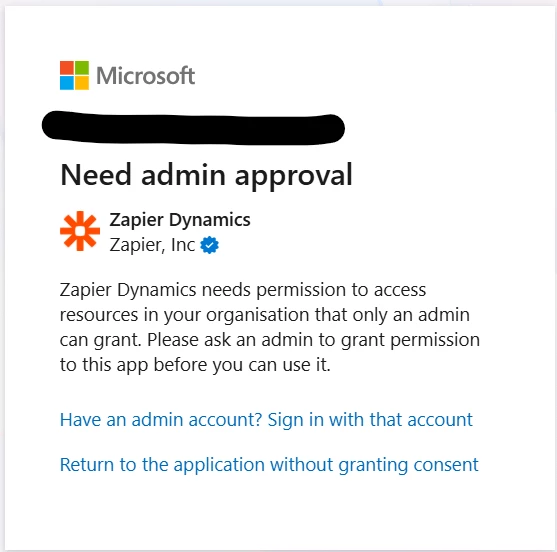


Any suggestions, what kind of specific permissions we need to provide to allow accounts connection? 


Kins regards

Peter

 

4 replies

Troy Tessalone
Zapier Orchestrator & Solution Partner
Forum|alt.badge.img+14
  • Zapier Orchestrator & Solution Partner
  • December 22, 2025

Hi ​@Pio 

Help links for using Microsoft Dynamics 365 in Zaps: https://zapier.com/apps/microsoft-dynamics-crm/integrations#help


Prerequisites

To use the Microsoft Dynamics 365 CRM app on Zapier, you must have:


drtanvisachar
Forum|alt.badge.img+1

Hello ​@Pio 

This is a permissions thing on the Microsoft side, not a Zapier error.

Dynamics 365 requires an admin to approve third party apps. A Global Admin or Dynamics Admin needs to grant consent to the Zapier app from that screen or in Azure AD. Once approved, reconnect the account in Zapier and it should work.

Helpful links below.

https://help.zapier.com/hc/en-us/articles/8496312271501-Connect-Microsoft-Dynamics-365-to-Zapier
 

https://help.zapier.com/hc/en-us/articles/8496274500365-Why-does-Zapier-need-admin-approval-for-Microsoft-
apps
 

https://learn.microsoft.com/en-us/entra/identity/enterprise-apps/grant-admin-consent


  • Author
  • New
  • December 23, 2025

Hi Troy, 


We meet all of these requirements. We have been using a paid version of Dynamics for several years. I am the Power Apps admin with full access to the environment, and we are currently using a premium Zapier app trial.

Zapier created enterprise applications in Azure and global admin assigned them to me however, we still do not have access to the service.


Are there any more settings we are not aware of? 


Troy Tessalone
Zapier Orchestrator & Solution Partner
Forum|alt.badge.img+14
  • Zapier Orchestrator & Solution Partner
  • December 23, 2025

@Pio 

Try this tip for connecting apps to Zapier: https://community.zapier.com/how-do-i-3/tip-use-new-different-private-browsers-to-connect-app-accounts-to-zapier-28812


Try connecting to the LIVE environment instead of the DEV environment.


You can try opening a ticket with Zapier Support: https://zapier.com/app/get-help