Answer

Only 4 status options appear when updating Jira issue in Zapier

  • November 8, 2024
  • 3 replies
  • 36 views

Forum|alt.badge.img

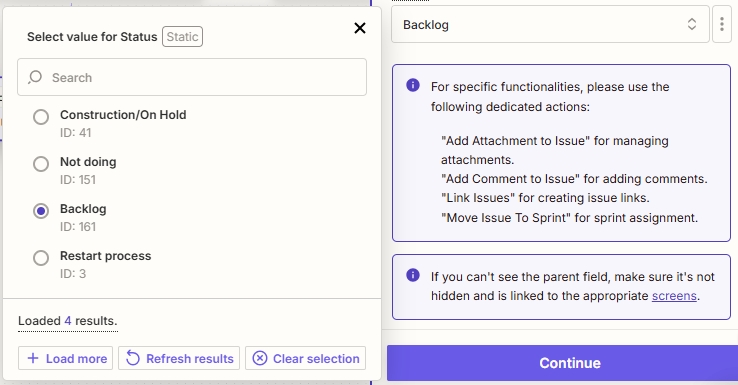
I'm using Zapier to update an existing issue in Jira, but I'm encountering a problem: when I try to select the Status field, I only see 4 status options available. Clicking '+ Load more' just reloads those same 4 options without showing any additional statuses.

Has anyone else experienced this issue? Is there a way to make all of my available issue statuses appear so that I can select the correct one?

Any insights or solutions would be greatly appreciated!
 

Best answer by Toptracer

Thanks for your input—it was really helpful! Using the IDs was the key to making it work. I found that Zapier only displays the next available statuses within the workflow based on the current status of the issue being tested. When I tested an issue in a different status, I was then able to see the other statuses available within the workflow.

This post has been closed for comments. Please create a new post if you need help or have a question about this topic.

3 replies

Troy Tessalone
Zapier Orchestrator & Solution Partner
Forum|alt.badge.img+14
  • Zapier Orchestrator & Solution Partner
  • November 8, 2024

Hi @Toptracer 

For us to have more context, post screenshots showing which Jira Zap step you are using.

Try clicking the field label to see a tooltip with more info.

If you know the internal ID of the field option, then try using the [...] button to switch to “Custom” mode so you can map a number value, then test.


Help links for using Jira Software Cloud in Zaps: https://zapier.com/apps/jira-software-cloud/integrations#help


Forum|alt.badge.img
  • Author
  • Beginner
  • Answer
  • November 8, 2024

Thanks for your input—it was really helpful! Using the IDs was the key to making it work. I found that Zapier only displays the next available statuses within the workflow based on the current status of the issue being tested. When I tested an issue in a different status, I was then able to see the other statuses available within the workflow.


SamB
Community Manager
Forum|alt.badge.img+11
  • Community Manager
  • November 11, 2024

Yay! Thanks so much for sharing the solution you found @Toptracer - great work! 🙌 And a big thank you to @Troy Tessalone for pointing you in the right direction! 🤗

Sounds like you’re all set for the moment but if anything changes and you need some help please do reach back out to the Community - we’ll always be happy to assist. 

In the meantime, happy Zapping! ⚡